This discussion has been locked.
You can no longer post new replies to this discussion. If you have a question you can start a new discussion

[7.403] WAN NIC Down after up2date to 7.403!

After installing the 7.403 up2date, my internet connection wouldn't come up.

It is completely possible that my ISP decided to wig out at the same time; I'm not sure.

My LAN was working, and it's the same model NIC as the WAN.

ethtool was showing the WAN NIC up and down, and ifconfig was showing it up and down and up with and without an IP.

the kernel log was repeating
2009:06:08-16:55:05 fw kernel: e1000e: eth0 NIC Link is Up 1000 Mbps Full Duplex, Flow Control: None

I messed with it for awhile and rebooted once and powered off once, but couldn't get it back up.
I'm now back on 7.402 after a re-install/restore, and it's working fine.

Question: did the network driver or anything else change in 7.403 that could cause something like this?

Thanks,
Barry


This thread was automatically locked due to age.

Parents
  • I tried the up2date again; lost network again... tried lowering the network link to 100 or 10mbps but it never worked... I could ping the gateway for short periods with about 90% loss, still kept seeing messages in the kernel log like
    2009:06:08-18:14:27 fw kernel: e1000e: eth0 NIC Link is Up 100 Mbps Full Duplex, Flow Control: None

    Thanks,
    Barry
  • I take it you are seeing the issue on the last machine listed in your signature... I've installed the 7.403 up2date on several different units that use the e1000 driver, but haven't seen that problem yet... do you see link issues on the ports if you connect them to a different switch?

    CTO, Convergent Information Security Solutions, LLC

    https://www.convergesecurity.com

    Advice given as posted on this forum does not construe a support relationship or other relationship with Convergent Information Security Solutions, LLC or its subsidiaries.  Use the advice given at your own risk.

  • I had to roll back as well.  I was experiencing issues with the external interface on my Atom machine as well.  It would not keep DHCP leases.  I guess I'll stick with 7.402 until either 7.404 is released or the next main update.  Although I am feeling adventurous, maybe I'll give the next beta release a go (it should be pretty solid by now from what I've seen)!
  • I don't think it's that solid yet.  I suspect there are quite a few people like me who have no idea what was fixed after 7.450.  I've checked to try to verify some issues raised by others, but I haven't gone hunting for vermin.
     
    Sophos UTM Community Moderator
    Sophos Certified Architect - UTM
    Sophos Certified Engineer - XG
    Gold Solution Partner since 2005
    MediaSoft, Inc. USA
  • I've emailed support about this problem again. Same support ID as posted above.

    Barry
  • I've emailed support about this problem again. Same support ID as posted above.

    Barry


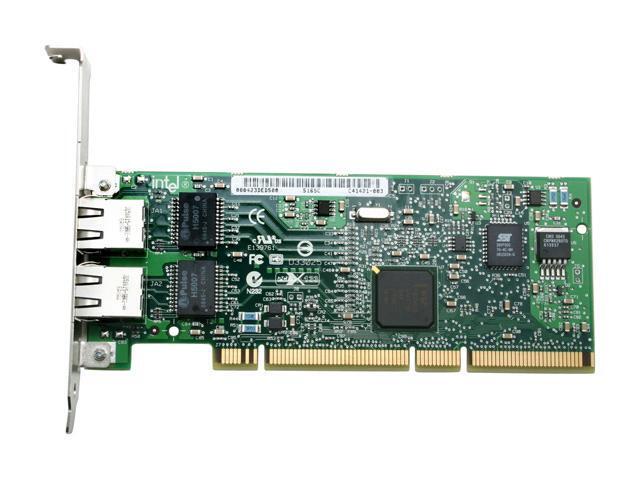
    I'm curious, are we using the same Intel gigabit cards?
    While our boards are different (Intel v. MSI), I'm using the Intel Pro1000 MT Dual Port (64bit PCI-X) cards (in a 32bit slot of course).  
    Granted, I know all of the Intel cards use the e1000 universal drivers, but I'm just curious.  Have you tried switching around the interfaces?  
    E.g. assign Port A on the card to External and Port B to Internal?  (Port A on my card always appears as Eth1 and gets assigned Internal and Port B as Eth2 and I always assign it External (the on-board NIC shows up as Eth0).  

    Intel PRO/1000 MT Dual Port Server Adapter - Overview

  • Hi, both my NICs are onboard... lspci says "Intel Corporation 82574L"...

    Since my last post, my dhcp lease from my ISP expired, so I'm now forced to keep manually resetting the NIC, or downgrade to 7.402 AGAIN or 'upgrade' to the beta.
    [:(]

    Barry
  • 7.460 seems to be better here.

    Barry
  • I had run into this issue a few days ago. But all I had to do was unplug and re-plug the ethernet wire and things started working again.
    Hoping things stay connected until 7.404 comes out or I have a chance to install 7.460.
  • CTO, Convergent Information Security Solutions, LLC

    https://www.convergesecurity.com

    Advice given as posted on this forum does not construe a support relationship or other relationship with Convergent Information Security Solutions, LLC or its subsidiaries.  Use the advice given at your own risk.

  • Looks like 7.404 addresses this issue...

    http://www.astaro.org/astaro-gateway-products/hardware-installation-up2date-licensing/26588-axg-7-404-soft-release.html


    Very nice!  Astaro is really on the ball!
    Quick question, I'm currently at 7.402 and 7.403 causes reboot issues for my remote machine.  Can I skip 7.403 and install 7.404 on top of 7.402?  Or do I need to go ahead & do 403 and then put on 404?
  • You'll have to install 7.403 and 7.404 in sequence (you can't skip an up2date, they are not cumulative)... however, just make sure that 7.403 and 7.404 are uploaded to the up2date manager, then click the update to latest version button; both updates will apply and the unit will reboot and be at version 7.404.

    CTO, Convergent Information Security Solutions, LLC

    https://www.convergesecurity.com

    Advice given as posted on this forum does not construe a support relationship or other relationship with Convergent Information Security Solutions, LLC or its subsidiaries.  Use the advice given at your own risk.

Reply
  • You'll have to install 7.403 and 7.404 in sequence (you can't skip an up2date, they are not cumulative)... however, just make sure that 7.403 and 7.404 are uploaded to the up2date manager, then click the update to latest version button; both updates will apply and the unit will reboot and be at version 7.404.

    CTO, Convergent Information Security Solutions, LLC

    https://www.convergesecurity.com

    Advice given as posted on this forum does not construe a support relationship or other relationship with Convergent Information Security Solutions, LLC or its subsidiaries.  Use the advice given at your own risk.

Children
  • Incidentally, if this is a remote, production unit, that is far, far away and that you have a hard time getting to in the event of an issue, I would wait a while until others have tested this up2date; errors have been found in other "Soft Releases" before... if it's within reach, or it's no problem to go to the unit and reload from ISO and restore backup, then it's no big deal if it fails.

    CTO, Convergent Information Security Solutions, LLC

    https://www.convergesecurity.com

    Advice given as posted on this forum does not construe a support relationship or other relationship with Convergent Information Security Solutions, LLC or its subsidiaries.  Use the advice given at your own risk.

  • You'll have to install 7.403 and 7.404 in sequence (you can't skip an up2date, they are not cumulative)... however, just make sure that 7.403 and 7.404 are uploaded to the up2date manager, then click the update to latest version button; both updates will apply and the unit will reboot and be at version 7.404.


    Very good, thanks for the confirmation.  I was 99% sure the up2date packages weren't cumulative, but wanted to make sure.
  • Incidentally, if this is a remote, production unit, that is far, far away and that you have a hard time getting to in the event of an issue, I would wait a while until others have tested this up2date; errors have been found in other "Soft Releases" before... if it's within reach, or it's no problem to go to the unit and reload from ISO and restore backup, then it's no big deal if it fails.


    It's just a personal remote machine at my folks house that really had a lot of trouble with the 7.403 update (they're on a cable modem w/dhcp).  
    I rolled the dice and put 7.404 on that machine remotely and it sprang back to life.  It rebooted very quickly and the VPN was back up within about 5 minutes of me remotely starting the update.  
    So far so good!
  • Cool! Post your results to the soft release thread... oh looks like you already have...

    CTO, Convergent Information Security Solutions, LLC

    https://www.convergesecurity.com

    Advice given as posted on this forum does not construe a support relationship or other relationship with Convergent Information Security Solutions, LLC or its subsidiaries.  Use the advice given at your own risk.

  • Cool! Post your results to the soft release thread... oh looks like you already have...


    Yep, I have two different low-power firewall setups (VIA C7 & Intel Atom) and with Astaro being extremely generous with our home-user licenses, I figure kicking the tires on all their latest releases (soft & beta) and reporting back is the least I could do in helping them stomp out issues that invariably crop up from time to time.  
    It's truly great that Astaro supports such a wide variety of hardware and actively solicit feedback from their diverse hardware install base.