This discussion has been locked.
You can no longer post new replies to this discussion. If you have a question you can start a new discussion

SSL certificate error

We have a website hosted externally for which we recently purchased a new SSL certificate from COMODO. When trying to access this website from outside of our network - everything works fine. If i need to open the site from our internal network I get a certificate error that the site is using an invalid certificate that's registered to our other internally hosted website which is still valid. It looks to me that I need to install the new certificate for that external site on Astaro (maybe I'm wrong - I'm new to Astaro which was configured by someone else). The certificate has *.cer extension and I'm getting "Import of certificate failed" error. Any thoughts? Thanks!

Suvie


This thread was automatically locked due to age.

  • Hi,

    Have you enabled the HTTP/S proxy feature in Astaro and ticked the 'Scan HTTPS (SSL) Traffic' box?  If so you actually need to import the proxy certificate from the Astaro into your computer's web browser.  You can do this by going into 'Web Security' > 'HTTP/S' > 'HTTPS CAs' and click the 'Download' button.

    Hope this helps.


    Regards,

    Jon.
  • Hi!

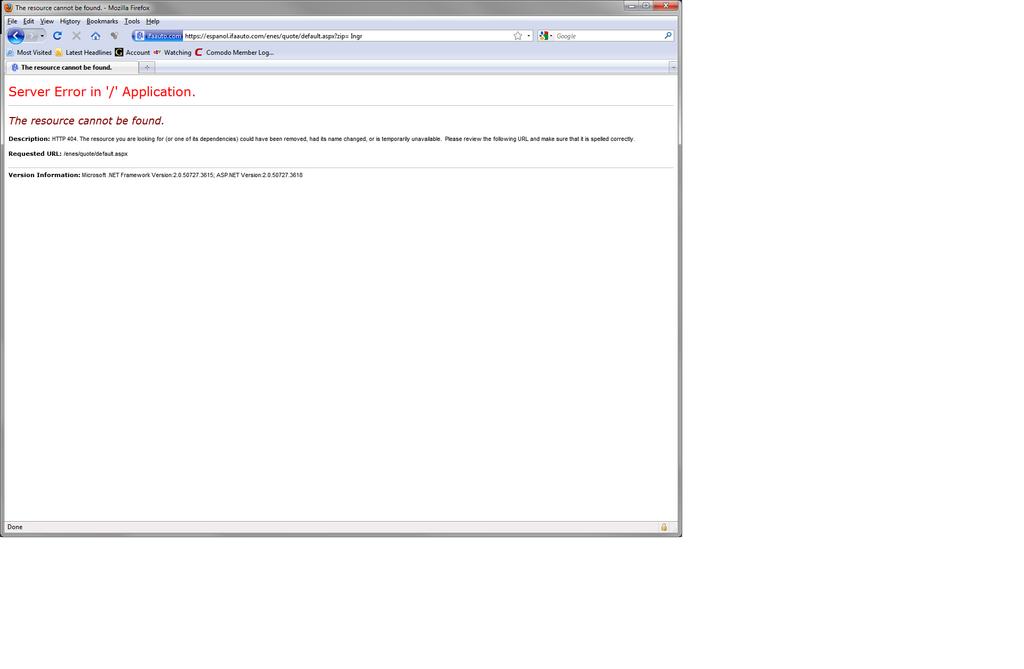
    We do have 'Scan HTTPS (SSL) Traffic' box ticked and I already have The proxy CA installed on my desktop according to Certificates MMC. It looks like this problem is related to everyone in the building - nobody can open that external website since we had a new SSL certificate installed over there. We are behind Astaro so I was wondering if I can do something on Astaro to allow the connection. Right now, even if I add that website to the list of exceptions where certificate check is skipped, I'm getting the following error which doesn't happen If i try access that site externally:

    Server Error in '/' Application.
    The resource cannot be found.
    Description: HTTP 404. The resource you are looking for (or one of its dependencies) could have been removed, had its name changed, or is temporarily unavailable.  Please review the following URL and make sure that it is spelled correctly.

    Version Information: Microsoft .NET Framework Version:2.0.50727.3615; ASP.NET Version:2.0.50727.3618 

    The fact that the site is fully accessible from the Internet and we are getting errors makes me think that it can be addressed on Astaro but i don't know how...

    Thanks!
    Suvie
  • Sorry, should've paid more attention to what you said earlier [:P]:

    The certificate has *.cer extension and I'm getting "Import of certificate failed" error.


    Taken from the built-in Astaro user guide:

    You can only upload certificates in PKCS#12 format which are password protected.


    Perhaps your certificate isn't in the above format?  As far as I know (unless someone can correct me) the .cer file extension refers to the PEM format which isn't password-protected.  I'm not sure what file extension the PKCS#12 format uses though.  Are you able to download your certificate in this format from your certificate issuer?
  • Hi!

    Comodo sent me another one in *.crt fromat and i had no problem uploading to Astaro - it appeared under Local Verification CAs. However, it did not help our original problem - we still can't access the website from internal network. To be exact, we do see the front page, but once any of the links or buttons are clicked on - this is where that "Server Error in '/' Application." comes up... I'm completely lost here... No idea how to get it to work - any suggestion will be greatly appreciated!

    Thanks!
    Suvie
  • Hi,

    What is the website's address out of interest (perhaps there are elements of the web pages being blocked by Astaro)?  Have you tried to internally access the site by its IP address (and port number, if applicable) as well as its FQDN?  Have you checked to make sure that internal users are allowed by your web server to access the website (I wouldn't normally see this as a problem, but it's probably worth checking)?  What web server do you use?

    What version of Astaro are you using?  If you happen to use v8.x the only other thing  I can suggest at this moment is to try using the Web Application Firewall (WAF) if you haven't done so already.


    Regards,

    Jon.
  • Hi!

    We have a Spanish version of our website hosted by MotionPoint.
    The URL is 'espanol.ifaauto.com' which resolves to 'esifa.convertlanguage.com/.../'. The IP address of the site seems to be 205.216.26.120.
    Internally, if i click on “Ir” button or  “Recuperar cotización” link (in the orange space), or "Recuperar cotización" link in the bottom left-hand menu I’m getting the error.. The rest of the links either resolve to the pages hosted on convertlanguage.com or to the pages hosted on our internal webserver - which is all fine. Somehow it seems that some requests are blocked and i have no idea how to address it. We both use IIS6 in a Windows 2003 servers. When i try by IP address it resolves to  'esifa.convertlanguage.com/.../' and gives me the same problem.
    Thanks!
    Suvie
    error.jpg
  • doing opposite designer LV handbags things. Lan Heath also nfl youth jerseys astonishingly well-behaved, do LV handbags discount not flirt with Yang Dynasty. The high quality LV replica handbags  incoming day, thing unscheduled custom nfl jerseys situation, Yang Ming and low Broom sleep .