This discussion has been locked.
You can no longer post new replies to this discussion. If you have a question you can start a new discussion

No Internet connection for clients

I installed my first Astaro a coupe of days ago on an Intel Atom board with a dual core Atom, 2 GB RAM. It is running with no problems so far.

I have been trying to install another system so that I can test site-to-site VPN connectivity. However, I have installed on three different computers from an old HP Dual Xenon, a newer SuperMicro Xenon, and a Dell T105 and I am unable to connect to the Internet from any client. I can ping external addresses from the Astaro box but I cannot ping past the external IP address of the Astaro box from a client. I cannot get to any Web site either, I just get a time out. This is happening on three different systems but they are configured the same as the first install that I did. 

Did I miss some switch that turns the system to allow clients to connect? This is driving me crazy because I can't help but think that I have overlooked something simple.


This thread was automatically locked due to age.

  • Hi, did you enable Masquerading and some PacketFilter rules?

    Ping is controlled on the ICMP page, btw.

    Barry
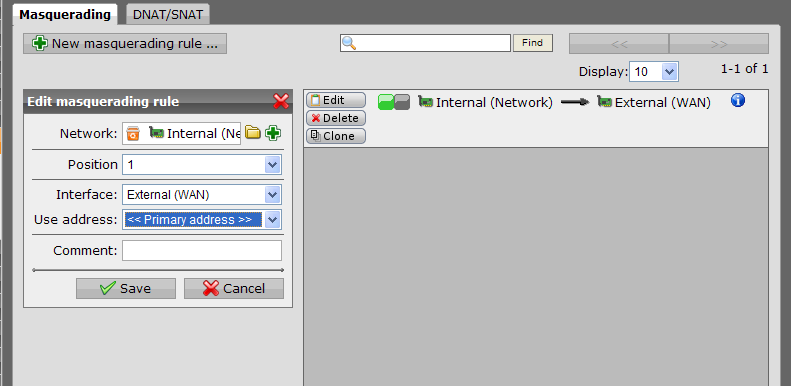
  • I made no changes to NAT, there is one masquerading rule there. I have the packet filters that are set up when you check all the options on what services to allow clients to access on the Internet. I have even tried setting up a Internal-Any-Any packet filter rule but still no access.
  • There's not enough information to be able to understand your situation... You say you can't get past the External interface.  What is beyond it?  Do you have private or public IPs on the External interfaces of each?  Etc.

    What happens if you turn the first-installed unit off and put one of the others in its place?

    Did you install the newer units and then restore from a backup of the first unit?

    Cheers - Bob
     
    Sophos UTM Community Moderator
    Sophos Certified Architect - UTM
    Sophos Certified Engineer - XG
    Gold Solution Partner since 2005
    MediaSoft, Inc. USA
  • Do you ping an externe IP adress or an external hostname?
    Try to set ALL check boxes under Networks Security - ICMP (and don´t forget to press three times APPLY - once in every section :-)

    Is the ping working when you ping an IP adress, like 141.1.1.1 ?
    Is it working when pinging a hostname, like Google ?
  • Olm: I have tried both IP and hostname and both time out (but I can ping them both ways from the Astaro box). I have the boxes checked to allow ICMP as well as a packet filter rule to allow Internal-Any-Any.

    BAlfson: The external is behind a private IP address. I have two ways that I have been trying to test. 

    1st - External connected to a CradlePoint CTR-500. CTR-500 IP address is 192.168.254.1 and the external NIC IP is 192.168.254.100. The Cradlepoint is connected to a Verizon wireless card. The Astaro box itself can access the Internet fine. I can ping hostnames or IP addresses from the Astaro box. 

    2nd - I have also had the external Nic connected to my internal lan with the external IP address of 192.168.69.69 going through my working Astaro box with an IP address of 192.168.69.254.

    My internal IP address of the Astaro box (the one not working) is 192.168.16.1. I have my test workstation connected to a switch with the internal Nic of the Astaro box. My IP setting on the workstation is 192.168.16.2/24, GW 192.168.16.1, DNS Svr 192.168.16.1.

    From my workstation I can ping 192.168.16.1 fine. I can ping 192.168.254.100 or 192.168.69.69 (depending on how I have it connected) just fine. However, I cannot ping 192.168.254.1 or 192.168.69.254 or anything beyond that. I also cannot pull up the Web interface for the Cradlepoint (192.168.250.1) or the working Astaro box (192.168.69.254).

    I have not tried to replace the working one as I am pretty sure that I tested my current working box the same way before putting it in place. It should work when the external is connected to a private IP. Also, since I work from home, I can't replace it during the day. However, if it has to be connected to a public IP on the external side then I will try after I am done with work some time.
  • can you provide some screenshoots masqerading and NAT rules?
  • Here is the only rule set up (it was set up by the install). This is the same as on the Astaro install that is working.

    I am going to install Untangle to see if it works. I do not think it is my hardware (I have tried on 3 different systems) but I guess it's a possibility. Funny thing is my working install in on a low cost system - Jetway Intel Atom board with the 3 port GB NIC add on card. Worked with no problems from the start. The other systems are higher end but one is an older dual Xenon, one is a fairly new SuperMicro Quad Core Xenon, and the other is a Dell T105, dual core Athlon. None of the systems had any problems with the hardware detection.
  • hmm very strange. Can you provide the output of "tcpdump -n -i ethX"  (where ethX is the wan interface ) when you do a ping from your desktop PC THROUGH the ASG to the CradlePoint (192.168.16.1) and then when you ping to a internet address (like 141.1.1.1) ?
  • Problem solved, it was the chair to keyboard interface!

    The testing workstation is a virtual machine using bridged networking. The VM has an IP address of 192.168.16.2 and the host has a IP address of 192.168.69.107. I don't know the exact explanation but I am guessing that there was an issue with the return routing not knowing how to get to the bridged IP address. I hooked up a physical machine and it works fine.

    I did test the first install in this manner but the host was on the same network as the Astaro box so there were no routing issues with the VM.

    There may be a more eloquent explanation, but bottom line it was my error - live and learn.

    Thanks all for the help.