This discussion has been locked.
You can no longer post new replies to this discussion. If you have a question you can start a new discussion

problems on upgrading from 7.405 to 7.500

hi all,
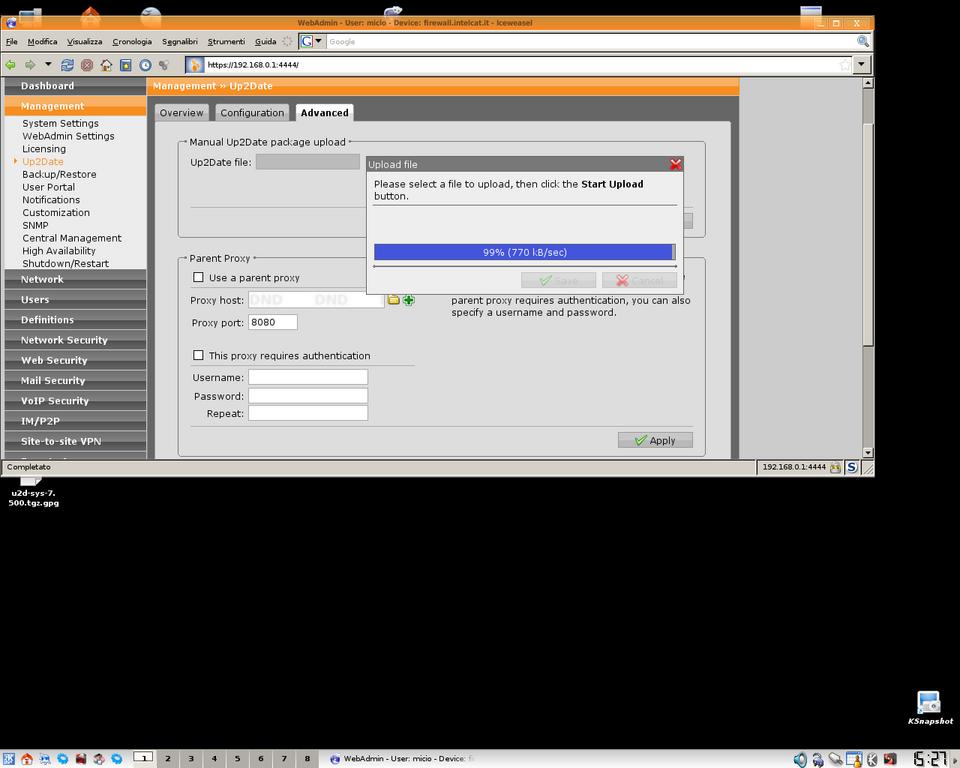
I cannot upload the upgrade file using Iceweasel browser under Linux Debian stable,
I've try several times to upload the huge file u2d-sys-7.500.tgz.gpg (240.7 MB) from the 
panel "Management---Up2date---Advanced" following the manual procedure but after a long time it stop when is about at 99% .
I post an image to well explain what's happen,
Any help will be very appreciate
thankyou very much


This thread was automatically locked due to age.

  •  
    Sophos UTM Community Moderator
    Sophos Certified Architect - UTM
    Sophos Certified Engineer - XG
    Gold Solution Partner since 2005
    MediaSoft, Inc. USA
  • thanxx for the hint..but unfortunatelly I cannot acces to the FW by console
    is in another place..not in my home
    I must wait for a fix from the ASG team...hope soon
    ASG Team please could you fix this problem on the update sysstem..if is possible ?
    thankyou very much ..bye
  • You can use Console and SSH too. So you DON'T have to be infront of the Astaro.
  • This is not the place to contact Astaro Support.  If you have Platinum Support, you can submit a support ticket at https://www.astaro.com/license/open_support_case.  If you have Gold Support in Europe, I think you have to contact your reseller.

    Cheers - Bob
     
    Sophos UTM Community Moderator
    Sophos Certified Architect - UTM
    Sophos Certified Engineer - XG
    Gold Solution Partner since 2005
    MediaSoft, Inc. USA
  • ok I've dowloaded the package by the console(wget....) than run the command auisys.plx --showdesc
    the cursor is flashing but nothing happen and opening the webadim page there is nothing to upgrade..I can see that my firmw version is 7.405 and is up to date and stop.
    could you please post a step by step procedure ?
    thankyou very much
  • ok..all right..thankyou very much
  • Micio, I wasn't trying to put you off - just making sure that anyone who comes by and sees your request understands that the Astaro people occasionally volunteer personal time here, but that this area is for users, and is not an official way to contact Astaro.

    As Suzzyx says, if you can reach your Astaro via WebAdmin, then you also can reach it with SSH and run instructions at the command line from a remote location.

    Cheers - Bob
     
    Sophos UTM Community Moderator
    Sophos Certified Architect - UTM
    Sophos Certified Engineer - XG
    Gold Solution Partner since 2005
    MediaSoft, Inc. USA
  • i hjave the same problem, but i already downloaded the file, ther'es no point of doing a wget, but i can't upload it with winSCP because the loginuser does not have permission and i can't login directly as root(nor do a su - root on winscp, or at least i don't know how).

    any ideas?
  • I think the easy way to do it, if your Astaro has less than 1GB of RAM, is to do the wget.  Otherwise, you have to muck around and change permissions.

    Cheers - Bob
     
    Sophos UTM Community Moderator
    Sophos Certified Architect - UTM
    Sophos Certified Engineer - XG
    Gold Solution Partner since 2005
    MediaSoft, Inc. USA
  • Balfson, i found an easy way to do

    logged to the console as loginsuer
    then su root
    then:
    astaro:/var/up2date # chown root sys


    upload the file via winscp with loginuser
    then:
    cd sys
    astaro:/var/up2date/sys # chown root:root *.*
    auisys.plx --showdesc


    voila!, it works, even for a total linux newbie like me, hehehe