This discussion has been locked.
You can no longer post new replies to this discussion. If you have a question you can start a new discussion

Displaying user names in Web Security Statistics

Hi,

I am trying to configure the Astaro to display usernames instead of IP addresses in Web Security Statistics.

So far I have set Operation Mode to Active Directory SSO and configured the browser proxy settings to The Astaro's FQDN. This allows connection to the Internet but still shows IP addresses rather than username.

Any suggestions will be appreciated.

Thanks,
Mark.


This thread was automatically locked due to age.

  • Check the 'Content Filter (HTTP/S)' logfile.  If you aren't seeing names in there, it's because your configuration needs tweaking.  If they are in there, then you might have a glitch, because they should appear in the reports if they're being seen by the proxy.

    Cheers - Bob
     
    Sophos UTM Community Moderator
    Sophos Certified Architect - UTM
    Sophos Certified Engineer - XG
    Gold Solution Partner since 2005
    MediaSoft, Inc. USA
  • Hi Bob,

    Thanks for the suggestion.

    I've checked the log and can only see an IP address mentioned. I've pasted a sample of the log below;
    name="http access" action="pass" method="GET" srcip="172.20.20.26" user="" statuscode="304" cached="0" profile="REF_IklPseFdIO (MTS No Sign Policy)"

    Can you suggest where to look next.

    Thanks,
    Mark.
  • I meant to mention the document I added to the Astaro KnowledgeBase last year: HTTP/S Proxy Access with AD-SSO (Caution, the section "Configure User Authentication" should be eliminated as it has no effect on AD-SSO and can cause problems in larger organizations).  There's a glitch in the group definition process that you might be experiencing, but it wouldn't hurt to step through the whole process.

    Cheers - Bob
     
    Sophos UTM Community Moderator
    Sophos Certified Architect - UTM
    Sophos Certified Engineer - XG
    Gold Solution Partner since 2005
    MediaSoft, Inc. USA
  • Hi Bob,

    Thanks for the guide. I have followed it to the letter but still see user="" in the live log. I am able to surf the web.

    Do you have any further suggestions.

    Thanks,
    Mark.
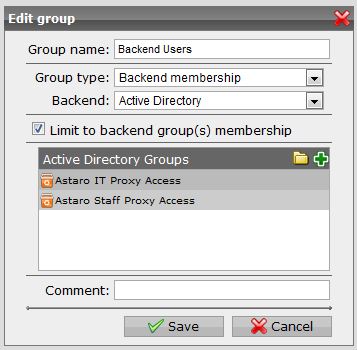
  • Please show pics of the group definition to which this user should belong.  Also, show the edit of the HTTP/S Profile and the edit of the Filter Assignment.

    Cheers - Bob
     
    Sophos UTM Community Moderator
    Sophos Certified Architect - UTM
    Sophos Certified Engineer - XG
    Gold Solution Partner since 2005
    MediaSoft, Inc. USA
  • Hi Bob,

    Below are hopefully the pics you are asking for;

    Let me know if you require further screen grabs.

    Thanks for your help,
    Mark.
  • The 'Operation mode' on the 'Global' tab only applies to traffic not handled in a Proxy Profile.  In the pics, the Proxy Profile is set to "Standard mode", and that would result in the behavior you describe.

    Was that it?

    Cheers - Bob
     
    Sophos UTM Community Moderator
    Sophos Certified Architect - UTM
    Sophos Certified Engineer - XG
    Gold Solution Partner since 2005
    MediaSoft, Inc. USA
  • Hi Bob,

    Sorting out the Proxy Profiles has fixed the problem. I have changed the Operational Mode to Active Directory SSO.

    Thanks for your help.

    Mark.
  • Hi Bob,

    Now that I have this working on one of my Astaro Gateway devices I am having problems with my other (production) one.

    Both devices are authenticating to the same Windows 2008 R2 server and the browsers are connecting to the relevant Gateways by name not IP. I have attached a screen shot of the log.

    I have tried removing the offending device and re-adding it to the domain but no luck. All other settings appear the same on both Astaro devices. Both are using firmware v7.510.

    Any suggestions?

    Thanks,
    Mark.
  • Normally, I'd expect to see "crap_callback" when the users' browsers are configured to find the Astaro Proxy with an IP instead of an FQDN, but maybe it's that the Astaro isn't properly joined to the domain...

    See section IV of the instructions I linked to in Post #4.  If you add the Astaro to your AD manually, you don't get the right connection.

    Was that it?

    Cheers - Bob
     
    Sophos UTM Community Moderator
    Sophos Certified Architect - UTM
    Sophos Certified Engineer - XG
    Gold Solution Partner since 2005
    MediaSoft, Inc. USA