This discussion has been locked.
You can no longer post new replies to this discussion. If you have a question you can start a new discussion

Dual-connection Proxy config

I was wondering if there was any way to split the Web Security proxy profiles so that one profile uses connection A and another profile surfs through connection B....? (Astaro v7.508)

We have a dual-department setup, using 1 firewall, having separate internet connections, where the internet traffic of one of the departments should not block the other department... as it is doing now...

Is there any way to have this config?

Thanks for the info...


This thread was automatically locked due to age.

  • I think it is not possible to do this in the GUI. The only way i know is to create policy routes.
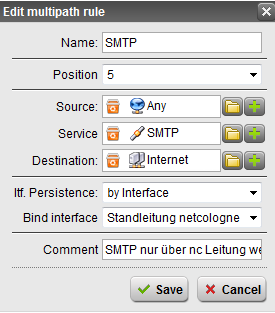
  • If you have the possibility to set seperate IP-Ranges for those departments you're good. Just use Multi-Path rules (by Interface) and you're done. Seperating it by proxy profiles won't work as there is no such option.
  • I tested the 'policy routing' way, but it only seems to work when I use a policy route for none-proxied traffic... The Web Proxy still uses the 'default' gateway route, and doesn't want to use the policy route for some reason... When disabling the proxy in my browser, and allowing traffic on http through a packet filter for my machine, I use the second connection.

    The MultiPath configuration, I had some issues (some of them rather big) before, as the MultiPathing seems to decide itself which connection it uses, when using the balancing profile... That way, our email (we use SPF and reverse DNS, both being checked on the other sides) is being sent through the 2 connections, even if we specify to route it through the default connection... that way, a lot of our email traffic is being received from an 'unknown' IP... I know I can adjust spf to include all WAN IP's here, and reverse DNS could be changed too, but I just _only_ want to have email going out from connection A, and all http/https proxy traffic through connection B...

    Anyone who can assist me and tell me _how_ they did it exactly?
    I have been trying the whole day, yesterday, without the success I was hoping for.

    Thanks!!!
  • Hi,

    I attached 2 pics showing my configuration for this. The service "web surfing" is a group of services including ports 80, 8080 and 443 in my case.

    All other traffic will be distributed between the two interfaces. If you don't want that you can set a rule below all the other multipath rules that directs "any" service to a seperate interface. It works just like a packet filter list. The first rule that matches applies. So if you put one on the bottom for "everything else" you can make sure where all your traffic goes.

    Additionally, if you have more than one IP address on one of your outgoing interfaces you can use a source NAT to make sure it uses the correct IP for outgoing SMTP traffic. If you need help on this, let me know.
  • bkortleven, krycek is right, multipath is the only possibility to achieve what you want, but it will work.
    BTW this is ONLY working for un-proxied traffic and the http proxy traffic, but not for traffic which has been processed by any other proxy (like the SOCKs proxy, POP3, smtp, dns, NTP, ...proxy)
  • Yes multipath may also work (I thought it only works with none-proxied traffic). I have a question. Can I separate proxied FTP traffic from proxied HTTP traffic when I only use HTTP/S proxy and multipath rules? The Astaro support says no.

    Thanks.
  • Ölm:
    I didn't know it only worked for the http/s proxy with multipath rules. Don't need the other oned right now but that's a bummer that it doesn't. did you test it?

    dfischer:
    Hum... I think I don't quite understand what you are trying to achieve.

    You are using the http proxy and no ftp proxy right? so ftp just uses a packet filter rule? Then you can easily use the multipath rules with service "ftp"...

    Maybe I didn't understand your question correctly. In that case could you clarify a little bit more?
  • Ölm:
    I didn't know it only worked for the http/s proxy with multipath rules. Don't need the other oned right now but that's a bummer that it doesn't. did you test it?


    Sorry, I didn´t understand your question completely. But yes I tested it.

    To be clear: I did not mean that other proxied traffic is not be able to be loadbalanced by the multipath rules. I meant, for all other proxy traffic except http proxy traffic it is not possible to implement the setup which bkortleven wanted to achieve - separate two diofferent internal groups!
  • I have a question. Can I separate proxied FTP traffic from proxied HTTP traffic when I only use HTTP/S proxy and multipath rules?


    Yes it should work, I cannot see a real technical reason why not. You need two multipath rules, one for the FTP traffic, one for the HTTP traffic, so it´s nothing special there.  Just bind FTP traffic to the one interface, and HTTP to the other interface. It MIGHT be that for the FTP traffic the "ip address pass through mechanism" of the HTTP Proxy is not working, in this case, in the multipath rule, do not use "Internal LAN network" as "source", but use "Uplink Primary addresses" as source.
  • @Krycek
    You can use the HTTP/S Standard Proxy with ActiveDirectory authentification for HTTP/S and FTP Traffic without using the separate FTP-Proxy. Because the customer wants to give only some persons FTP access and wants to separate the HTTP/S traffic to one internet connection and FTP to an other one. I hope it is a little more understandable.
     
    @Ölm:
    I want to test it next year again. Thanks. :-)