This discussion has been locked.
You can no longer post new replies to this discussion. If you have a question you can start a new discussion

Web Proxy is blocking a download

hello,
I have a strange problem with the Web Proxy in a ASG120 unit.

When I try to open this link with IE
http://www.adapt.it/acm-on-line/Home/documento3023.html

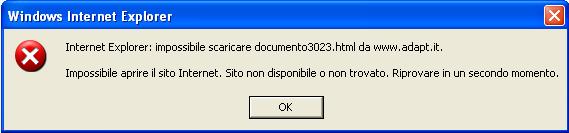
I get an error: Unable to download the file, unable to found web site. [:S]
If I retry a second time, I get the file successfully. The first time I open the file I always get the error described (see the screenshot in attachment). When I disable the Web Proxy, the file is always downloaded successfully. I have tried to disable Antivirus function in Astaro, but the error still occurs.

Any ideas? Do you have problems when you try to download this file?
Thank you
Eclipse79


This thread was automatically locked due to age.

Parents
  • When is it not blocked?  Is this just random?
     
    Sophos UTM Community Moderator
    Sophos Certified Architect - UTM
    Sophos Certified Engineer - XG
    Gold Solution Partner since 2005
    MediaSoft, Inc. USA
  • When is it not blocked?  Is this just random?


    No, it is not random:
    - In Firefox the download works always
    - In Internet Explorer the download fails always the first time I try. After the error message, I retry to download (pressing enter in the address bar): in this way I can download the file successfully. If I close Internet Explorer and I repeat the procedure, I get the same behaviour (so: first time always fails , second time always ok ).

    The same issue is experienced by utm_kid (the second post of this thread). [:O]
    It's very very strange... I have tried to disable Antivirus, spyware protection, I have also disabled all the categories of url filtering, but the issue still occurs. The only way to solve the problem is to disable the proxy!! Only in this way I can download without any errors.

    I think that this proxy has some problem
Reply
  • When is it not blocked?  Is this just random?


    No, it is not random:
    - In Firefox the download works always
    - In Internet Explorer the download fails always the first time I try. After the error message, I retry to download (pressing enter in the address bar): in this way I can download the file successfully. If I close Internet Explorer and I repeat the procedure, I get the same behaviour (so: first time always fails , second time always ok ).

    The same issue is experienced by utm_kid (the second post of this thread). [:O]
    It's very very strange... I have tried to disable Antivirus, spyware protection, I have also disabled all the categories of url filtering, but the issue still occurs. The only way to solve the problem is to disable the proxy!! Only in this way I can download without any errors.

    I think that this proxy has some problem
Children
No Data