This discussion has been locked.
You can no longer post new replies to this discussion. If you have a question you can start a new discussion

Dashboard Displays "0 Emails Processed"

Hello,

I just finished rebuilding my Astaro [7.405] this morning into new hardware.  It's working FANTASTICALLY!

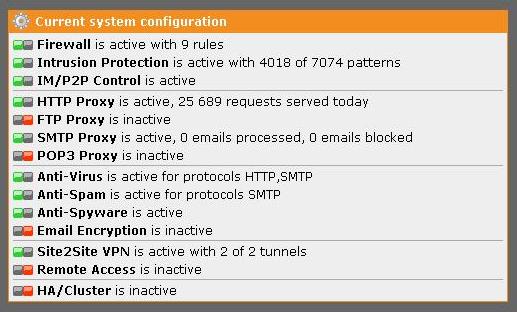
One slight issue that I can't seem to figure out.  I can see that emails are being processed through the proxy by looking at the live log, graphs, mail manager, etc.  However when I look at the dashboard, next to SMTP Proxy (which shows active) I see "SMTP Proxy is active, 0 emails processed, 0 emails blocked"

If I click on Mail Security, it will show the daily mail traffic graph just fine but under "Top Email Recipients", "Top Email Senders", "..Spam Countries", etc.  It says "No data is available for this report".

I am attaching screen prints to show what I mean.

Any idea how I can get these statistics to show correctly?


This thread was automatically locked due to age.

Parents
  • I believe I have pinned down why I'm still not getting any informatio besides the spam graph in mail security.

    In our old Astaro, a good chunk of the reporting features were not working and one of the big things we hoped to resolve in our new build was to get these working again.  I'm thinking that because I restored the firewall from a backup of the old firewall, some of those corrupted databases may have came over with it. 

    Now all I need to do it start the DB's from scratch.  I tried using the suggested way to stop, remove and restart the PostGreSQL but i'm being asked for a password to stop the Postgresql service.  I am logged in as root.   

    Any suggestions or a better way to reinitialize the database?  I am not concerned about the data at this point since there isn't that much as it is and it didn't work on the old box for quite some time.
Reply
  • I believe I have pinned down why I'm still not getting any informatio besides the spam graph in mail security.

    In our old Astaro, a good chunk of the reporting features were not working and one of the big things we hoped to resolve in our new build was to get these working again.  I'm thinking that because I restored the firewall from a backup of the old firewall, some of those corrupted databases may have came over with it. 

    Now all I need to do it start the DB's from scratch.  I tried using the suggested way to stop, remove and restart the PostGreSQL but i'm being asked for a password to stop the Postgresql service.  I am logged in as root.   

    Any suggestions or a better way to reinitialize the database?  I am not concerned about the data at this point since there isn't that much as it is and it didn't work on the old box for quite some time.
Children
No Data