This discussion has been locked.
You can no longer post new replies to this discussion. If you have a question you can start a new discussion

Dashboard Displays "0 Emails Processed"

Hello,

I just finished rebuilding my Astaro [7.405] this morning into new hardware.  It's working FANTASTICALLY!

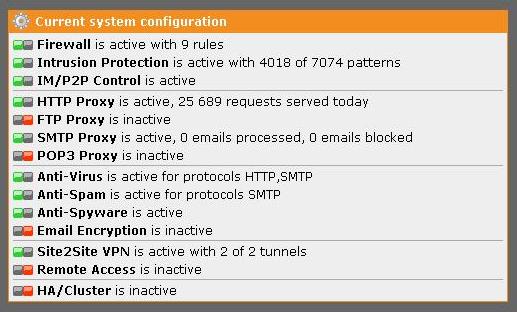
One slight issue that I can't seem to figure out.  I can see that emails are being processed through the proxy by looking at the live log, graphs, mail manager, etc.  However when I look at the dashboard, next to SMTP Proxy (which shows active) I see "SMTP Proxy is active, 0 emails processed, 0 emails blocked"

If I click on Mail Security, it will show the daily mail traffic graph just fine but under "Top Email Recipients", "Top Email Senders", "..Spam Countries", etc.  It says "No data is available for this report".

I am attaching screen prints to show what I mean.

Any idea how I can get these statistics to show correctly?


This thread was automatically locked due to age.

Parents
  • If the change you made to the Exchange smart host setting failed to resolve this issue, you may need to ask Astaro support to reinitialize the PostgreSQL database for email reporting.

    Cheers - Bob
     
    Sophos UTM Community Moderator
    Sophos Certified Architect - UTM
    Sophos Certified Engineer - XG
    Gold Solution Partner since 2005
    MediaSoft, Inc. USA
  • Hi,
    I usually wait 24hrs after a new installation  before worrying to much about the dashboard data. More often than not the  midnight rollover fixes most of those issues.

    Regards
    Ian M
Reply Children
No Data