This discussion has been locked.
You can no longer post new replies to this discussion. If you have a question you can start a new discussion

ASG as bridge

Hello,

Could I setup ASG as a transparent bridge sitting between my firewall and internal network?  I just want to add virus, spam, web filtering protection to my existing network.

Internet 


This thread was automatically locked due to age.

Parents
  • Yes you can, but why don't you put the wireless/firewall into bridging mode ans use the ASG as a firewall?

    Ian M
  • Thanks for replying Ian,

    I'm kind of happy with my wireless router/FW setup because I've spend quite a bit of time configured to use a 3rd party firmware.  Plus the ASG is so new to me and I just didn't want to mess with the ASG FW and screw up everything..[:$]

    I noticed the ASG FW turns on as default.  it is possible to turn it off? or can I just leave it turn on and not configure any rules?  I tried configured as transparent bridge last night and everything stop working, so could someone point me to an example deployment configuration setup for newbie...[:)]

    My dedicated PC setup include 2 Broadcom NIC and recognized by ASG, 512MB RAM, Pentium 4, and 130GB.  I plugged one ether cable (eth0) to my switch and the other cable (eth1) to my wireless router/FW and bridge them together and all my connection dropped.

    Any help is greatly appreciated.
  • Hi,
    welcome to the ASG world of network security.

    The ASG by default has everything blocked.

    Depends on what fuctions you have on your ASG.

    Basically you need a packet filter rule allowing your internal network to your external network.

    You will need to configure the wireless side to NIC to be a normal LAN so it obtains an IP address from the wireless router or you can assign it a fixed address. You will need to assign your internal NIC a fixed address on the same network.

    That will get you basic connectivity through the ASG with firewall functions.

    From there you can turn on other functions in other tabs to improve your security.

    When you get this working try it for a while and also experiment. Save a configuration you are comfortable with if you need to restore because of a failure. An important point to remember the ASG uses port 4444 for secure access, it is recommended that YOU don't change it.

    Ian M
    I had tried bridging once and forgot about only using one IP.
  • Yes, you can use the Astaro in the Scenario you describe.  You can put the proxies in transparent mode, and configure two (or more) ethernet interfaces as a bridge.  Works fine, I have 1 customer that has run Astaro this way for 4 years or so behind a (now defunct) Cisco PIX.  We are getting ready to dump the PIX and put the Astaro in "regular" mode, so we can use the failover functions, etc.

    CTO, Convergent Information Security Solutions, LLC

    https://www.convergesecurity.com

    Advice given as posted on this forum does not construe a support relationship or other relationship with Convergent Information Security Solutions, LLC or its subsidiaries.  Use the advice given at your own risk.

Reply
  • Yes, you can use the Astaro in the Scenario you describe.  You can put the proxies in transparent mode, and configure two (or more) ethernet interfaces as a bridge.  Works fine, I have 1 customer that has run Astaro this way for 4 years or so behind a (now defunct) Cisco PIX.  We are getting ready to dump the PIX and put the Astaro in "regular" mode, so we can use the failover functions, etc.

    CTO, Convergent Information Security Solutions, LLC

    https://www.convergesecurity.com

    Advice given as posted on this forum does not construe a support relationship or other relationship with Convergent Information Security Solutions, LLC or its subsidiaries.  Use the advice given at your own risk.

Children
  • Thank you for replying Bruce,

    I've tried Ian suggestion just to initially get it up and running, but to no avail.

    I have eth0 (Internal LAN) connected to my switch w/IP of 192.168.50.100 and I have eth1 (External WAN) connected to my wireless router/FW w/IP of 192.168.50.101

    The eth0 interface showing is up and eth1 shows down

    When I tried to bridged both NIC, my entire LAN dropped connection.  I'm not exactly sure what I'm doing...[:)]

    Thanks in advance for any help you can provide
  • The problem with the interface that is down might a simple as requiring a crossover cable. Not all NIC are capable of auto negotiation or auto crossover.

    Ian M
  • The problem with the interface that is down might a simple as requiring a crossover cable. Not all NIC are capable of auto negotiation or auto crossover.

    Ian M


    I'm using a dual NIC (same card) and both identified as Broadcom NetXtreme BCM5704 Gbit by ASG.  Could that be the problem?  Both lid up during boot process and after the system comes up, only one of is lid up.

    Both interfaces setup as followed:

    Type (ethernet standard)
    Hardware (eth0 and eth1)
    Address (192.168.50.100 - eth0 and 192.168.50.101 - eth1)

    If any luck I get this working..[:)], what packet rule should set?

    source (Internal LAN)
    service (Any)
    destination (External WAN)

    Thanks again
  • The proper way to setup bridging in astaro for this situation would be to just have eth0 configured under network interfaces, remove the config for eth1. Then go to Network > Bridging, create a bridge with eth0 and eth1. Once the bridge is enabled both interfaces will respond to the same IP address.

    The astaro does not like to have two or more interfaces configured that are in the same network, so creating a bridge is the recommended configuration. You will still need to add packet filter rules to allow the traffic to pass. A basic rule to get going would be Source: Internal Network > Service: any -> Destination: Any, you can get more specific once you get up and running.
  • The proper way to setup bridging in astaro for this situation would be to just have eth0 configured under network interfaces, remove the config for eth1. Then go to Network > Bridging, create a bridge with eth0 and eth1. Once the bridge is enabled both interfaces will respond to the same IP address.

    The astaro does not like to have two or more interfaces configured that are in the same network, so creating a bridge is the recommended configuration. You will still need to add packet filter rules to allow the traffic to pass. A basic rule to get going would be Source: Internal Network > Service: any -> Destination: Any, you can get more specific once you get up and running.

    After I did what you suggested, the following happened:

    wireless router/FW goes haywire (keep going into diag mode)
    wireless clients can't connect
    wired client comes to a halt

    I unplug the eth1 cable connect to my wireless router and all come back normal.

    Thanks again for your help
  • What features have you enabled on the astaro? make sure dhcp is only configured on one of the devices, either the astaro or the wireless router. What is the LAN IP of the wireless router?
  • What features have you enabled on the astaro? make sure dhcp is only configured on one of the devices, either the astaro or the wireless router. What is the LAN IP of the wireless router?

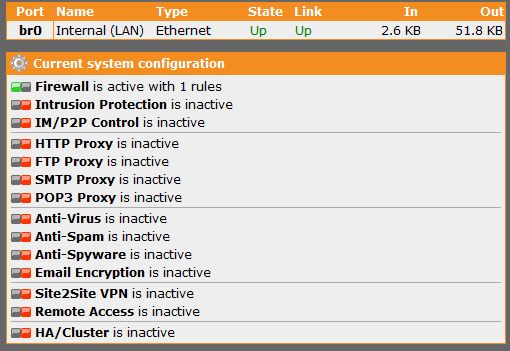
    none so far just the 1 rule you suggested.  dhcp is running on the wireless router only and astaro dhcp is not configure.  lan IP of the wireless router is 192.168.50.254.  below is the screen shot

    Thank You
  • dknyinva, I'm curious.  What is the brand & model of your wireless router, and what is the 3rd party firmware you're using in it?

    Thanks - Bob
     
    Sophos UTM Community Moderator
    Sophos Certified Architect - UTM
    Sophos Certified Engineer - XG
    Gold Solution Partner since 2005
    MediaSoft, Inc. USA
  • dknyinva, I'm curious.  What is the brand & model of your wireless router, and what is the 3rd party firmware you're using in it?

    Thanks - Bob

    My wireless router is a Buffalo brand model WHR-G54S and the 3rd party FW is dd-wrt
  • any help on this is kindly appreciated