This discussion has been locked.
You can no longer post new replies to this discussion. If you have a question you can start a new discussion

drop connection to ETH0 - help here

Hi,

We are running Astaro 6.304. We have some kind of connection drop to ETH0.
It can be anytime , come and goes - in those cases I can't ping eth0 inteface on my firewall (and no Internet - panic)

I can ping other nodes on the same switch but not Astaro eth0. 
Any ideas?


This thread was automatically locked due to age.

Parents
  • Maybe the link speed autosensing does not work correctly. Try setting the link speed manually - Network->Interfaces->Hardware->Edit and disable autonegotiation, set link speed manually.

    Cheers,
      andreas
  • I don't believe those settings are there in v6.304 andreas. Only v7.
  • Oh, you are right. Sorry, mis-read the version, upcoming 7.004 confuses my brain [:P]

    There is no way to set that using the WebAdmin in Version 6. You can try various link-speed settings on the other end of the cable though - maybe it already helps if you change auto-negotiation there to a fixed setting.

    Cheers,
      andreas
  • Oh, you are right. Sorry, mis-read the version, upcoming 7.004 confuses my brain [:P]

    There is no way to set that using the WebAdmin in Version 6. You can try various link-speed settings on the other end of the cable though - maybe it already helps if you change auto-negotiation there to a fixed setting.

    Cheers,
      andreas

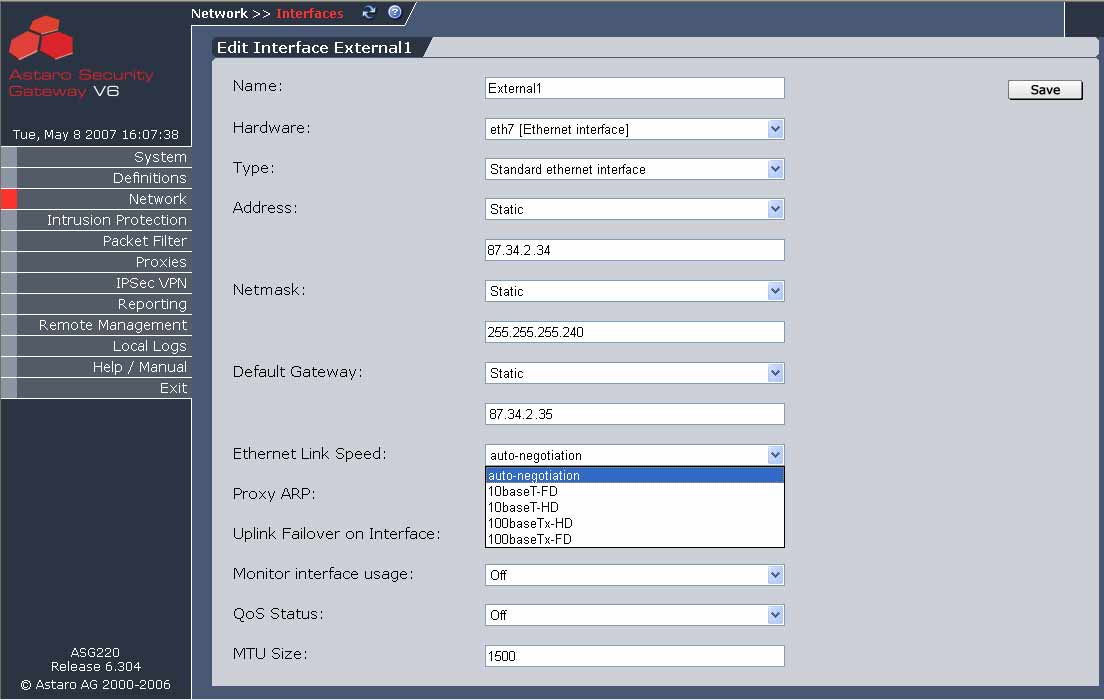
    You CAN SET the LINK speed in ASG V6 - 6.304
    There is a KNOWN issue with auto negotiate and CISCO routers which is why the change was made in ASG/ASL V6
    WEB Admin > Interfaces >   Select a "real interface" not additional addresses
    SELECT EDIT then scroll to "Ethernet LINK Speed" and use "Drop Down" and choose .. 10BaseT-FD etc...

    Hope that helps ...
Reply
  • Oh, you are right. Sorry, mis-read the version, upcoming 7.004 confuses my brain [:P]

    There is no way to set that using the WebAdmin in Version 6. You can try various link-speed settings on the other end of the cable though - maybe it already helps if you change auto-negotiation there to a fixed setting.

    Cheers,
      andreas

    You CAN SET the LINK speed in ASG V6 - 6.304
    There is a KNOWN issue with auto negotiate and CISCO routers which is why the change was made in ASG/ASL V6
    WEB Admin > Interfaces >   Select a "real interface" not additional addresses
    SELECT EDIT then scroll to "Ethernet LINK Speed" and use "Drop Down" and choose .. 10BaseT-FD etc...

    Hope that helps ...
Children