This discussion has been locked.
You can no longer post new replies to this discussion. If you have a question you can start a new discussion

drop connection to ETH0 - help here

Hi,

We are running Astaro 6.304. We have some kind of connection drop to ETH0.
It can be anytime , come and goes - in those cases I can't ping eth0 inteface on my firewall (and no Internet - panic)

I can ping other nodes on the same switch but not Astaro eth0. 
Any ideas?


This thread was automatically locked due to age.

  • Maybe the link speed autosensing does not work correctly. Try setting the link speed manually - Network->Interfaces->Hardware->Edit and disable autonegotiation, set link speed manually.

    Cheers,
      andreas
  • I don't believe those settings are there in v6.304 andreas. Only v7.
  • Oh, you are right. Sorry, mis-read the version, upcoming 7.004 confuses my brain [:P]

    There is no way to set that using the WebAdmin in Version 6. You can try various link-speed settings on the other end of the cable though - maybe it already helps if you change auto-negotiation there to a fixed setting.

    Cheers,
      andreas
  • Oh, you are right. Sorry, mis-read the version, upcoming 7.004 confuses my brain [:P]

    There is no way to set that using the WebAdmin in Version 6. You can try various link-speed settings on the other end of the cable though - maybe it already helps if you change auto-negotiation there to a fixed setting.

    Cheers,
      andreas

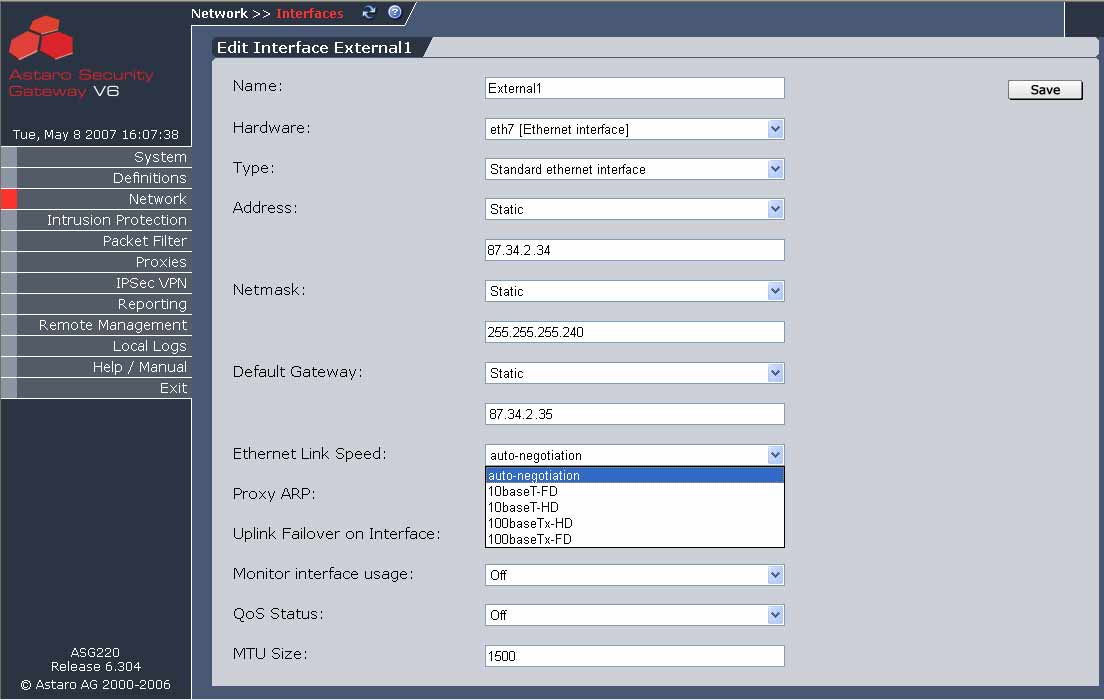
    You CAN SET the LINK speed in ASG V6 - 6.304
    There is a KNOWN issue with auto negotiate and CISCO routers which is why the change was made in ASG/ASL V6
    WEB Admin > Interfaces >   Select a "real interface" not additional addresses
    SELECT EDIT then scroll to "Ethernet LINK Speed" and use "Drop Down" and choose .. 10BaseT-FD etc...

    Hope that helps ...
  • I believe that feature in V6 is ONLY available on the appliances--not a software only install.

    CTO, Convergent Information Security Solutions, LLC

    https://www.convergesecurity.com

    Advice given as posted on this forum does not construe a support relationship or other relationship with Convergent Information Security Solutions, LLC or its subsidiaries.  Use the advice given at your own risk.

  • You are right, there is no way i can do this in webadmin, my lan interface is "Standard ethernet interface" no speed setting. I'll try to put 1GB duplex on our 3com switch, I'll post you is problem is solved.

    Please if anyone have more ideas please post me.

    Thanks alot,
    Zeraldin
  • I tried to set end device (3com switch in 1GB tried even 100MB speed) no success.
  • I tried to set end device (3com switch in 1GB tried even 100MB speed) no success.

    You can set the interface spped from the command line interface (CLI) so, connect to the console with SSH. Command line: 

    Login as     loginuser     
    do a    su -    at the prompt  this will let you become "root" user (use root Password) 
     
    CD ..  to root  folder   from there you can run

    #mii-diag eth1              this wil report the negotiated speed and mode.
     
    root#mii-diag -F 10baseT-HD eth2       will set eth2 to 10Mb Tx T Half duplex
    root#mii-diag -F 10baseT-FD eth2       will set eth2 to 10base Tx Full  duplex
    root#mii-diag -F 100baseT-HD eth2       will set eth2 to 10base Tx Half duplex


    This is NOT persistent (ie reboot box the speed will revert back to original config, this may help and save time testing.
  • Hi, 
    I see in my logs is:
    19:30:21 128.1.1.2 138 -> 128.1.1.255 138 UDP 20 195 128 CE 
    19:30:21 128.1.1.2 138 -> 128.1.1.255 138 UDP 20 195 128 Spoofing MAC ff:ff:ff:ff:ff:ff:00 -> 04:76:3b:54:0d:08:00 
    19:30:21 128.1.1.2 138 -> 128.1.1.255 138 UDP 20 195 128 Spoofing MAC ff:ff:ff:ff:ff:ff:00 -> 04:76:3b:54:0d:08:00 
    19:30:22 128.1.1.2 138 -> 128.1.1.255 138 UDP 20 195 128 CE 
    19:30:22 128.1.1.2 138 -> 128.1.1.255 138 UDP 20 195 128 Spoofing MAC ff:ff:ff:ff:ff:ff:00 -> 04:76:3b:54:0d:08:00 
    19:30:22 128.1.1.2 138 -> 128.1.1.255 138 UDP 20 195 128 Spoofing MAC ff:ff:ff:ff:ff:ff:00 -> 04:76:3b:54:0d:08:00 
    19:30:23 128.1.1.2 138 -> 128.1.1.255 138 UDP 20 209 128 CE 
    19:30:23 128.1.1.2 138 -> 128.1.1.255 138 UDP 20 209 128 Spoofing MAC ff:ff:ff:ff:ff:ff:00 -> 04:76:3b:54:0d:08:00 
    19:30:23 128.1.1.31 138 -> 128.1.1.255 138 UDP 20 191 128 Spoofing MAC ff:ff:ff:ff:ff:ff:00 -> 13:72:60:b9[:D]6:08:00 
    19:30:23 128.1.1.2 138 -> 128.1.1.255 138 UDP 20 209 128 Spoofing MAC ff:ff:ff:ff:ff:ff:00 -> 04:76:3b:54:0d:08:00 
    19:30:23 128.1.1.31 138 -> 128.1.1.255 138 UDP 20 191 128 Spoofing MAC ff:ff:ff:ff:ff:ff:00 -> 13:72:60:b9[:D]6:08:00 

    When I turn Spoofing protection=off it seems that problem is gone (my internal LAN is 128.1.1.0 (23) - don't ask me I know it's not private addressed), how do I solve this spoofing problem.