This discussion has been locked.
You can no longer post new replies to this discussion. If you have a question you can start a new discussion

WebAdmin: invalid username or password, after apply system_password_reset (utm 9.709-3)

Hello

i could not login: WebAdmin: invalid username or password

so i did a system_password_reset,via init=/bin/bash
it seems ok, but after setting a new password, i still got WebAdmin: invalid username or password

so i did system_password_reset,via init=/bin/bash a second time
but again no success, i still get: WebAdmin: invalid username or password

Version: 9.709-3

any help appreciated

Thanks


This thread was automatically locked due to age.

Top Replies

  • in reply to markusw +1 verified

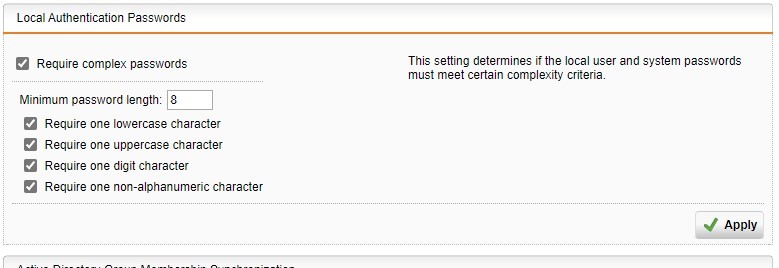
    I don't know for sure, but via SSH, I don't think that it gives you any indication that your password may not be strong enough, as they did some password complexity requirements for admin a while back.  

    Make sure you follow that in case it is enabled (mine is how the default is set).  Follow that, change your password accordingly, then try it again.

    Jump to answer
Parents
  • Hi,

    i still cant access the Webadmin

    why can't i set a new password?

    Just yet, i tried to reinstall the system, but got following error: install.tar wasn't found on the installation media

    somehow i'm getting nowhere

    anybody?

    thanks!

Reply
  • Hi,

    i still cant access the Webadmin

    why can't i set a new password?

    Just yet, i tried to reinstall the system, but got following error: install.tar wasn't found on the installation media

    somehow i'm getting nowhere

    anybody?

    thanks!

Children
  • Step 1: Restart the server. You can't get through this error and start all over again without restarting.

    Step 2: Boot from USB. You'll need to load all the way to the installer, but don't start the installation yet.

    Step 3: Open the shell: press ALT F2 before proceeding with anything else. This will open the shell where we run our command to remount.

    Step 4: Reassemble the USB drive. The main command you're going to execute will be something like this.

                 Mount /dev/sdb1 /install

    Step 5: Exit the shell safely. Press ALT+F1 to exit the shell

    Step 6: Install. Run the installer.

    XG 19.5 GA 64-bit | Intel Xeon 4-core v3 1225 3.20Ghz
    16GB Memory | 500GB SSD HDD | GB Ethernet x5