Hi,
how can I restart the SMPT Service with Webamin?
Regards
This thread was automatically locked due to age.

Yes Nick KEY, so while login to the putty > you need to type loginuser so there you type in the password for the loginuser following with it type "su" where you need type in the root password !!
================
Can you share the screenshot Interface & routing > Interface !!
Hello Nick KEY,
Thank you for reaching out to the community, you can restart via ssh > under the ssh menu Press 5 for the device management > Press 3 for the advance shell:
1.) For SMTP Transparent Proxy: service awarrensmtp:restart -ds nosync
2.) For SMTP MTA Mode: service smtpd:restart -ds nosync
Thanks & Regards,
_______________________________________________________________
Vivek Jagad | Team Lead, Global Support & Services

Sophos Community | Product Documentation | Sophos Techvids | SMS
If a post solves your question please use the 'Verify Answer' button.
Thanks & Regards,
_______________________________________________________________
Vivek Jagad | Team Lead, Global Support & Services

Sophos Community | Product Documentation | Sophos Techvids | SMS
If a post solves your question please use the 'Verify Answer' button.
Follow the steps mentioned in the KBA to go to the ssh menu & once you are in ssh menu you can follow the first step I shared initially !!
Thanks & Regards,
_______________________________________________________________
Vivek Jagad | Team Lead, Global Support & Services

Sophos Community | Product Documentation | Sophos Techvids | SMS
If a post solves your question please use the 'Verify Answer' button.
Thanks & Regards,
_______________________________________________________________
Vivek Jagad | Team Lead, Global Support & Services

Sophos Community | Product Documentation | Sophos Techvids | SMS
If a post solves your question please use the 'Verify Answer' button.
On webGUI = Under the Network > Interfaces !!
Thanks & Regards,
_______________________________________________________________
Vivek Jagad | Team Lead, Global Support & Services

Sophos Community | Product Documentation | Sophos Techvids | SMS
If a post solves your question please use the 'Verify Answer' button.
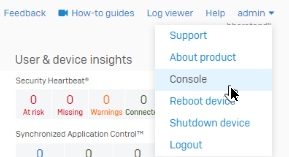
At the top right hand corner of the gui there is a menu, one item is console. You will be asked for a password to login to the console, then follow the instructions in the kba.
ian
XG115W - v19.5.1 mr-1 - Home
If a post solves your question please use the 'Verify Answer' button.
Oh so you are using UTM 9 Product, I'll move the thread !!
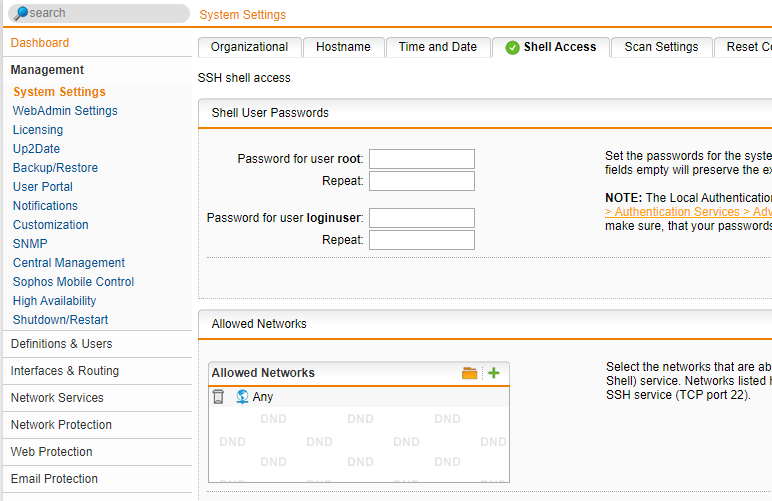
that will be under Management > system settings > shell access
command: /var/mdw/scripts/smtp restart
Interfaces & Routing > Interfaces [you'll be able to see the IP address to ssh into] 
Thanks & Regards,
_______________________________________________________________
Vivek Jagad | Team Lead, Global Support & Services

Sophos Community | Product Documentation | Sophos Techvids | SMS
If a post solves your question please use the 'Verify Answer' button.
Yes Nick KEY, so while login to the putty > you need to type loginuser so there you type in the password for the loginuser following with it type "su" where you need type in the root password !!
================
Can you share the screenshot Interface & routing > Interface !!
Thanks & Regards,
_______________________________________________________________
Vivek Jagad | Team Lead, Global Support & Services

Sophos Community | Product Documentation | Sophos Techvids | SMS
If a post solves your question please use the 'Verify Answer' button.