The new GUI

Cuuld we get the old GUI style back please? Sorry to he honest here but the new Blue/Black on bright white makes eyes hurt, is very chaotic and... quite ugly. Still it is just my personal opinion but so far all people I did talk to agree with it so...

Please include an option to system settings to have WebAdmin on the Legacy old color scheme which was excellent.
  • I actually like the user interface. Nice and clean, change is hard for most IT folks (myself included) but I always look forward to a new interface with a new major release and I think the new interface looks cleaner overall.
    However some of the colors carried over from previous backups are not too pretty to look at.

    Regards
    Bill
  • Hello 

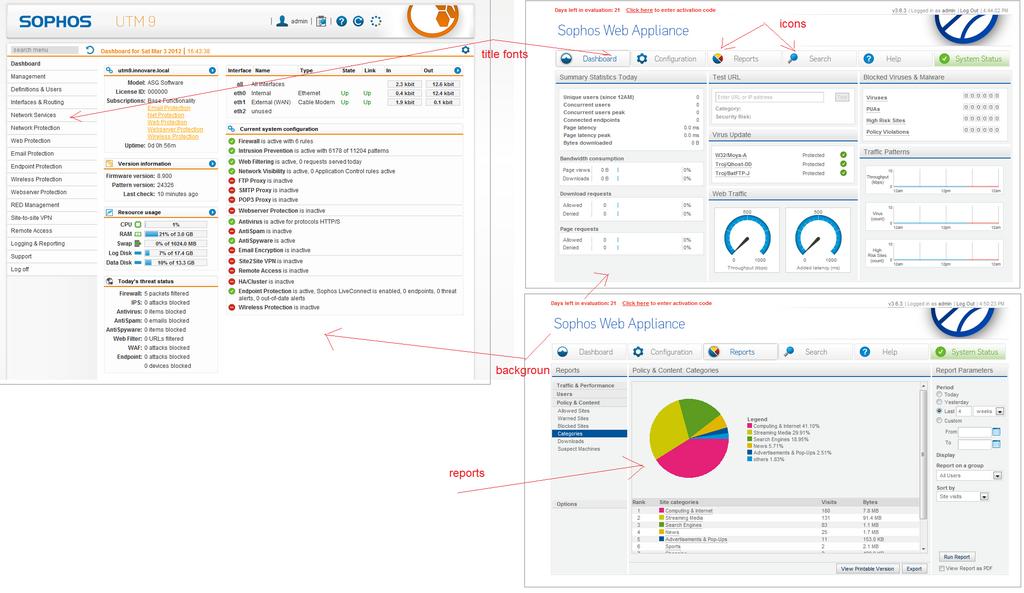
    I think so that the Sophos UTM design team should be see other interfaces, as Sophos Web Appliance. The white color with a correct backgrounds, fonts and icons are very fine.

    See the interfaces in the attached image.

    Try to execute these minimal changes in the look-and-feel and wait for the users response [:)]

    Regards,

    Linck Tello Flores
    Innovare e-Business sac
  • I will have to agree with Innovare with adding some color. The white background jumps out at you and overshadows the rest of the interface. The overexposure of white makes it hard to find the one piece of information you are looking for on the interface. If the white can be toned down the should be less resistance but this is my two cents.

    Here are some recommendations:

    1. Darken the silver / gray on the interface.
    2. Add some additional colors to the interface. It seams the new interface is limited to only a select few colors when looking at the graphs. Not sure this will change over time when the quick view interface used for reporting, etc has been fully populated. 
    3. Will the Mail Manager interface have the new look? Right now it still has the old look.   

    Final note: Astaro / Sophos is a great product for the money, strong community, and one of the few firewalls that can be used by home user with little to no cost.

    Griff
  • The funny thing is: Sophos' existing appliances (not the Astaro UTM ones) have much more contrast and better readability than our new v9 webadmin. I, for one, really have to agree with many of your complaints. But I'm neither the responsible designer nor developer.. but I have learned colors, typography and design during my period of training and I really share your pain.
  • +1 on that!

    Generally I like the new light look of the UI, but reading is really painfull. All lists need much more contrast!
  • I darkened my screen a bit, and now it's easier to see things here and on the Astaro and Sophos websites.  Maybe the secret is to darken the blue tints used for backgrounds and lines - that applies to the Sophos site, too.

    As it is, in order to see the design, I have to make the screen so dark that it's hard on my eyes.  I have the same problem on my other laptop.  I'm going back to bright-enough-to-read with all-white backgounds and almost-visible lines between sections.

    Cheers - Bob
     
    Sophos UTM Community Moderator
    Sophos Certified Architect - UTM
    Sophos Certified Engineer - XG
    Gold Solution Partner since 2005
    MediaSoft, Inc. USA
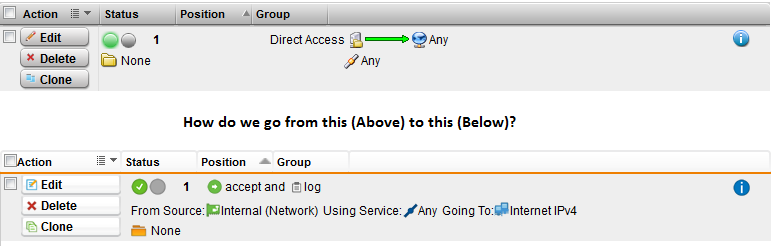
  • How do we go from an easy to read and flow through Firewall Rule to a bunch of text and images on running together?

    It just seems that the UI has taken a major step backwards.

    I don't care that the arrow isn't there back the text for all runs together like one long sentence with no periods.

    Simply adding some Spacing, and Bold Text would help

    From Source: Internal Network - Using Service: ANY - Going to: Internet IPv4
  • The new gui needs a little bit of tuning, but it is not so bad. 
    Main Problem will be the usage of screenshots in Presentation, because the light grey is too light for a beamer. The Interface looked horrible to me, at the roadshow.

    My Opinion is, to have a Layout in between the Astaro and Sophos layout. This is more work, but the admins out there will not cry so much. 

    Or may be you should have a white manager Layout and a black "Console admin" Layout.

    Sven

    Astaro user since 2001 - Astaro/Sophos Partner since 2008

  • Since this is a major redesign, I'd like to make the suggestion that there be a consistent way, across all areas of WebAdmin, to show the Traffic Selector, and that that term "Selector" be used.  It will clarify things for those new to firewalls, routers and the Sophos UTM.

    I also agree that replacing arrows with text does not improve either readability or understandability.  On the contrary, it makes the display less readable.

    Whether logging is shown by a tablet or a pencil makes no difference to me.  Adding the word "log" does increase understandability, and could reasonably be used without any symbol.

    Here's a suggestion for a Firewall rule (notice also the changed locations of the information):

    It would be helpful if, for example, in the list of Firewall rules, you could hover over "Internal (Address)" and have the IP appear.  Similarly for all objects in all displays of rules without having to edit the rule.

    A Full NAT rule to offer a server at a remote location via a public IP on the local UTM would look like:

    Selector: Internet → Any → External [Remote Server] (Address)
    Full NAT: Internal (Address) → (unchanged) → Remote Server via VPN


    An example SNAT would be:

    Selector: Internal (Network) → Terminal Services → Internal [Phantom] (Address)
    SNAT: Internal (Address) → (unchanged)


    QoS rules would remain largely unchanged from V8.

    Multipath rules would be like:

    Selector: VPN Pools → Web Surfing → Any 
    Persistence: (by interface) FiOS


    Cheers - Bob
     
    Sophos UTM Community Moderator
    Sophos Certified Architect - UTM
    Sophos Certified Engineer - XG
    Gold Solution Partner since 2005
    MediaSoft, Inc. USA
  • While i see your point with those large displays, please keep in mind that we still have customers in less developed countries, where 1024 is the average screen size. And most of our developers are working on screens that are 1280 pixels wide (dual monitor setup though).

    And, just because i'm curious: why do you run your browser fullscreen? You could easily make the window smaller, so that it uses maybe half of the screen? Don't get me wrong here, i'm not arguing, i'm just curious.

    Well I simply use the browser window maximized as I have lots of tabs usually open and with having a maximized window I see all the tab titles and do not have to scroll around...  [:)]