This discussion has been locked.
You can no longer post new replies to this discussion. If you have a question you can start a new discussion

How to access the Modem Interface in my configuration?

Hello,

I've been using the XG Firewall for a few days now and it's great so far. 

There has been one issue I couldn't solve on my own, I hope you guys can help me with this:


I've got my network configuration like this:
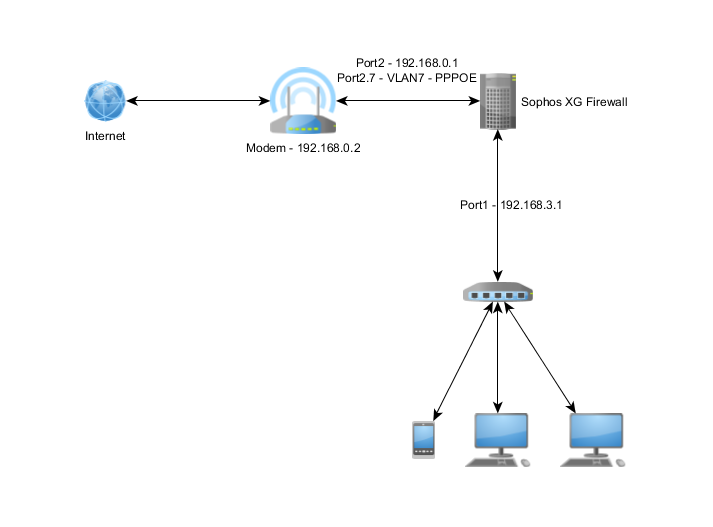
Now all I want is to access the modems web interface (Port2, 192.168.0.2) from my network (Port1, 192.168.3.0)

Is there a simple NAT rule or something to achieve this? Thanks alot for your attention!


This thread was automatically locked due to age.
Parents
  • Hi Paul,

    Show me the interface configurations. Here, the modem and LAN switch are directly connected devices for the XG hence, you don't need any specific configurations. I think you just need a LAN to WAN Fw-rule with MASQ, as the LAN requests will be NATed with the out interface i.e. 192.168.0.1 and the XG will add the required entry in the routing table.

    Thanks

    Sachin Gurung
    Team Lead | Sophos Technical Support
    Knowledge Base  |  @SophosSupport  |  Video tutorials
    Remember to like a post.  If a post (on a question thread) solves your question use the 'This helped me' link.

  • Hello sachingurung,

    excuse me for getting back at you this late. Busy day.


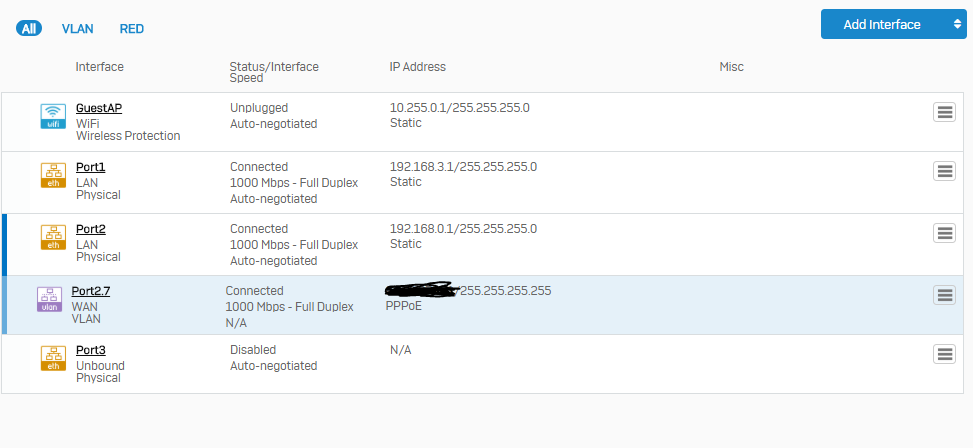
    I made a screenshot of my interface configurations:

    Do I really need a LAN-To-WAN-Rule? Only the VLAN Port 2.7 is configured to be in the WAN Zone.

    Thank you so much for your assistance

  • Okay I took another shot at this, here is what I came up with:

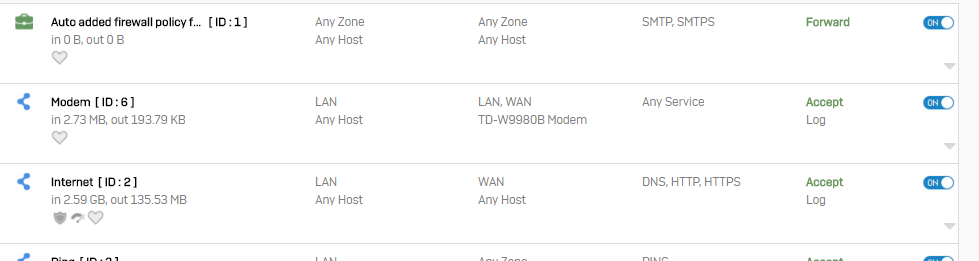
    I created a firewall rule on top of my general Internet rule:


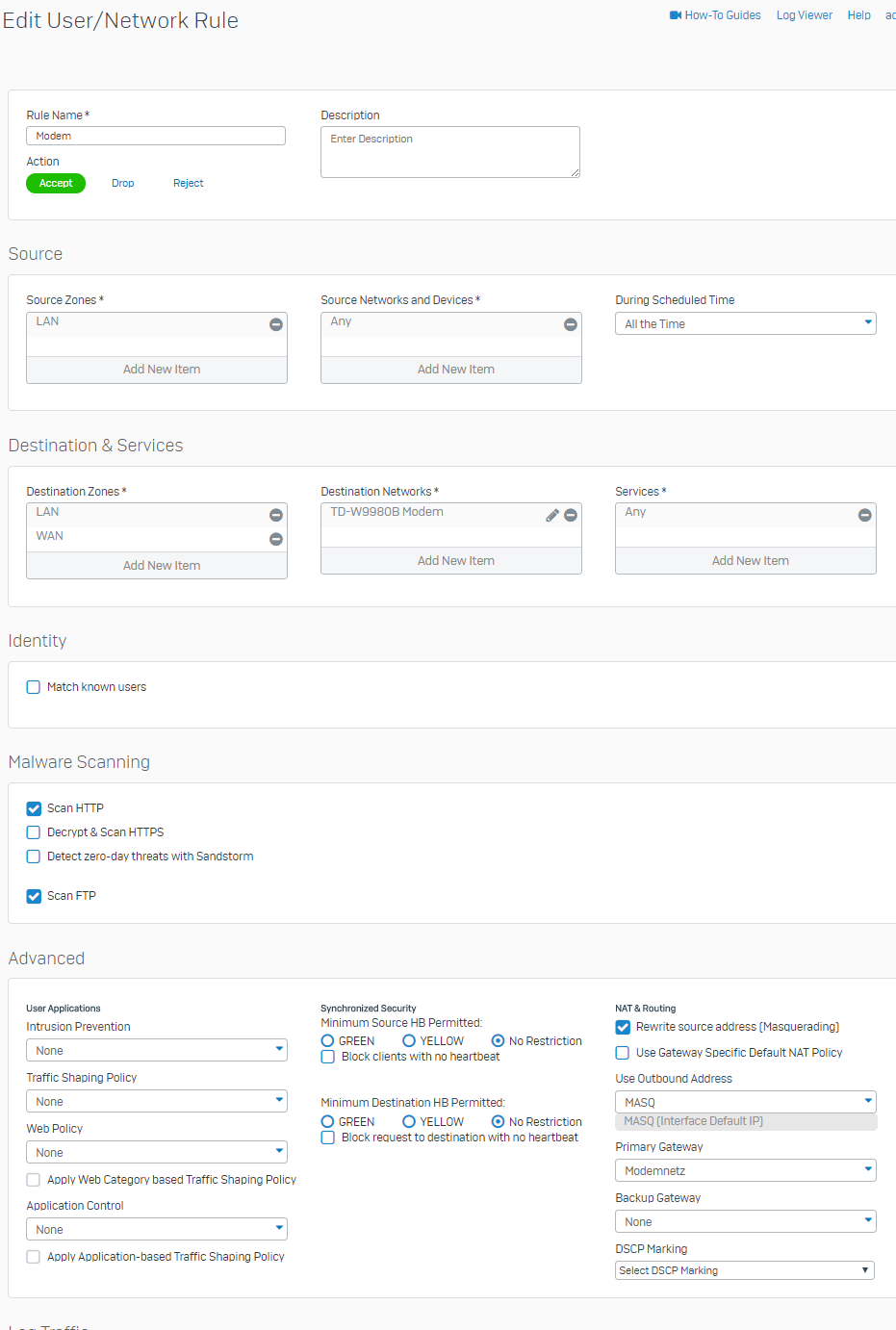
    with the following settings:


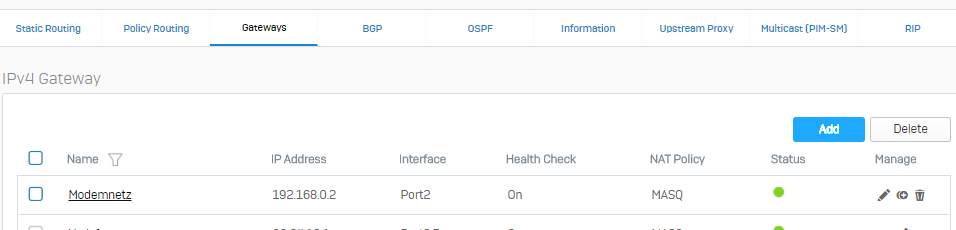
    Where the Destination Network is the IP-Address of my Modem (192.168.0.2) and the Primary Gateway is called 'Modemnetz':

    I added both LAN and WAN as destination zones because it somehow doesn't work if either is missing. (If I remove LAN, the Outbound Address 'MASQ: Interface Default IP' is missing from selection)

    Now I can access the modem web interface just fine and everything seems to work. 

    Since I am not very confident, i have to ask:

    Is my configuration like this problematic security-wise or am I set with it? Do I have to change anything or can I simplify my configuration?

    Thanks alot so far!

Reply
  • Okay I took another shot at this, here is what I came up with:

    I created a firewall rule on top of my general Internet rule:


    with the following settings:


    Where the Destination Network is the IP-Address of my Modem (192.168.0.2) and the Primary Gateway is called 'Modemnetz':

    I added both LAN and WAN as destination zones because it somehow doesn't work if either is missing. (If I remove LAN, the Outbound Address 'MASQ: Interface Default IP' is missing from selection)

    Now I can access the modem web interface just fine and everything seems to work. 

    Since I am not very confident, i have to ask:

    Is my configuration like this problematic security-wise or am I set with it? Do I have to change anything or can I simplify my configuration?

    Thanks alot so far!

Children