This discussion has been locked.
You can no longer post new replies to this discussion. If you have a question you can start a new discussion

Sophos XG 135 - Internet stops working for 10-15 mins

Hi all,

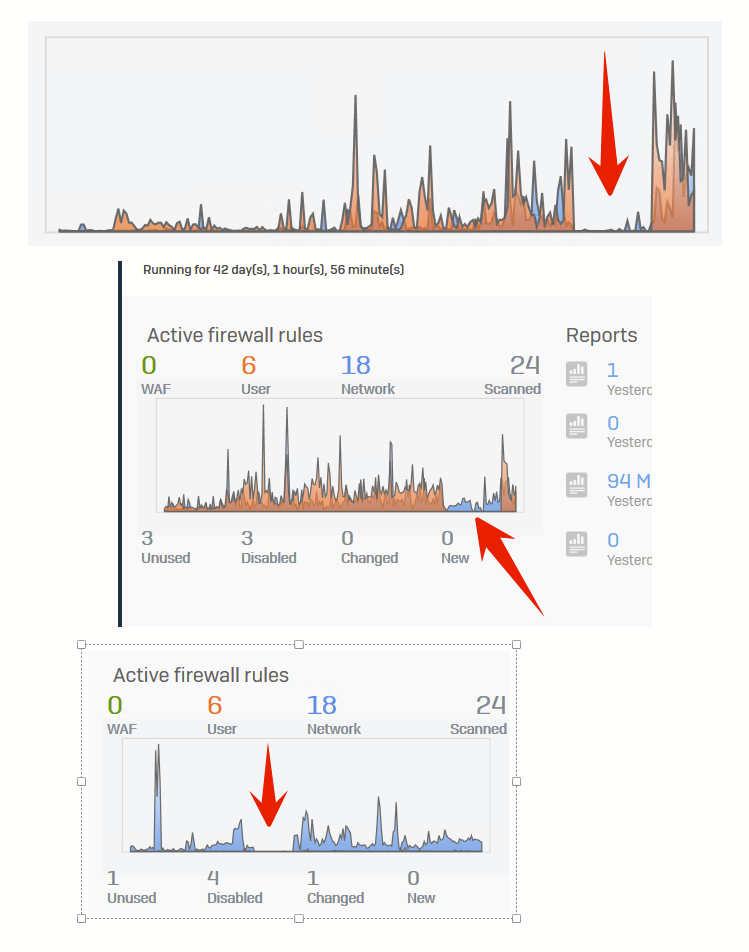
we have a strange problem with daily internet outages that lasts for about 10-15 mins. There is no internet in the office at all during the outage, and no one can connect from the outside. I can see clearly on the graph that internet stopped working. I've tried disabling STAS completely, but it happened again. No logs, no e-mail notifications, and no internet Slight smile

This is driving me and users CRAZY.

What is happening with this device ? We have HA config.

No answer from support, and no new firmware from December 2020., really ?

Any ideas what can I try to disable ?

I can disable all security features, but than why we are paying for it ?


This thread was automatically locked due to age.

Top Replies

  • Hello there,

    Thank you for contacting the Sophos Community.

    Sorry to hear you’re having issues with the device. May know the Case ID you logged with support.

    What Firmware Version are you running v17 or v18?

    When this issue happens can you still access the GUI of the XG?

    Can you please submit the following files:
    csc.log, applog.log, syslog.log, msync.log and networkd.log

    If possible, memory and CPU graph and all this detail with exact date and time when issue observed.

    If you have any log under /var/cores, please submit the output of the command.
    Also the output of this command:  grep 'NMI\|backtrace' /log/syslog.log
    Additionally please run the following command, to disable Firewall-Acceleration and monitor if the issue happens again.
    console> system firewall-acceleration disable
    To see if the Firewall Acceleration is enabled, please run
    console> system firewall-acceleration show

    Also if the issue is recurrent, please provide Console Logging:

    Note: Be sure that the computer in question does not go into Standby or Hibernate while logging.

    Using PuTTY, go to 'Session' - 'Logging.'
    Here, select "All session output', and set the file name to a folder and name for later retrieval.
    Configure the Serial connection to use the proper COM port on your PC and a Speed of 38400.
    Start the session, and log in to ensure it is all proper.
    Once logged in, you can leave it there or log out and leave the session at the password prompt. Either way, leave the session active and allow it to capture the output from the next reboot.
    Once that reboot occurs, you can end the Serial connection and provide the logs to support further investigation.

    Regards,

    Jump to answer
Parents
  • New info -

    - Internet stops regularly every morning when users comes to work, around 9 h

    - I can even ping the WAN interface, and I can connect to the VPN successfully but I cannot reach any internal resource, and users cannot browse any internet resource during the outage

    - I can connect to User Portal

    - Outage last for about 10-15 mins

    - Outage persists between devices in HA ( tried switching devices )

    Any clue before devices replacement ? ?

  • Hello Miroslav,

    In these cases, I would try to Console in or SSH into the XG, to see what output the XG is showing at the moment.

    If you’re able to console, I would check the syslog.log and the csc.log try to do a tcpdump and/or drop-packet-caputre see if the XG is throwing the packets or simply ignoring them.

    In any case, if the issue happens again with the new devices, get the logs I mentioned above, and the console output and mention this is the Second time the issue has happened, and send me the Case ID.

    Regards,


    Emmanuel (EmmoSophos)
    Technical Team Lead, Global Community Support
    Sophos Support VideosProduct Documentation  |  @SophosSupport  | Sign up for SMS Alerts
    If a post solves your question use the 'Verify Answer' link.
  • Soooo ... after pulling my hair some more  with this annoying problems ... it seems that SSL decryption engine in 18.0.4 is completely broken. As the last resort I've disabled SSL decryption in firewall rules and globally, and magically we have no internet outages for two days. I just wanted to save myself some travel time ( 80 km in one direction ) to replace units for RMA ones, because I felt that this could be a software problem. We have HA, and the same problem is present on both units.

    So Sophos, shame on you once more, I'm really, really disappointed ... again.

    - can you please check will this problem be solved in firmware update, and WHEN will FW update be available ?

Reply
  • Soooo ... after pulling my hair some more  with this annoying problems ... it seems that SSL decryption engine in 18.0.4 is completely broken. As the last resort I've disabled SSL decryption in firewall rules and globally, and magically we have no internet outages for two days. I just wanted to save myself some travel time ( 80 km in one direction ) to replace units for RMA ones, because I felt that this could be a software problem. We have HA, and the same problem is present on both units.

    So Sophos, shame on you once more, I'm really, really disappointed ... again.

    - can you please check will this problem be solved in firmware update, and WHEN will FW update be available ?

Children