
This discussion has been locked.
You can no longer post new replies to this discussion. If you have a question you can start a new discussion

Site to Site VPN and Static routing

Hello guys

I have a Cyberoam CR10 at the Headquarters and aCyberoam CR15 in another branch office. The Headquarters Cyberoam is connected to another VPN that we communicate with a clouds server 172.32.20.10. Sorry about the image.
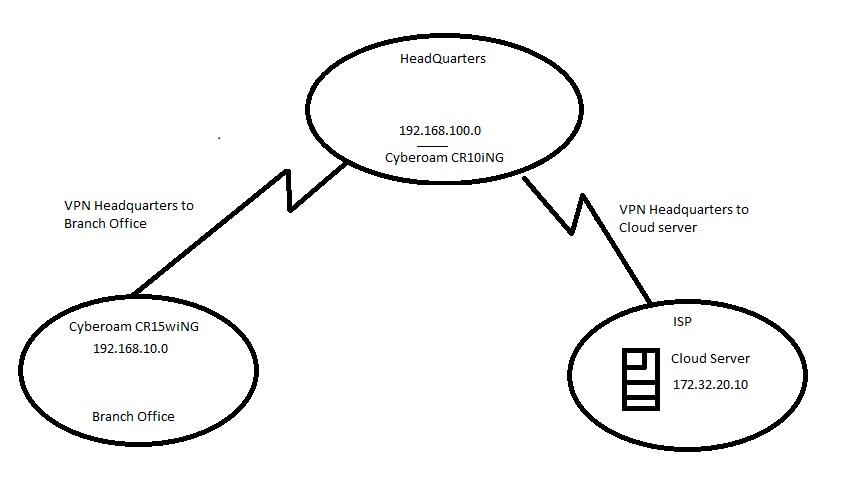
Can you please tell me if its possible the Branch office users to communicate with the Cloud Server. Can I create a static route at the Branch office Cyberoam saying that if I want to see 172.32.20.10 go through the external interface of Headquarters Cyberoam? Anyone has an idea?

Thank you 


This thread was automatically locked due to age.
Parents Reply Children
  • So at the Branch office Cyberoam I have to create a static route saying that if you want to find 172.32.20.10 go through the interface of the Headquarters Cyberoam. At the Sophos firewall of the ISP I have to create a static route saying that if you want to find Branch office network go through the headquarters interface. But I don't understand the VPN to VPN rule that you are saying can you please explain?

    Thank you

  • Hello  

    I have a question here , why static route? As per diagram you have connected via IPsec VPN site-site connection. 

    Let me share my side of the configuration as per your diagram using IPsec tunnel. 

    3 Sites 

    Branch Office.  Tunnel Between BO and HO

    Local Network -> 192.168.10.0/24 

    Remote Network ->192.168.100.0/24; 172.32.20.10/32

    Rules-> LAN to VPN and VPN to LAN.

    Headquarters Tunnel between HO and ISP

    Local Network > 192.168.10.0/24; 192.168.100.0/24

    Remote network ->172.32.20.10

    Rules -> LAN to VPN, VPN to LAN and VPN to VPN (No Nat)

    ISP Tunnel between ISP and HO

    Local Network -> 172.32.20.10

    Remote network -> 192.168.100.0/24 192.168.10.0/24


    Regards,

    Aditya Patel
    Global Escalation Support Engineer | Sophos Technical Support

    Knowledge Base  |  @SophosSupport | Sign up for SMS Alerts
    If a post solves your question use the 'This helped me' link.