This discussion has been locked.
You can no longer post new replies to this discussion. If you have a question you can start a new discussion

proxy attempting to connect to host

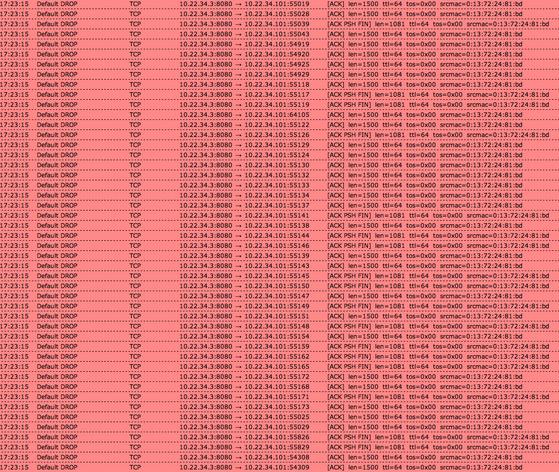
I have an unusual situation.  The http proxy(8080) is attempting to connect to a host over and over.  The firewall is dropping all the connections to the host.  

Is this unusual or is this normal?

When I look at the firewall live log the source is the http proxy address attempting to connect to a Mac OS X host on my network.

Chris


This thread was automatically locked due to age.

  • 8080 is known as secondary http(80) for webserver services. Maybe your MacOs is accepting connections on that port or an misconfiguration of DNAT rules where destination is BLANK
  • for that purpose most of the users change their proxy port to 3128 or higher, to distinguish this requests
  • Thanks for the quick reply.  I will look for a DNAT rule and let you know.
  • Checked DNAT all rules have a destination. Rebooted system and the requests stopped.  After a short period the request started again.

    I attached a screen shot of the traffic to this post.

    The proxy address is 10.22.34.3 and the host address is 10.22.34.101.

    Please help, I can't identify why this is happening.
    Chris
  • There might be some hints in the IPS and the http proxy log. 
    Is 10.22.34.101 suppose to have access to the http proxy?
  • Yes the 10.22.34.101 is suppose to have access to the proxy.  I have checked ips and the http proxy log.  They both have zero entries about the host.  It looks like a flood.
  • I did a TCPDUMP on the host and the host is send packet to the proxy.  The firewall was only logging one side of the conversation.
  • It was the helpd process on Mac OS X attempting to connect with apple.  The program doesn't support proxy authentication and continues to request connections.
  • Chris, please post one of those lines from the full Firewall log file.  Unlike all of the other Live Logs, the Firewall Live Log contains only limited information.  Is there anything in the Web Filtering log at that time?  Also, please state the precise version - 9.004-34?

    I don't understand your last post.  Perhaps you could say that in a different way?

    Cheers - Bob
     
    Sophos UTM Community Moderator
    Sophos Certified Architect - UTM
    Sophos Certified Engineer - XG
    Gold Solution Partner since 2005
    MediaSoft, Inc. USA
  • I'm not clear on DNAT rules you have or how hosts connects in internet
    For sure there is a Proxy configuration problem, you can see best practices how to implement it to fit your needs
    My Advice, if you don't need users authenticate through Active Directory or Browser put the proxy in "Transparent Mode" and delete any NAT rules that force hosts to pass through port 8080. And last, change the default port 8080 to 3128