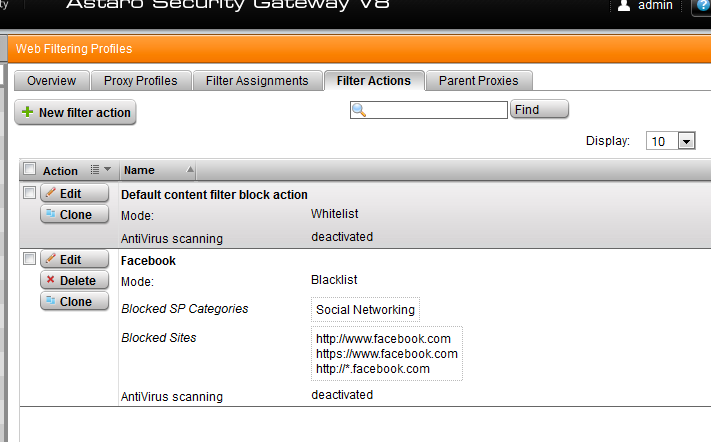
You would do so by setting up proxy profiles. Time events are controlled through the filter assignment and you can block the sites using the blacklist in a filter action.
__________________ ACE v8/SCA v9.3
...still have a v5 install disk in a box somewhere.
I created a Proxy Profile and added the 2 ip addresses I would like to block, added the filter assignments and filter actions and made sure the rule is active but it is not blocking the website I specified in the filter actions. Any ideas?
First thing to check is the web filtering logs for the http proxy should indicate what the issue is. The log should be able to tell you if the traffic is passing through the proxy and which profile it is matching as well as if the traffic is being passed/blocked.
If you cannot resolve the issue please post the log lines for the site you are trying to block as well as screenshots of your proxy configuration.
Here is what I am trying to do. I am trying to block websites from being accessed during the night. I only want them blocked on 2 of my computers. Here is my setup but I know I am missing something. Thanks..
One thing that stands out like a sore thumb is that in the proxy profile, the source network has to be something internal to your network. The source network is from the perspective of the web proxy, which controls outbound web requests.
__________________ ACE v8/SCA v9.3
...still have a v5 install disk in a box somewhere.
If I am trying to block computer with the ip address of 192.168.2.203 from accessing Willkommen bei Facebook - anmelden, registrieren oder mehr erfahren during nighttime hours. Would I add the ip address 192.168.2.203 in the proxy profile, source network? I have added the filters and the assignment but it still is not working. If there are any other settings you would like to see then let me know. Thanks
If I am trying to block computer with the ip address of 192.168.2.203 from accessing Willkommen bei Facebook - anmelden, registrieren oder mehr erfahren during nighttime hours. Would I add the ip address 192.168.2.203 in the proxy profile, source network? I have added the filters and the assignment but it still is not working. If there are any other settings you would like to see then let me know. Thanks
I tested 2 different IP's and (1) was wireless and (1) connected via ethernet. The one connected via the ethernet was blocked correctly and the one connected wireless did not get blocked. Here are the logs. The wireless is being served via a linksys router used as an access point. Do I have something misconfigured with wireless or using a linksys router as an access point?