This discussion has been locked.
You can no longer post new replies to this discussion. If you have a question you can start a new discussion

First installation Content filtering in Transparent mode

hello all guys.
my company has just bought a SG110 and I place inside my network without having to change anything.
The purpose is to place the appliance just to make content filtering.
I have read that there is a need for it to work in transparent mode, in order to do so should set the ports in bridged mode.

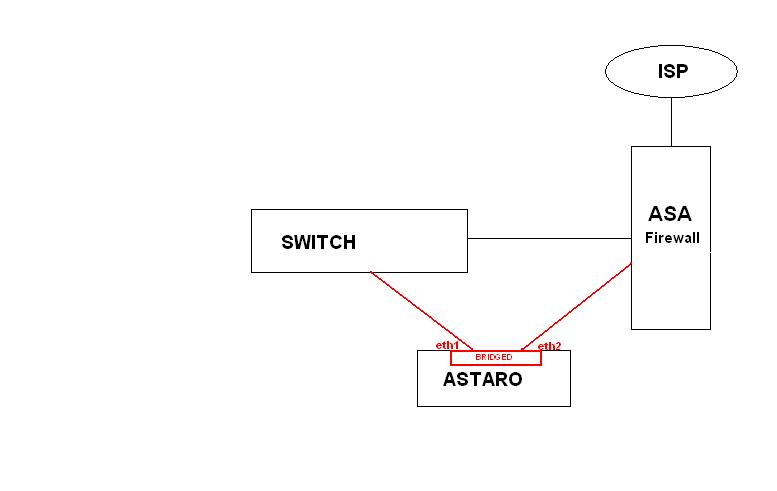
I show the scheme of my network adding Astaro.

the configuration is correct? Or something wrong?

Thanks in advance for reply.

M.


This thread was automatically locked due to age.

  • anyone help me please?!

    Thanks.
  • Hi,

    When you say content filtering, are you talking about the http proxy(Websecurity)?
    If so, you only need to use bridging if you want to use it in full transparent mode, instead of 'normal' transparent mode. Are you sure you need that?

    If you want to use a transparent proxy with bridging, please make sure that the traffic actually passes through the ASG. In the image that you posted, you most likely need to remove the direct link between the Switch and the 'ASA'. 
    Please be aware that you still need to configure packet filter rules if you want the ASG to pass traffic in bridged mode.
  • Hi,
    thanks for reply.
    I have read that i can deploy ASG either as a gateway or transparent mode.
    I want only use ASG as websecurity, than if I understand than i enable bridge in full trasparent mode.

    Than i enable bridge and remove the direct link on the switch and connect to ASG and other site for ASA.

    Than i have:

    SWITCH  ASTARO  ASA

    right?!


    Hi,

    When you say content filtering, are you talking about the http proxy(Websecurity)?
    If so, you only need to use bridging if you want to use it in full transparent mode, instead of 'normal' transparent mode. Are you sure you need that?

    If you want to use a transparent proxy with bridging, please make sure that the traffic actually passes through the ASG. In the image that you posted, you most likely need to remove the direct link between the Switch and the 'ASA'. 
    Please be aware that you still need to configure packet filter rules if you want the ASG to pass traffic in bridged mode.
  • If this is an ASG 110, it is licensed for only 10 IPs, but I would have thought that an organization with a Cisco ASA would have many more IPs.  Can you confirm that you have fewer than 10 users, or that you have licensing for Web Security for ASG 120?

    If this is strictly a Web Proxy, then I might suggest a different approach.  This might be your only choice if you only have licensing for 10 IPs.  Set up the ASG with a single interface connected to the internal network, and use a non-Transparent mode.  In the ASA, allow outbound web traffic only from the IP of the ASG.  Set the browsers for all users to use the web proxy at the IP of the ASG.  In this way, only the traffic for web browsing will pass through the Astaro.

    Cheers - Bob
     
    Sophos UTM Community Moderator
    Sophos Certified Architect - UTM
    Sophos Certified Engineer - XG
    Gold Solution Partner since 2005
    MediaSoft, Inc. USA
  • Hi BAlfson,
    thanks for reply.
    I have a license for Web Security ASG 120.
    The customer does not want to make any changes to its network structure, and more are already using a proxy (squid).

    If i forced on ASG an address belonging to of the customer's internal network(setting the ASA as gateway?!) and set the browsers for all users to use the web proxy at the IP of the ASG I then disable the squid?

    Thanks in advace.
    M

    If this is an ASG 110, it is licensed for only 10 IPs, but I would have thought that an organization with a Cisco ASA would have many more IPs.  Can you confirm that you have fewer than 10 users, or that you have licensing for Web Security for ASG 120?

    If this is strictly a Web Proxy, then I might suggest a different approach.  This might be your only choice if you only have licensing for 10 IPs.  Set up the ASG with a single interface connected to the internal network, and use a non-Transparent mode.  In the ASA, allow outbound web traffic only from the IP of the ASG.  Set the browsers for all users to use the web proxy at the IP of the ASG.  In this way, only the traffic for web browsing will pass through the Astaro.

    Cheers - Bob
  • I want only use ASG as websecurity, than if I understand than i enable bridge in full trasparent mode.

    Than i enable bridge and remove the direct link on the switch and connect to ASG and other site for ASA.

    Than i have:

    SWITCH  ASTARO  ASA

    right?!

    Right.  That will work, and, since this is a 120, there's no concern about a 10-IP limit.  As ulmi said, "you still need to configure packet filter rules if you want the ASG to pass traffic in bridged mode."

    The customer does not want to make any changes to its network structure, and more are already using a proxy (squid).

    Are you saying that all of the users already have their browsers configured to use the squid proxy?

    If i forced on ASG an address belonging to of the customer's internal network(setting the ASA as gateway?!) and set the browsers for all users to use the web proxy at the IP of the ASG I then disable the squid?

    Squid also can be a reverse proxy, so disabling it may not be an option, but disabling squid and putting the Astaro at the same IP might mean the least changes for the customer - I don't know.  I first mentioned this approach because I thought you had a 110.

    If you had a Network Security subscription, you might want to avoid bridging as QoS won't work with a bridge.  It appears that you can use either approach in this situation.

    Cheers - Bob
     
    Sophos UTM Community Moderator
    Sophos Certified Architect - UTM
    Sophos Certified Engineer - XG
    Gold Solution Partner since 2005
    MediaSoft, Inc. USA