This discussion has been locked.
You can no longer post new replies to this discussion. If you have a question you can start a new discussion

AD Basic Auth works, SSO does not

I have Astaro 8.100 and I have managed to get basic authentication working with my AD setup.  I wanted to go the last step and make everything SSO, but when I enable SSO, I cannot even open a web page, I get page cannot be displayed errors.  If I bypass the proxy, or go back to basic auth, everything is fine.  I don't see anything in the proxy logs when blocked, it is as if the system never even looks at the proxy in that mode.  Any suggestions?  Thanks for any responses.


This thread was automatically locked due to age.

  • Hi,

    check users --> authentication --> Global Setting | create users automatically is check and HTTP Proxy is check.
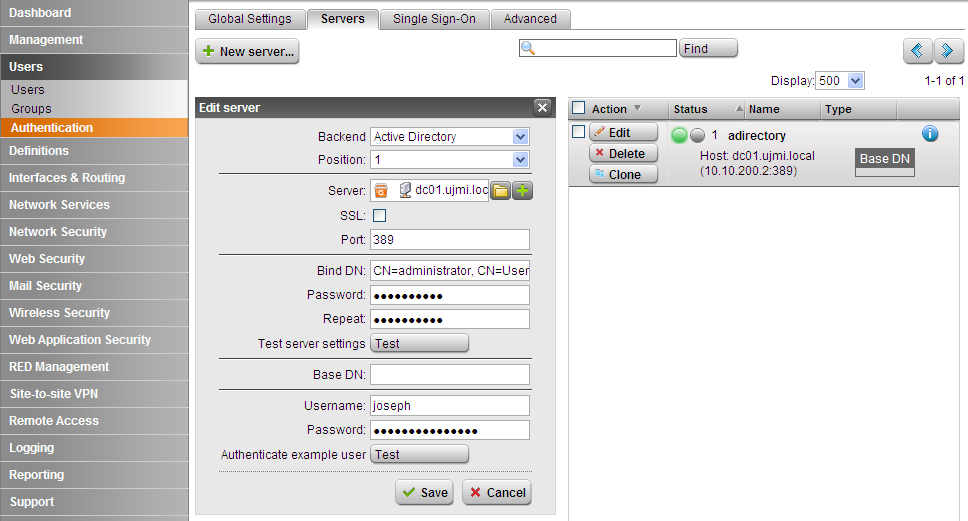
    check users --> authentication --> Servers | AD server is already created.
    check users --> authentication --> SSO | the status is joined to domain.

    check web security --> HTTP/S --> global | allow networks (ie. 192.168.0.0/24 or any) and user/groups (user/groups AD)

    -G. Joseph-
  • All of that is set, or even basic auth won't work.  Am I looking for anything else on those settings?
  • Did you test server setting and user auth? All test passed?
    users --> authentication --> Servers | {your adirectory}
    users --> authentication --> user auth | {ad user for test}
     
    Did you create HTTP/S Profiles?
  • hello guys,

    I am facing the same issue here.
    When the SSO is activated on the box, i am not able to access any website on the internet , also it is not working at all when i do the test username from the server configured on the box.
    there is no group name returned back when i do the test.
    please help me , since this is an urgent issue for my end customer.
  • First, make sure the SSO must passed the test (see my last attachments).
    In AD, create Group for proxy access ie. "GRP Astaro Proxy Users" and add users for internet access.
    Astaro --> Users --> Groups: Create new Group ie. "Proxy Users AD" --> backend: Active Directory --> checked Limits to backend groups.
    Add your AD group for proxy access you created in AD (GRP Astaro Proxy Users) --> Save.
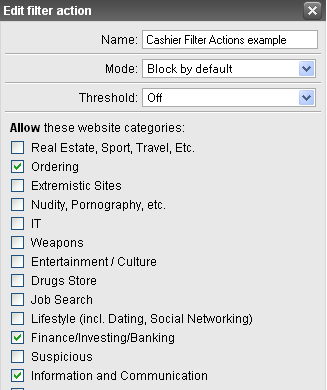
    Create HTTP/S Profiles: First create Filter Actions --> Filter Assignments (add group "Proxy Users AD") --> Proxy Profiles (operation mode: AD SSO)
     
    tips: you can make AD Groups (ie. Proxy ADM Users, Proxy Cashier Users, etc). and also make Astaro Users Groups for that AD Groups. In Filter Assignments, create different Filter Actions for that Groups [:)]
     
    -G. Joseph-
    PT. Ultrajaya Milk Industry & Trad Co., Tbk.
    Indonesia
  • hi gejosdotcom,

    i just tried to do something on the AD and after that the test from the astaro to the AD using that user worked fine, i just changed for the test user to access all machines on the network instead of one machine and after that it worked, so now it is authenticated but the proxy profile is blocking everything.nothing can be accessed for this user.
  • Have you create HTTP/S Profiles that I explained?
    It should work with HTTPS Profiles configuration.
  • yes i did it all..but without any luck [:(]
     i changed the type of the https profile from transparent to active directory with no luck too.nothing can access the inetrnet
  • hmm... HTTP/S with AD Auth it works for me.
    Have you see my last attached files?
     
    btw, better use standard than transparent for test the proxy, because transparent can work without proxy.
     
    Regards,
    -G. Joseph-
    PT. Ultrajaya Milk Industry & Trad Co., Tbk.
    Indonesia
  • so what do you think????
    i have checked your attachments and i have the same config. [:)]