This discussion has been locked.
You can no longer post new replies to this discussion. If you have a question you can start a new discussion

WAF issue with Windows Home server

I have a WHS behind my firewall and WAF turned on. When I try and upload a file it starts then about 1.5meg or so into the transfer the file fails and retries. I set the WAF firewall policy to monitor and get this error in the log when it fails.

"2011:01:10-23:01:43 edge reverseproxy: [Mon Jan 10 23:01:43 2011] [error] [client 15.195.201.89] ModSecurity: Request body (Content-Length) is larger than the configured limit (134217728). [hostname "jzkkn5.homeserver.com"] [uri "/remote/upload.ashx"] [unique_id "TSvWJ0Dp8gcAADn0BQcAAAAN"] 
2011:01:10-23:01:43 edge reverseproxy: srcip="15.195.201.89" localip="64.233.242.7" size="347" user="-" host="15.195.201.89" method="POST" statuscode="413" time="1033" url="/remote/upload.ashx" server="jzkkn5.homeserver.com" referer="-" cookie="ASP.NET_SessionId=xdalsumfc3usig451bp2c355; RemotePortalAuth=B0A23024F7EBE9B8F36C822CBA49D36CF27706B34125473FF65EFE4E361EA70EEAF6E2FF304B5E280347D9EEC91C4B9DEC38895F6F74B594937C014F25690C129F4B7EA0360F1F7A2A19544B3AE55D404741CDA6B46D17DC884BAFE3F5EF6511CEF0889FEB3B8A4EB422A9BB9E24847BDD41D148; HASH_ASP.NET_SessionId=CB18F8270F28E0A9590A70B66563FC5DF61F46A1; HASH_RemotePortalAuth=87CDC322A5E8A71C72AD4923E3BE304F516224EE" set-cookie="-" 

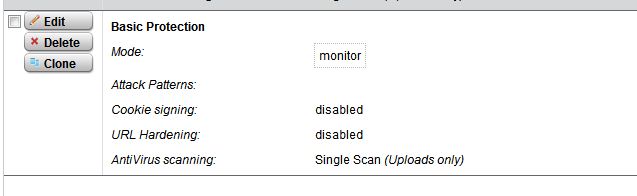
I have to disable every firewall option in the WAF but non will work. It does work if I turn everything off in the WAF firewall policy except Scanning. With that the file uploads fine. I have attached the screen shoots in how I have it setup when it works. I see that it is reporting "Request body (Content-Length) is larger than the configured limit (134217728)" Can someone help me figure out if this can be adjusted or am I stuck with not being able to use nothing but scanning?

Thanks


This thread was automatically locked due to age.

  • Looks pretty straight forward to me (I of course could be missing something) But from the ERROR you supplied it's saying that the file being uploaded is LARGER than the configured SIZE LIMIT

    Update:
    Most WAF systems keep uploads to a lower size 1-4MB. I would assume this would have to be changed in the config file via the CLI.
  • So for this applacation where you have large file transfers there is no way at this time to use the WAF with the firewall enabled? I don't see anywere a option to set this. As I said before it has to be in the firewall modual as it works with everthing turned off except scanning. Bummer
  • So for this applacation where you have large file transfers there is no way at this time to use the WAF with the firewall enabled? I don't see anywere a option to set this. As I said before it has to be in the firewall modual as it works with everthing turned off except scanning. Bummer


    As before this would probably need to be set at the command line interface (CLI). You will need to SSH in to the ASG and find the config file for the function in question. (Sorry I don't know off hand what config file you need to look for, maybe someone else can chime in on that) [I will look in to it and see what I can find out for you]

    What kind of applications are you trying to use that would require massive file uploads? I can't speak for what everyone else uses it for, but we use it for Web/SQL traffic... If you're using it for file sharing or something along those lines it might just be better to use a VPN setup as your security layer.
  • Windows Home Server us remote access to files stored on the server for upload and download through Web Interface.
  • The WAF uses Apache Mod Security, so I'd look for apache config files, probably under /var/chroot-waf or something like that.

    Keep in mind that your changes are likely to be overwritten by Astaro up2dates, possibly even by pattern up2dates.

    Please also add this as a feature request at http://feature.astaro.com

    Barry
  • Beeing no mod_security specialist google.com might be your friend:

    Looking for "mod_security Request body is larger than the configured limit" will lead you in the right direction. But like the others said: be aware of changing the configuration in the "obvious" configuration files like "apache2.conf". They will not only will be overwritten by updates but also after a restart since the configuration ist AFAIK stored in different place (which can be found by checking the forum).

    Anyway... normally you should configure your WAF the way that it does not apply any security functions when you do a upload which size you do not know. I´m not so familiar with the WAF in ASL but if there ist a posibility you should exclude the path to /remote/upload.ashx from everything but scanning the upload like you already did.


    techno.kid