This discussion has been locked.
You can no longer post new replies to this discussion. If you have a question you can start a new discussion

Interface Colour Problem

Hi.... 

Any Body can tell me, why only one interface (eth1) is showing in sky blue colour...???
and what is the mean of it...??


This thread was automatically locked due to age.

  • Hi.... 

    Any Body can tell me, why only one interface (eth1) is showing in sky blue colour...???
    and what is the mean of it...??


    I don't use v8, but I suppose it is an istogram of bandwidth usage. You see only eth1 coloured just because it has an higher value compared to the others [:)]

    Edit: I didn't noticed that eth5 has a similar bandwidth (3.2mbit respect 2.6mbit), but no istogram is shown. Parhaps it is strange..
  • Actually, it all looks correct to me.  Apparently, the LAN interface is 100Mb or 1Gb in both directions, and the WAN interface is configured to show the bar based on a 4Mb download speed.

    Cheers - Bob
     
    Sophos UTM Community Moderator
    Sophos Certified Architect - UTM
    Sophos Certified Engineer - XG
    Gold Solution Partner since 2005
    MediaSoft, Inc. USA
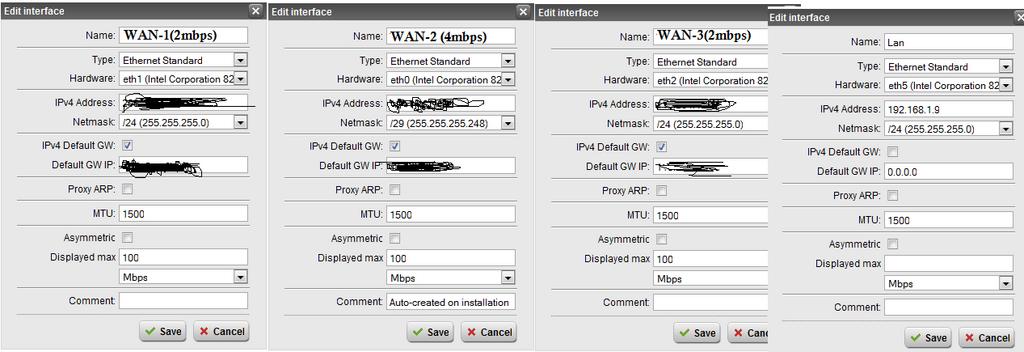
  • 1.Let me explain.. I have 3 wan interface as u seen, One is 4mbps(e0), and other tow are 2mbps(e1,e2)..
    But why it is showing on only eth1...???? Please see interface attachment also. I have same configuration for All three WAN Interface. Than why only on eth1...???

    If it is Histogram than why only on one interface.
  • 1.Let me explain.. I have 3 wan interface as u seen, One is 4mbps(e0), and other tow are 2mbps(e1,e2)..
    But why it is showing on only eth1...????


    I'll try to explain my point of view (considering also what Bob said about Lan interface and guessing something about your configuration).

    All your ethernet devices are configured at the same speed, that's ok. Probably you have configured QoS for eth1 (usually External interface) setting it to 4mbit. No QoS defined for other interfaces. In this case, the speed limit for your interfaces are these:

    eth0: 1000mbit
    eth1: 4mbit
    eth2: 1000mbit
    eth5: 1000mbit

    In this case:

    Incoming 2,6mbit for eth1 is the 65% of its speed limit (so you see an istogram over the middle of his lenght).

    Outgoing 143k for eth1 is the 3,5% of its speed limit (so you see little istogram).

    Outgoing 3,4mbit for eth5 is the 0,34% of its speed limit (so you don't see any istogram, because it would be very short)


    A final consideration: perhaps there is something strange in Displayed Max fuction. From the manual (of v7):

    Displayed Max (optional): Here you can enter the maximum downlink bandwidth
    of your connection, if you want the Dashboard to reflect it. The bandwidth
    can be given in either MB/s or KB/s. Select the appropriate unit from
    the drop-down list.


    Because you put 100mbit in all the ethernet devices, for eth0, eth2, eth5 the dashboard should use 100 and not 1000 as maximum value. In this case the outgoing 3,4mbit would be 3,4% of bandwidth (and not 0,34%), more or less the same percentage of outgoing 143k of eth1 (3.5%). So if you see a little istogram for outgoing eth1 you should see also an istogram for outgoing traffic in eth5 (same percentage!). 

    Could you please try to delete the "Displayed Max" values for all interfaces? It is optional, let's see what happens [:)]

    EDIT: I just tried in Astaro demo unit (I don't have a v8 yet), but my guessing was not correct, asg does not set the max bandwidth value for the dashboard from QoS. Sorry! 

    Are you absolutely sure that all interfaces has 100mbit for Displayed Max value?
    bye
  • EDIT: I just tried in Astaro demo unit (I don't have a v8 yet), but my guessing was not correct, asg does not set the max bandwidth value for the dashboard from QoS. Sorry!

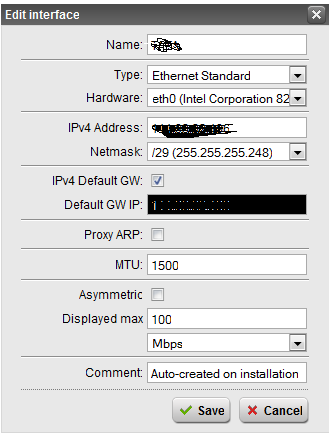
    Right, it's in the Interface definition...

    Vivek, please show a pic of the Interface definition using eth1 so that future participants will understand the answer to your original question.

    Thanks - Bob
     
    Sophos UTM Community Moderator
    Sophos Certified Architect - UTM
    Sophos Certified Engineer - XG
    Gold Solution Partner since 2005
    MediaSoft, Inc. USA
  • eclipse79, its ok,  i don't know your real name, but thanks for reply, BAlfson's thanks you too.

    Ya I am 100% sure, all interfaces has 100mbit for Displayed Max value. i want to tell you one thing, i set Displayed max 100 mbps, due to this colour problem, i thought may be it will work, but nothing happened. Plz check i m also showing all interface configuration as attachment. please check it..
  • That looks like a bug you found!

    Cheers - Bob
     
    Sophos UTM Community Moderator
    Sophos Certified Architect - UTM
    Sophos Certified Engineer - XG
    Gold Solution Partner since 2005
    MediaSoft, Inc. USA
  • may be Bob, than what is the solution, and i have another problem, related  to interface.

    I have three WAN interface as you now know,  when i choose multipath force fully rule, i mean all traffic by one wan interface, it should go, but on dash Bord it is showing traffic on all other interfaces, some time only on single interface, some time on both and some time on all interfaces. one more thing i have noticed that when i opened in out bandwidth on dashbord, forcefully multipath configured interface is going by other interface with huge traffice.

    If i am sending Lan traffic by one interface, than why its going by other WAN interfaces.. but when i check IP(whatismyip.com) it shows only one wan IP, which i defined in forcefully rule.


    My Feature Request - Per User Bandwidth Graph (Qos Graph)
  • That looks like a bug you found!

    Cheers - Bob
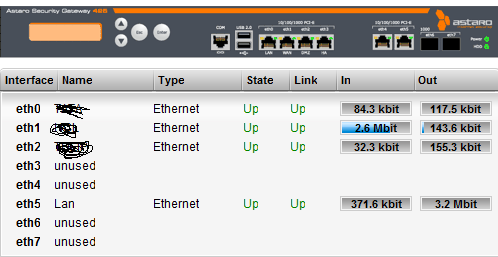

    Are you sure Bob? In the screenshot you can see that eth5 does NOT have "displayed max" value. (eth0 and eth2 have too low traffic for the histogram to be visible)

    vivekrajput, what if you decrease the "displayed max" for eth0 and eth2 to 500 kbit?
  • Nothing happening, same colour displayed only on eth1 ..