This discussion has been locked.
You can no longer post new replies to this discussion. If you have a question you can start a new discussion

Standard Proxy: Interesting difference from FTP connections between FF and IE

Hello, 
this is the scenario: 


  • Web Proxy in standard mode
  • FTP added as target service in advanced proxy configuration
  • FTP proxy set as Transparent
  • IE and FF using the same proxy configuration (192.168.1.1:8080 proxy for all services, excluding local addresses).


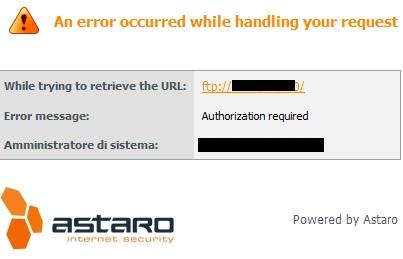
Connecting to a password protect FTP server, FireFox ask for username and password with a popup. Internet Explorer does not request the login informations but an Astaro page appears saying "Authorization Required" (see screenshot). Obviously if you modify the FTP address inserting username and password in the url, the ftp connection is started successfully.

Did you ever experienced this behavior? Why it happens? Is it a bug? [:O]


This thread was automatically locked due to age.
  • Have you tried to turn off the pop-up blocker in IE?  Is this IE7?  If IE8, is it in compatibility mode?

    Web Proxy in standard mode
    FTP added as target service in advanced proxy configuration
    FTP proxy set as Transparent
    IE and FF using the same proxy configuration (192.168.1.1:8080 proxy for all services, excluding local addresses). 

    In this case, IE and FF will never use the FTP Proxy.  Having the FTP Proxy in transparent (or both) mode only has meaning for browsers when the HTTP Proxy does not handle FTP traffic.

    Cheers - Bob
     
    Sophos UTM Community Moderator
    Sophos Certified Architect - UTM
    Sophos Certified Engineer - XG
    Gold Solution Partner since 2005
    MediaSoft, Inc. USA
  • Have you tried to turn off the pop-up blocker in IE?  Is this IE7?  If IE8, is it in compatibility mode?


    In this case, IE and FF will never use the FTP Proxy.  Having the FTP Proxy in transparent (or both) mode only has meaning for browsers when the HTTP Proxy does not handle FTP traffic.

    Cheers - Bob


    Hi Bob!
    It happens with both IE7 and IE8, with or withouth popup-blocker, with or without (in IE8) compatibility mode... It seems to me that HTTP proxy has priority to FTP proxy settings, but is very strange... isn't it? [:(]

    EDIT: The priority of http proxy respect to ftp proxy is visible also because if I remove ftp service from allowed target services (in http advanced settings) I see the error "service not allowed" (or something similar) in the content blocked page....
  • It seems to me that HTTP proxy has priority to FTP proxy settings

    Because the browser is pointed at the HTTP/S Proxy for FTP.

    The priority of http proxy respect to ftp proxy is visible also because if I remove ftp service from allowed target services (in http advanced settings) I see the error "service not allowed" (or something similar) in the content blocked page.

    Yes, you then would need to remove proxying for FTP in your browser settings.

    Cheers - Bob
     
    Sophos UTM Community Moderator
    Sophos Certified Architect - UTM
    Sophos Certified Engineer - XG
    Gold Solution Partner since 2005
    MediaSoft, Inc. USA
  • Because the browser is pointed at the HTTP/S Proxy for FTP.
    Yes, you then would need to remove proxying for FTP in your browser settings.
    Cheers - Bob


    Yes Bob, you are right... (I will do this) but how can you explain the different behaviour between IE and FF? I set both in the same way ... [:S]
  • I don't know enough about FF, but, in the IE 'LAN Settings', you can press the 'Advanced' button and select the precise services that are proxied to which Ports/IPs.

    Cheers - Bob
     
    Sophos UTM Community Moderator
    Sophos Certified Architect - UTM
    Sophos Certified Engineer - XG
    Gold Solution Partner since 2005
    MediaSoft, Inc. USA
  • I don't know enough about FF, but, in the IE 'LAN Settings', you can press the 'Advanced' button and select the precise services that are proxied to which Ports/IPs.

    Cheers - Bob


    The strangeness is exactly this [[:)]] I set up the same proxy options for all services (http, https, ftp) in both browsers [[:)]]

    So the expected behavior should be the IE one?
  • Hi,
    I´m dealing with the same issue.
    My configuration is the same and I´ve tried out some different ftp proxy settings.

    The only way the IE8 makes what I want is giving him the auth within the address:

    ftp://user[:P]assword@ftp://myserver    where you can try to leave some information...

    Probably someone find this interesting ;-)