This discussion has been locked.
You can no longer post new replies to this discussion. If you have a question you can start a new discussion

[7.506] Error while trying to modify HTTP Proxy Advanced/Misc Settings

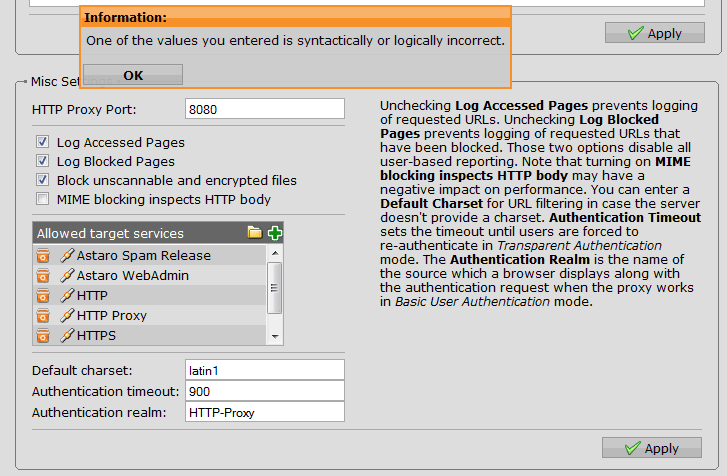
When I try to modify the misc settings in the HTTP/S proxy Advanced tab (I was trying to add the FTP as allowed service for the proxy) I received the error as the attached picture shows...

Then I realized that I don't have to add anything that the error is generated even when I just access the Advanced tab and click apply for the misc settings without touching any of its values. The error message is the same.

Any ideas why could that be happening? Database issue?

Thanks for any info.


This thread was automatically locked due to age.

  • I think the standard configuration comes with:

    Astaro Spam Release 
    Astaro WebAdmin
    FTP 
    HTTP 
    HTTP Proxy 
    HTTPS 
    LDAP


    What do you have?

    Also, what's in 'Allowed networks' on the 'Global' tab.

    Cheers - Bob
     
    Sophos UTM Community Moderator
    Sophos Certified Architect - UTM
    Sophos Certified Engineer - XG
    Gold Solution Partner since 2005
    MediaSoft, Inc. USA
  • I think the standard configuration comes with:

    Astaro Spam Release 
    Astaro WebAdmin
    FTP 
    HTTP 
    HTTP Proxy 
    HTTPS 
    LDAP


    What do you have?

    I have it all in there except for the FTP, which I removed years ago but now I wanted to put it back in...

    In the allowed networks there are 3 interface networks. Each on own physical interface (172.20.13.80/29, 172.20.13.88/29 and 172.20.13.0/28).

    I'm able to change all other things in the proxy except for the misc part in the advanced section which throws an error.

    Right now I turned on the FTP proxy but the Frox hangs sometimes and needs to be restarted...
  • Hmm, that's a little confusing.  In order for the FTP Proxy to handle traffic from a browser, the browser must NOT be sending FTP requests on port 8080 to the HTTP/S Proxy at the IP of "Internal (Address)" but the HTTP/S proxy doesn't consider the content of 'Allowed target services' when it's in "Transparent" mode.  What mode is the HTTP/S Proxy in?

    Cheers - Bob
    PS Sometimes, little glitches can be repaired by doing a backup/restore of the configuration.
     
    Sophos UTM Community Moderator
    Sophos Certified Architect - UTM
    Sophos Certified Engineer - XG
    Gold Solution Partner since 2005
    MediaSoft, Inc. USA
  • Hmm, that's a little confusing.  In order for the FTP Proxy to handle traffic from a browser, the browser must NOT be sending FTP requests on port 8080 to the HTTP/S Proxy at the IP of "Internal (Address)" but the HTTP/S proxy doesn't consider the content of 'Allowed target services' when it's in "Transparent" mode.  What mode is the HTTP/S Proxy in?

    Cheers - Bob
    PS Sometimes, little glitches can be repaired by doing a backup/restore of the configuration.

    OK... Recap [[:)]]

    Right now I'm using transparent FTP proxy because I can't add the FTP to the allowed services of HTTP proxy. Of course I deleted the FTP proxy address from the client configs so the FTP requests are sent directly and are intercepted by Frox running on the ASG. This works.

    What does not work is that I want the FTP over HTTP requests to be handled via HTTP/S proxy so I want to add FTP to allowed services which throws the error.

    The backup/restore trick is what I tried first [[:)]] 

    And the HTTP proxy is configured in Standard mode and default port 8080.
  • Yeah, that's strange.  If you change the mode to "Transparent" and try to add "FTP" to the list, do you still get the same error?

    Another thing that causes strange behavior is using host/network definitions that are bound to an interface.  Are any of the networks in 'Allowed networks' bound to an interface instead of ">"?

    Cheers - Bob
     
    Sophos UTM Community Moderator
    Sophos Certified Architect - UTM
    Sophos Certified Engineer - XG
    Gold Solution Partner since 2005
    MediaSoft, Inc. USA
  • Yeah, that's strange.  If you change the mode to "Transparent" and try to add "FTP" to the list, do you still get the same error?

    Another thing that causes strange behavior is using host/network definitions that are bound to an interface.  Are any of the networks in 'Allowed networks' bound to an interface instead of ">"?

    Cheers - Bob


    HTTPS Proxy Switched to Transparent mode - Error still present

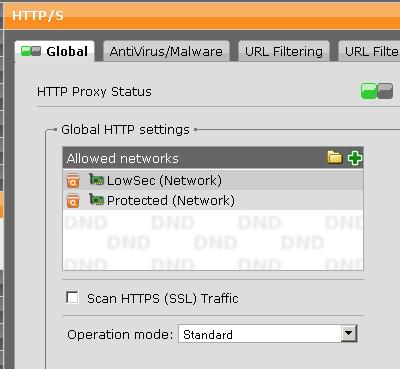
    Allowed Networks are 2  separate interface networks e.g. not CIDR blocks bound to interface as part of their definition but actual automatically created interface network objects created when defining IP interface (see screenie).
  • It looks like your configuration is perfect, and I'm out of ideas.  It's time to get Astaro Support involved.

    Cheers - Bob
     
    Sophos UTM Community Moderator
    Sophos Certified Architect - UTM
    Sophos Certified Engineer - XG
    Gold Solution Partner since 2005
    MediaSoft, Inc. USA