This discussion has been locked.
You can no longer post new replies to this discussion. If you have a question you can start a new discussion

blocked usage showing ip numbers

When I click on user - blocked usage - I see a lot of ip numbers no domain names which are blocked . I see this by just one user in our company.
What could happen. He is using a laptop which contains skype.
It is not allowed to use skype in out network so it is blocked by astaro. 
Is that why we see  a list  of blocked  ip numbers instead of domain names for this user.


This thread was automatically locked due to age.

  • It sounds like this user is accessing the "Default content filter action" (the basic setup in 'HTTP/S') proxy in either Transparent or Standard mode and that others are being selected for some 'HTTP/S Profiles' that use authorization.  If that's the case, you might want to adopt the idea of locking down the default, thereby forcing the user to authenticate.  Also, look at the IP the user is accessing with and see how he access the network without qualifying for one of the profiles.

    Cheers - Bob
     
    Sophos UTM Community Moderator
    Sophos Certified Architect - UTM
    Sophos Certified Engineer - XG
    Gold Solution Partner since 2005
    MediaSoft, Inc. USA
  •  If that's the case, you might want to adopt the idea of locking down the default, thereby forcing the user to authenticate.  


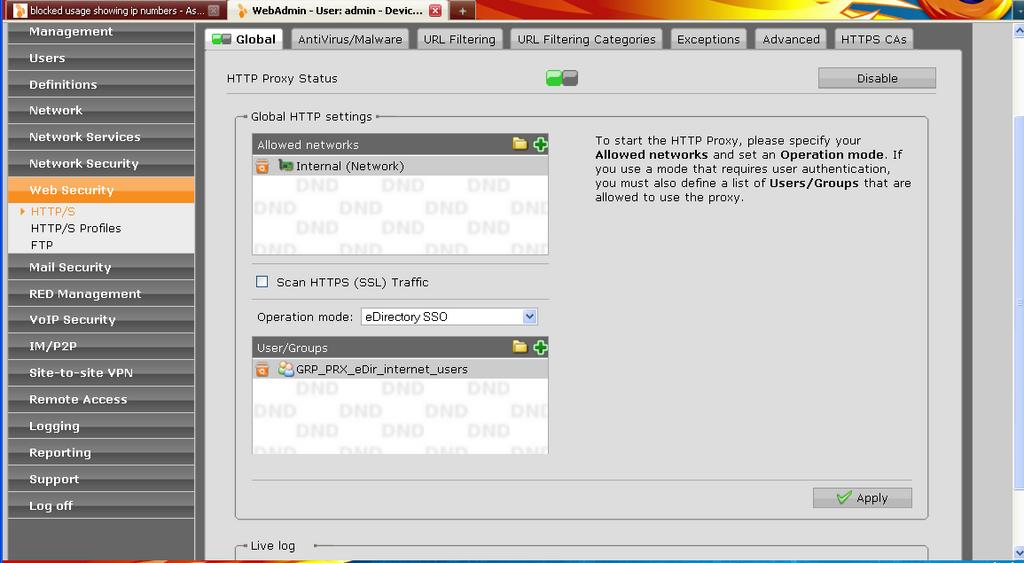
    Users are authenticated operation mode is eDirectory SSO.
    user - blocked usage : I see a lot of ip numbers but now also some  domain names which are blocked
  • If you see a log entry with user="", it's pretty certain that the proxy hasn't authenticated the user. Please show pictures of:
    [LIST=1]
    • the 'HTTP/S' Global tab
    • 'Edit' of the 'HTTP/S Profile' for which you expect the user to qualify
    • a line from the 'Content Filter (HTTP)' log showing user="" and srcip="xx.xx.xx.xx" which is inside one of the 'Source networks' of the Profile in 2.
    [/LIST]
    Cheers - Bob
     
    Sophos UTM Community Moderator
    Sophos Certified Architect - UTM
    Sophos Certified Engineer - XG
    Gold Solution Partner since 2005
    MediaSoft, Inc. USA
  • Those look perfect.  How about 2 and 3?

    Cheers - Bob
     
    Sophos UTM Community Moderator
    Sophos Certified Architect - UTM
    Sophos Certified Engineer - XG
    Gold Solution Partner since 2005
    MediaSoft, Inc. USA
  • Under tab Proxy Profiles:

    There are no proxy profiles defined.
    Click on the New proxy profile button to create one.

    a line from the 'Content Filter (HTTP)' log:

    2010:04:08-13:53:00 firewall httpproxy[20226]: id="0001" severity="info" sys="SecureWeb" sub="http" name="http access" action="pass" method="CONNECT" srcip="192.168.0.178" user="Eric" statuscode="200" cached="0" profile="REF_DefaultHTTPProfile (Default Proxy)" filteraction="REF_DefaultHTTPCFFAction (Default content filter action)" size="0" time="65013 ms" request="0xb0ae6770" url="www.fbto.nl/.../Banking"
  • Thanks, Anton.  I apologize; now I realize I mis-read your original post.  I guess I looked at the title of the thread and assumed that you were getting srcip="192.168.0.178" only, and not user="Eric" - but that's not what you wrote at all!

    I can't see from the line you show whether Skype is the problem you describe.  I guess that you aren't referring to the Web Security section of the Executive Report, but to the Network Security section.  If that's the case, then the IP address in the report means that there's no reverse DNS for the IP.  You might be able to see who owns the IP by looking it up with Domain Dossier - Investigate domains and IP addresses, get owner and registrar information, see whois and DNS records.

    The log line you show is interesting for another reason: size="0" time="65013 ms".  In spite of the fact that the Astaro gave a "pass" to this access, it failed, and Eric saw a message from the Astaro that he was blocked even though Astaro won't list the site as one it blocked.  Sometimes, this is caused by the slight delay induced by an anti-virus scan, and you can create an exception for it.  Sometimes that won't work, and, if you want to allow him to access his bank, you need a packet filter "Allow" rule and to tell him to list his bank as an exception to the proxy in his browser configuration.  Or maybe you have 'Scan HTTPS' enabled and he doesn't have the Astaro SSL certificate loaded yet.

    Cheers - Bob
     
    Sophos UTM Community Moderator
    Sophos Certified Architect - UTM
    Sophos Certified Engineer - XG
    Gold Solution Partner since 2005
    MediaSoft, Inc. USA
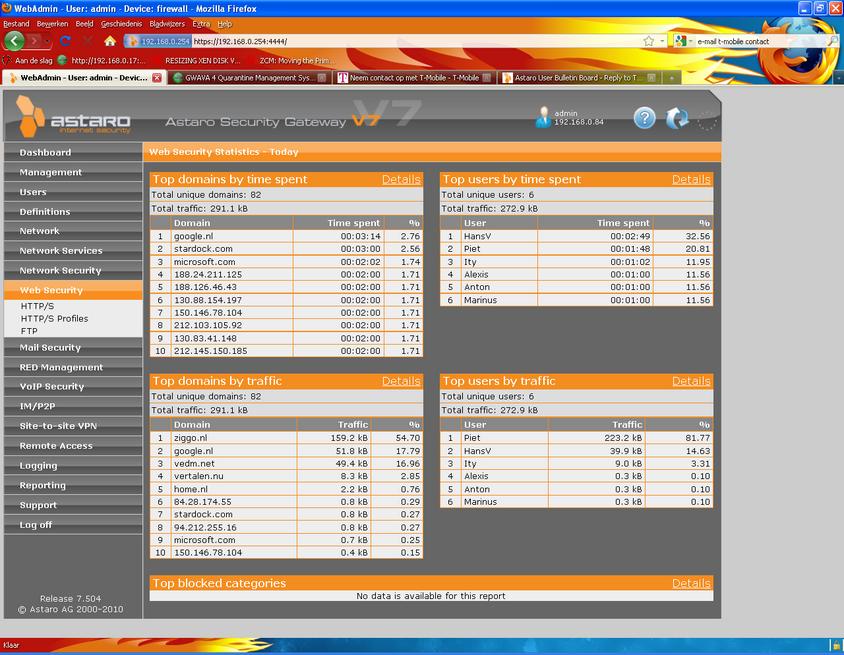
  • Actually I do not think he is trying to visit an url adress.
    As soon as the user eric login  the network I see a lot of ip adress numbers comming by in the web security list.
    They are not allowed.
    I think it has something to do with his skype client which is and should be blocked in our network  by astaro.

    see attachement

    Scan HTTPS (SSL) Traffic is not activated

    Looking up ip numbers from your link is just giving me the ip numbers provider name.
  • 188.24.211.125 rdsnet.ro
    188.24.211.125 demolan.ru
    130.88.154.197 University of Manchester Institute of Science and Technology
    150.146.78.104 Network of the CNR Istitutes in Rome
    212.103.105.92 coltel.ru L2TP personal customers
    130.83.41.148 TU Darmstadt, Hochschulrechenzentrum
    212.145.150.185 PASIPEKKAROENTY Service Network

    If you can track those IPs to Eric, then it would appear he's involved in scientific research.  If not, then maybe he has a trojan (.ro and .ru always make me nervous as those are known homes for the RBN).  The Web Security info in your picture is not for blocked sites; it shows "passed" traffic.

    In any case, the log line you showed us had a URL, not an IP.

    Cheers - Bob
     
    Sophos UTM Community Moderator
    Sophos Certified Architect - UTM
    Sophos Certified Engineer - XG
    Gold Solution Partner since 2005
    MediaSoft, Inc. USA
  • Many Thanks.
    I'll  scan the computer.