This discussion has been locked.
You can no longer post new replies to this discussion. If you have a question you can start a new discussion

Transparent HTTPS scanning proxy profile for one client

Hi all,

ASG in routing mode works fine. Sometimes one application has problems with getting information from it's external server through our transparent proxy. A single proxy profile using standard mode and setting up the application helped.

Now I want to try HTTPS traffic scanning. So at first I thought creating a profile for my client linked to the default action, default assignment and with HTTPS traffic scanning enabled will work.

It works without HTTPS traffic scanning. Log file shows my client goes through the defined profile but HTTPS goes through our paket filter rule.

At the second I created filter action and filter assignment completely new but HTTPS goes through pfr too.

Is there a possibility to get HTTPS traffic scanning with a transparent proxy profile enabled?

Deactivating HTTPS pfr and enabling in web proxy is no option.
-- 
Kind regards,

Steffen


This thread was automatically locked due to age.

  • if you want to use https scanning you ahve to remove the packet filter rule and instlal the astaro certificate manually on every machine.   when you try to establish an  ssl connection the proxy redirects the ssl connection from the remote  server to itself...then it initiates another ssl connection between  itself and your machine.  In between the two connections it decrypts the  data coming form you..scan it..re encrypts it with the remote key and  sends it along.  For the return trip it takes the packets form the  remote server..decrypts them..scans them..and then re-encrypts it with  the key it uses for the interior network.  This is a classic  man-in-the-middle attack and any decent ssl application will detect this  and either work badly or break and\or may generate warnings as well.  If you want to compromise security in this way you can install  the certificates for the astaro box on every workstation behind the  firewall....but some ssl applications can still detect this.

    Owner:  Emmanuel Technology Consulting

    http://etc-md.com

    Former Sophos SG(Astaro) advocate/researcher/Silver Partner

    PfSense w/Suricata, ntopng, 

    Other addons to follow

  • Hill William,

    Thank you for explanation but Astaros HTTPS traffic scanning through the web proxy is not new to me. It's like MITM.

    With my ASL I configured HTTPS for all cliens through the proxy in transparent mode too. Now I tried on my ASG with one client only.

    I tried to browse to https://www.gmx.net with my HTTPS profile enabled. But the pakets went through our pfr. That's why I asked.
    -- 
    Kind regards,

    Steffen
  • Can an admin move the thread to web proxy section please?
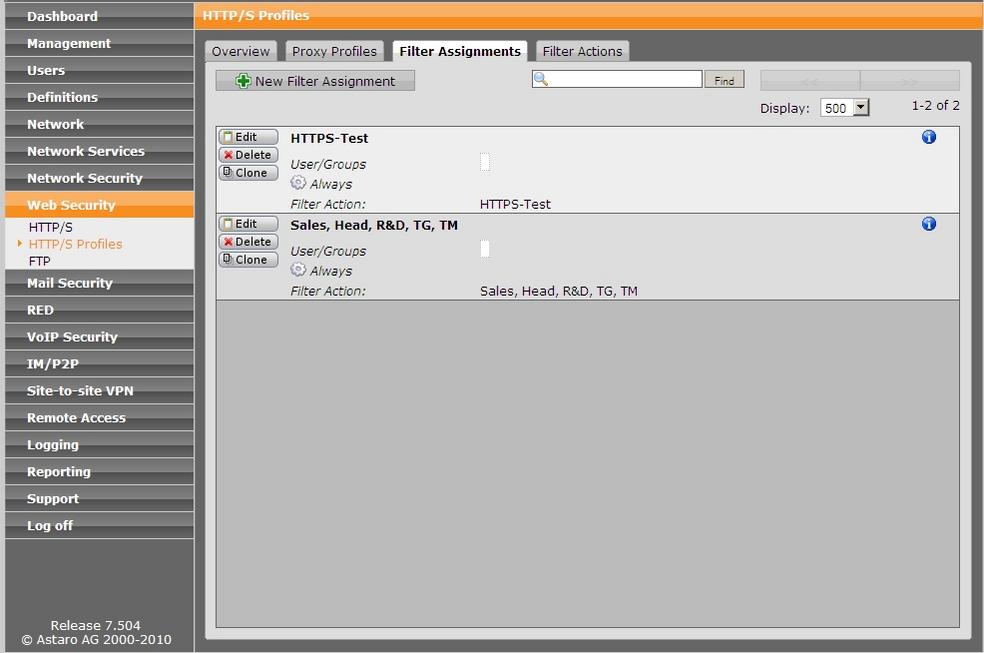
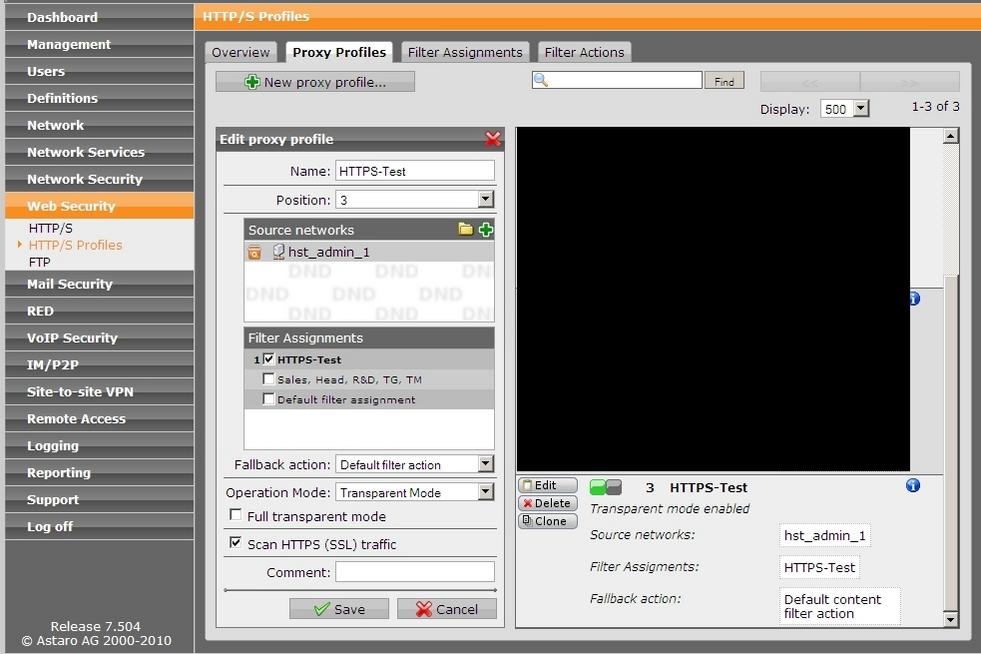
  • Steffen, is this your home installation?  Are you sure HTTPS is selected for this profile?  Can you show the log lines from the proxy and the PF showing what you see?  Maybe a pic of your filter assignment?

    Cheers - Bob
     
    Sophos UTM Community Moderator
    Sophos Certified Architect - UTM
    Sophos Certified Engineer - XG
    Gold Solution Partner since 2005
    MediaSoft, Inc. USA
  • Hi Bob,

    at Tuesday I can make some screenshots and give log entries.
    -- 
    So long - Steffen
  • Hi Bob,

    I tried again to surf HTTPS sites through the Proxy but happened the same as above.
    -- 
    Kind regards & Happy Easter

    Steffen
  • Hi Bob,

    and here the forgotten second picture.
    -- 
    Kind regards & Happy Easter

    Steffen
  • I can't read the log entries.  Can you just post those in clear text and change your IPs?  Also, do you confirm that hst_admin_1 is the subnet 10.x.25.0/24?

    Cheers - Bob
     
    Sophos UTM Community Moderator
    Sophos Certified Architect - UTM
    Sophos Certified Engineer - XG
    Gold Solution Partner since 2005
    MediaSoft, Inc. USA
  • Hi Bob,

    here you can read the PF LL entries:

    [PHP]
    2010:04:07-08:57:29 astaro httpproxy[4096]: id="0001" severity="info" sys="SecureWeb" sub="http" name="http access" action="pass" method="POST" srcip="***" user="" statuscode="200" cached="0" profile="REF_NTZkryZuSH (HTTPS-Test)" filteraction="REF_fRSTWCecVE (HTTPS-Test)" size="1740" time="910 ms" request="0xaf98c448" url="evintl-ocsp.verisign.com/.../ocsp-response"
    2010:04:07-08:57:30 astaro httpproxy[4096]: id="0001" severity="info" sys="SecureWeb" sub="http" name="http access" action="pass" method="POST" srcip="***" user="" statuscode="200" cached="0" profile="REF_NTZkryZuSH (HTTPS-Test)" filteraction="REF_fRSTWCecVE (HTTPS-Test)" size="1482" time="644 ms" request="0xb16cb5d0" url="evsecure-ocsp.verisign.com/.../ocsp-response"
    2010:04:07-08:57:31 astaro httpproxy[4096]: id="0001" severity="info" sys="SecureWeb" sub="http" name="http access" action="pass" method="POST" srcip="***" user="" statuscode="200" cached="0" profile="REF_NTZkryZuSH (HTTPS-Test)" filteraction="REF_fRSTWCecVE (HTTPS-Test)" size="1480" time="247 ms" request="0xb14befa0" url="ocsp.thawte.com/.../ocsp-response"
    2010:04:07-08:57:31 astaro httpproxy[4096]: id="0001" severity="info" sys="SecureWeb" sub="http" name="http access" action="pass" method="POST" srcip="***" user="" statuscode="200" cached="0" profile="REF_NTZkryZuSH (HTTPS-Test)" filteraction="REF_fRSTWCecVE (HTTPS-Test)" size="1480" time="381 ms" request="0xb14befa0" url="ocsp.thawte.com/.../ocsp-response" 
    [/PHP]

    The HTTPS traffic goes through our PFR. I think HTTPS traffic scanning couldn't work because it's not enabled in global settings. But I can't change it for all now - in our LAN. Admin client's IP belongs to our LAN, it's mine.

    On my testing ASL I've HTTPS traffic scanning enabled from first configuration. But there are only two clients, used by me not producing side effects.
    -- 
    Kind regards, Steffen
  • OK, that looks like it confirms that hst_admin_1 is the subnet 10.x.25.0/24.  If you can confirm that you have 'Scan HTTPS (SSL) traffic' selected in the "HTTPS-Test" profile, then I agree that you've uncovered a "feature" of the Transparent mode.  What if you put the profile into "Standard" mode and point your browser at the Proxy?

    Cheers - Bob
     
    Sophos UTM Community Moderator
    Sophos Certified Architect - UTM
    Sophos Certified Engineer - XG
    Gold Solution Partner since 2005
    MediaSoft, Inc. USA