This discussion has been locked.
You can no longer post new replies to this discussion. If you have a question you can start a new discussion

Content Filter Live Log Don't Understand

Hello!

So..I'm going to post this since for the past year I never understood it and finally it's bothering me. lol

I don't quite get the filter when you open the live log for content filtering.  I really would like to filter by IP, or even when a category gets blocked.  I don't want to see all the stuff that is allowed.

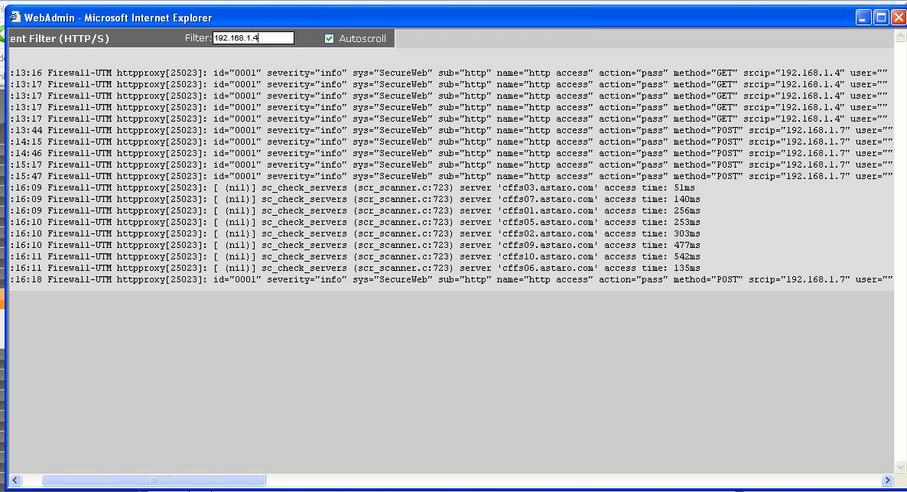
So by the screenshot here..I typed in my wifes IP address...and hit enter..yet nothing happens.  This has always worked this way where nothing happens.

Can someone explain if I'm doing this right even?  I really want better filter capabilities in astaro so I can see whats getting blocked.  I hate combing through these logs.  FYI:  I've tried both IE and firefox with no luck.

Thank you guys!! [:)]


This thread was automatically locked due to age.

Parents
  • Chugger, maybe you're thinking it's not working because you're expecting different behavior.  It's really the simplest possible live log + filter and does almost nothing.

    If I were to guess what happened in the picture in your first post, I'd say that you opened the live log, it began to show traffic from 192.168.1.7 and then you entered 192.168.1.4 in the 'Filter' field.  There was no traffic from .1.4, so nothing more appeared in the live log.  If you had erased the last character (4) in the 'Filter', you would have begun seeing the traffic from 192.168.1.7 again. 

    All of the live logs work the same way.  Before it posts a line, it checks to see if the line contains a match for the sequence of characters in the 'Filter' field.  If there's a match, it posts the line.  If not, it discards the line and consideres the next line.  Posted lines are not deleted from view when the content of 'Filter' is changed.

    Does yours work like that?

    Cheers - Bob
     
    Sophos UTM Community Moderator
    Sophos Certified Architect - UTM
    Sophos Certified Engineer - XG
    Gold Solution Partner since 2005
    MediaSoft, Inc. USA
Reply
  • Chugger, maybe you're thinking it's not working because you're expecting different behavior.  It's really the simplest possible live log + filter and does almost nothing.

    If I were to guess what happened in the picture in your first post, I'd say that you opened the live log, it began to show traffic from 192.168.1.7 and then you entered 192.168.1.4 in the 'Filter' field.  There was no traffic from .1.4, so nothing more appeared in the live log.  If you had erased the last character (4) in the 'Filter', you would have begun seeing the traffic from 192.168.1.7 again. 

    All of the live logs work the same way.  Before it posts a line, it checks to see if the line contains a match for the sequence of characters in the 'Filter' field.  If there's a match, it posts the line.  If not, it discards the line and consideres the next line.  Posted lines are not deleted from view when the content of 'Filter' is changed.

    Does yours work like that?

    Cheers - Bob
     
    Sophos UTM Community Moderator
    Sophos Certified Architect - UTM
    Sophos Certified Engineer - XG
    Gold Solution Partner since 2005
    MediaSoft, Inc. USA
Children
No Data