This discussion has been locked.
You can no longer post new replies to this discussion. If you have a question you can start a new discussion

uTorrent causing temporary "blackouts"

Greetings!

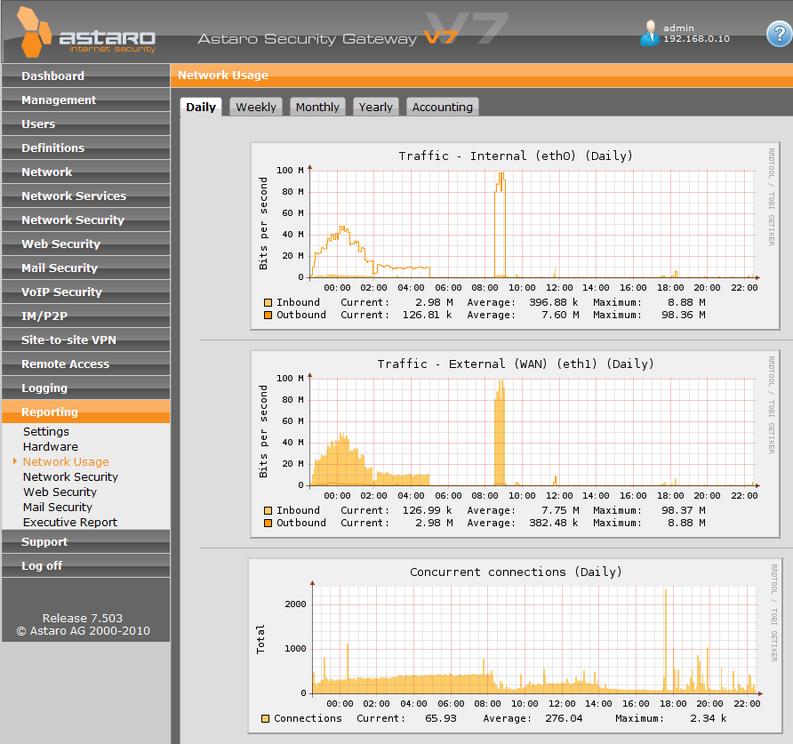
I'm running 7.503 - Free Home edition. I am running on a 100/100 WAN connection. My PC with problems is running uTorrent. When uTorrent is active, i will have regular temporary "blackouts" - no connections can be established, but existing ones work fine. I have setup DNAT Internet -> uTorrentPort -> Any // uTorrentPC -> uTorrentPort. Automatic Packet filter is activated. Generic Masquerading settings are left as default: Internal (Network) -> External (WAN).

I have tried setting uTorrent options down (50 global connections, 4 max half open) - but it does not seem to help. What's funny is that if i start up a VM (virtualbox) on the pc that cannot access anything, the virtual machine can browse as normal. (Virtual machine is connected through bridged, so it gets its own IP address). If i give it a few minutes, connections can once more be established.

I first dismissed the Astaro gateway as being to blame, but I'm curious as to if there are settings in the Astaro (either on web admin or through SSH) that could tweak stuff so it doesn't happen. Is there any settings that makes NAT connections take "forever" to time out?


This thread was automatically locked due to age.

  • windows version?

    Owner:  Emmanuel Technology Consulting

    http://etc-md.com

    Former Sophos SG(Astaro) advocate/researcher/Silver Partner

    PfSense w/Suricata, ntopng, 

    Other addons to follow

  • This is Windows 7 Enterprise 64-bit. (Intel Q9450, 8GB Ram)
  • I have that issue with vista 64 and windows 7 64(i run 7 64 now).  It's something with winders..i don't have this issue with the 32 bit..HOWEVER if you don't have the dnat and packetfilter rules setup right AND the torrent client then the machine grinds to a halt as the torrent app tries to punch through the firewall.

    Owner:  Emmanuel Technology Consulting

    http://etc-md.com

    Former Sophos SG(Astaro) advocate/researcher/Silver Partner

    PfSense w/Suricata, ntopng, 

    Other addons to follow

  • The torrent client and DNAT rules are set correctly. uTorrent reports green and i am "connectable". This was not an issue with the Buffalotech Wireless router the Astaro replaced, so i guess there are some keepalive settings on the NAT (in the linux kernel) that makes Astaro keep connections alive much longer than what the buffalotech does, causing a lot of stale or "to-be-terminated" connections.

    There are no event log errors on the "maximum concurrent connections reached" - however there are dns timeout errors as the torrent machine is unable to establish new connections until old one times out.
  • The DNAT shouldn't have "ANY" for the destination, try it instead with your external address and see if that makes a difference.

    Is IPS enabled?
  • IPS is enabled, however it's blocking 0 packets. snort_inline (the ips process) is consuming up to 70% cpu. 

    With ips on FTP and similar file transfer i get cpu-bound at ~60mbit/sec, while without ips i get ~94mbit with 2% cpu usage

    When looking at packets for torrent traffic, they seem to have my internal ip as destination ip, perhaps i should tell utorrent to "bind" to my external ip? (this does not really affect performance though)
  • turn off ips..see if that fixes it..if it does then you need to figure out which rule is eating BT.

    Owner:  Emmanuel Technology Consulting

    http://etc-md.com

    Former Sophos SG(Astaro) advocate/researcher/Silver Partner

    PfSense w/Suricata, ntopng, 

    Other addons to follow

  • Hi,
    You may be exceeding the max connections in Astaro (determined by your license).

    You should check, and lower the connections in the BT client(s).

    Also note that there is a new home user license with a much higher conn limit than previously.

    Barry
  • I am running 7.503 which should have the up-to-date connection limit. If i was on the limit of Astaro connections, the other PCs should not be able to establish any connections. This only applies to -the- computer running uTorrent, and it was -not- happening before Astaro. It does not even apply to Virtual machines running inside the computer running uTorrent.

    Disabling IPS did not help.

    I'm still thinking the NAT engine in Astaro works differently and is keeping connections alive longer. I see some other threads people having similar issues, and one suggestion was to run a SOCKS proxy for uTorrent, I guess i will have to resort to trying that.
  • i was running utorrent without issue .  I did have to tweak utorrent and astaro a bit.  Want me to resetup and give you my settings?

    Owner:  Emmanuel Technology Consulting

    http://etc-md.com

    Former Sophos SG(Astaro) advocate/researcher/Silver Partner

    PfSense w/Suricata, ntopng, 

    Other addons to follow