This discussion has been locked.
You can no longer post new replies to this discussion. If you have a question you can start a new discussion

AWG4000 - Microsoft Download Manageer

We use AWG 4000 with Active Directory Authentication. Most of it works well.
Now we try to download software from Microsoft with the Download Manager. First it seems all ok, but then download is paused, I can restart and the download continues, then paused again and so on.

In the Asataro-log-files I see no entry but with wireshark I get an error: "407 Proxy Authorization Required. Access is denied due the following condition: "Authentication failed"

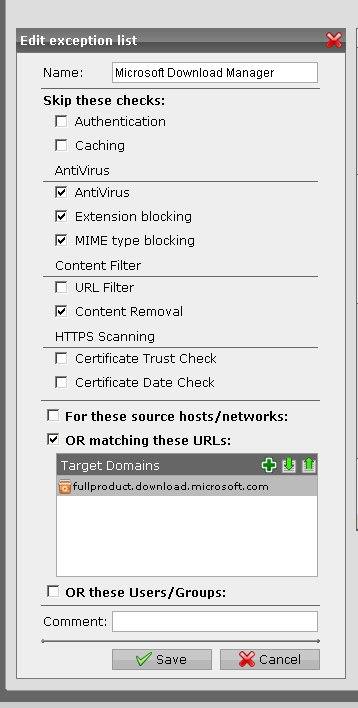
So I tested with Proxy Exception for 'fullproduct.download.microsoft.com' but it doesnt matter.

In German Forum someone is talking about the same problem, but without any solution.

Is this a known problem?

For info: Webbrowsers are configured with manual proxy settings for AWG.


This thread was automatically locked due to age.

Parents
  • Please show a picture of your exception.

    I notice in the German Forum that KSeeman comments that the Microsoft Download Manager has problems with NTLM; in another thread yesterday, BruceKConvergent observed:
    Try using the IP for the proxy setting in IE; this forces the SSO authentication to use NTLM instead of Kerberos; in our case, while Astaro figures out the Kerberos issue, this made it work. If your problem sounds like ours, I highly recommend that you start a case with Astaro support so they can chase this problem down.

    Does that apply to you?  If so, then it appears that the best solution for you is to use the numeric IP in the web browser proxy setting and also put an exception in the browser proxy settings for the two current addresses for your FQDN: 204.0.5.18 and 204.0.5.25.

    Cheers - Bob
     
    Sophos UTM Community Moderator
    Sophos Certified Architect - UTM
    Sophos Certified Engineer - XG
    Gold Solution Partner since 2005
    MediaSoft, Inc. USA
Reply
  • Please show a picture of your exception.

    I notice in the German Forum that KSeeman comments that the Microsoft Download Manager has problems with NTLM; in another thread yesterday, BruceKConvergent observed:
    Try using the IP for the proxy setting in IE; this forces the SSO authentication to use NTLM instead of Kerberos; in our case, while Astaro figures out the Kerberos issue, this made it work. If your problem sounds like ours, I highly recommend that you start a case with Astaro support so they can chase this problem down.

    Does that apply to you?  If so, then it appears that the best solution for you is to use the numeric IP in the web browser proxy setting and also put an exception in the browser proxy settings for the two current addresses for your FQDN: 204.0.5.18 and 204.0.5.25.

    Cheers - Bob
     
    Sophos UTM Community Moderator
    Sophos Certified Architect - UTM
    Sophos Certified Engineer - XG
    Gold Solution Partner since 2005
    MediaSoft, Inc. USA
Children
  • I have read the comment in German Forum and the different is that we use HTTPS Proxy.

    We use automatic proxy seraching via wpad, but it´s he same result if I choose manual proxy settings.

    To choose proy exception in the browser cannot be the solution because of our security policy.

    Now I try Astaro Support...

    In the attachement you can see the exception list (it must be the same like KSeeman´s)

    Thx - Helmut