This discussion has been locked.
You can no longer post new replies to this discussion. If you have a question you can start a new discussion

proxy with AD SSO

Hello,

I have a problem. I want to use Active directory SSO auth with my proxy.

what I did :

I created a AD connection in "Users/Authentication" without error

I switched the proxy to "Basic user authentication" and added Active directory users.

I configured IE and open a page. I have a prompt asking for user/password and it works.

So I went back in the Single Sign-on and configure my astaro. It joined the domain without error.

Back to proxy settings, switched to Active directory SSO.

Now when I open IE, proxy isn't asking for password but I have this error :

Access is denied due to the following condition: Authentication Failed 

If I check in http proxy log I have this error every time I try to access a web site :

[ 0x87fa7b8] adir_auth_process_negotiate (auth_adir.c:311) gss_accept_sec_context: Key table entry not found


does anyone has an idea ?

thanks


This thread was automatically locked due to age.

Parents
  • Look in the 'User authenitcation daemon' log.  Please show a pic of the 'Global' tab for HTTP/S.  Please show a pic of an edit of the group in 'Users/Groups' on the 'Global' tab.  If you just have Users there, please show a pic of a user for whom authentication fails.

    Cheers - Bob
     
    Sophos UTM Community Moderator
    Sophos Certified Architect - UTM
    Sophos Certified Engineer - XG
    Gold Solution Partner since 2005
    MediaSoft, Inc. USA
  • thanks for your anwser. 

    I went for lunch then I got back. I changes NOTHING, tried it again....and it works !

    I'm confused [:S]


    But I have another problem (maybe a bug ?)

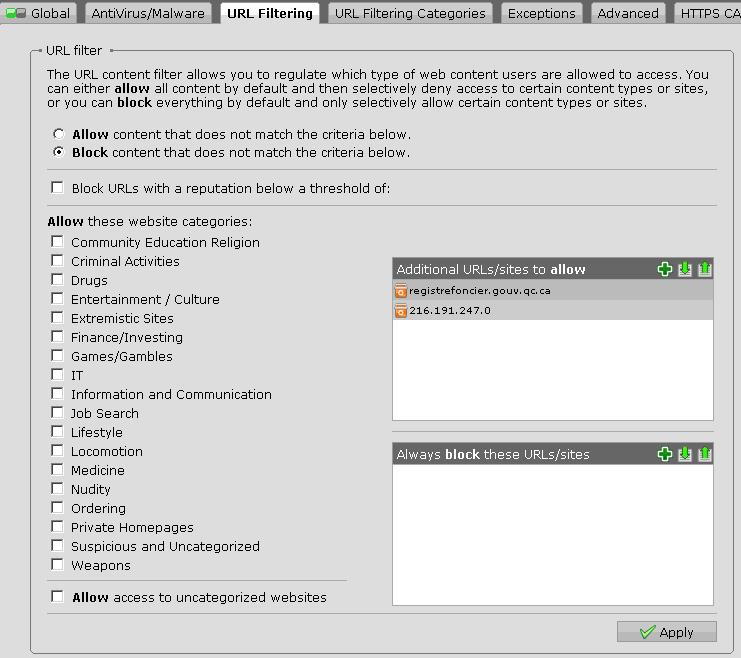
    I want all sites to be blocked except two as you can see on screenshot 1.

    If I use this config in Basic authentication mode, it works. Only these 2 sites can be opened but when I switch to Active Directory SSO, it doesn't work anymore. All sites are blocked, even the 2 sites I want to allow.

    The only way I found was to create an Exception (screenshot 2). This way it works.
    But why ...I don't have a clue. URL filtring should be the same for both auth method ?

    You can see the log for each test I did :


    [SIZE="4"]Accessing my sites with basic auth :[/SIZE] 
    id="0001" severity="info" sys="SecureWeb" sub="http" name="http access" action="pass" method="GET" srcip="REMOVED" user="REMOVED" statuscode="302" cached="0" profile="REF_DefaultHTTPProfile (Default Proxy)" filteraction="REF_DefaultHTTPCFFAction (Default content filter action)" size="171" time="466 ms" request="0x87f7638" url="Registre foncier du Qubec en ligne"    (sorry the forum automatically replace URL by website name)


    [SIZE="4"]Accessing my sites with AD SSO :[/SIZE]
    id="0002" severity="info" sys="SecureWeb" sub="http" name="web request blocked" action="block" method="GET" srcip="REMOVED" user="REMOVED" statuscode="403" cached="0" profile="REF_DefaultHTTPProfile (Default Proxy)" filteraction="REF_DefaultHTTPCFFBlockAction (Default content filter block action)" size="2234" time="0 ms" request="0x808fe38" url="www.registrefoncier.gouv.qc.ca/" exceptions="" error=""


    [SIZE="4"]Accessing my sites with AD SSO and exception created : [/SIZE]
    id="0001" severity="info" sys="SecureWeb" sub="http" name="http access" action="pass" method="GET" srcip="REMOVED" user="REMOVED" statuscode="200" cached="0" profile="REF_DefaultHTTPProfile (Default Proxy)" filteraction="REF_DefaultHTTPCFFBlockAction (Default content filter block action)" size="6176" time="100 ms" request="0x87f8700" url="www.registrefoncier.gouv.qc.ca/.../jpeg"


    EDIT :

    after doing some tests, when in SSO mode, ALL websites are blocked even if url filtring is set to ALLOW by default (that is why it works with exception which skip the url filtring)


    EDIT 2 :
    Which URL filtring settings am I supposed to edit ?
    I don't use HTTP profiles. In SSO mode, if I edit the URL Filtring tab in "HTTP/S" it doesn't work. BUT, if I go in "HTTP/S Profiles/Filter Actions", edit "Default content filter block action" and add my 2 sites there, it works !


    It seems that AD SSO mode use policy "Default content filter block action" in "HTTP profiles" section  instead of "URL filtring" in "HTTP/S" section 


    .
Reply
  • thanks for your anwser. 

    I went for lunch then I got back. I changes NOTHING, tried it again....and it works !

    I'm confused [:S]


    But I have another problem (maybe a bug ?)

    I want all sites to be blocked except two as you can see on screenshot 1.

    If I use this config in Basic authentication mode, it works. Only these 2 sites can be opened but when I switch to Active Directory SSO, it doesn't work anymore. All sites are blocked, even the 2 sites I want to allow.

    The only way I found was to create an Exception (screenshot 2). This way it works.
    But why ...I don't have a clue. URL filtring should be the same for both auth method ?

    You can see the log for each test I did :


    [SIZE="4"]Accessing my sites with basic auth :[/SIZE] 
    id="0001" severity="info" sys="SecureWeb" sub="http" name="http access" action="pass" method="GET" srcip="REMOVED" user="REMOVED" statuscode="302" cached="0" profile="REF_DefaultHTTPProfile (Default Proxy)" filteraction="REF_DefaultHTTPCFFAction (Default content filter action)" size="171" time="466 ms" request="0x87f7638" url="Registre foncier du Qubec en ligne"    (sorry the forum automatically replace URL by website name)


    [SIZE="4"]Accessing my sites with AD SSO :[/SIZE]
    id="0002" severity="info" sys="SecureWeb" sub="http" name="web request blocked" action="block" method="GET" srcip="REMOVED" user="REMOVED" statuscode="403" cached="0" profile="REF_DefaultHTTPProfile (Default Proxy)" filteraction="REF_DefaultHTTPCFFBlockAction (Default content filter block action)" size="2234" time="0 ms" request="0x808fe38" url="www.registrefoncier.gouv.qc.ca/" exceptions="" error=""


    [SIZE="4"]Accessing my sites with AD SSO and exception created : [/SIZE]
    id="0001" severity="info" sys="SecureWeb" sub="http" name="http access" action="pass" method="GET" srcip="REMOVED" user="REMOVED" statuscode="200" cached="0" profile="REF_DefaultHTTPProfile (Default Proxy)" filteraction="REF_DefaultHTTPCFFBlockAction (Default content filter block action)" size="6176" time="100 ms" request="0x87f8700" url="www.registrefoncier.gouv.qc.ca/.../jpeg"


    EDIT :

    after doing some tests, when in SSO mode, ALL websites are blocked even if url filtring is set to ALLOW by default (that is why it works with exception which skip the url filtring)


    EDIT 2 :
    Which URL filtring settings am I supposed to edit ?
    I don't use HTTP profiles. In SSO mode, if I edit the URL Filtring tab in "HTTP/S" it doesn't work. BUT, if I go in "HTTP/S Profiles/Filter Actions", edit "Default content filter block action" and add my 2 sites there, it works !


    It seems that AD SSO mode use policy "Default content filter block action" in "HTTP profiles" section  instead of "URL filtring" in "HTTP/S" section 


    .
Children
No Data