This discussion has been locked.
You can no longer post new replies to this discussion. If you have a question you can start a new discussion

Do I not understand how the Transparent mode skiplist works?

I have been getting some great help from one of our fellow members, but decided to post out here also, to see if I am just not understanding how the Proxy/Transparent mode skiplist and Packet Filter rules interact. 

-----------------------------------------------------------------------
I am using Transparent with authentication for the proxy.
I am using a proxy profile for two users with one filter called "core rules" assigned to both users
The core rules uses dual scan, blocks spyware, allows a few sites, blocks a few sites and blocks a few categories. 
I scan HTTPS & the certificates are in place. 
I have verified the IP of the test site. It is included in the APNIC network gourp.
Rule #1 is exceptions to the blocks, which currently, has two websites from another block in it. (NOT APNIC sites.)
------------------------------------------------------------------------

In my packet fitlers:
I have a packet filter that blocks all out going packets to China and the area. (APNIC. Which is a Network group of 22 networks)  

Rule #2
Internal network ---> any service  ---> APNIC ---> DROP

In my browser:
Proxy is set to 10.1.1.1 port 8080 for all types of traffic with no proxy for local host, and 10.1.1.1

In my advanced tab under Web Security:
Transparent mode skiplist has the network group APNIC added (and applied) to it
I did not tick the Allow HTTP traffic for listed hosts/nets

------------------------------------------------------------------------

This is how I expected all of this to work.


User surfs the web and finds a link to some site that is in China.
The user clicks on the link
The proxy checks to see if it is allowed/infected etc, and sees that this links IP is part of APNIC which is in the transparent skiplist.
Being in the skiplist, the proxy skips its self and sends it over to the packet filter rules.
The packet filter finds a match in rule #2 that says do not allow. (Drop)
The packet filter rule drops the packet(s). 

With the browser in the proxy, this is not what is happening. 

When I take the browser out of the proxy (The "No proxy" setting) the site is denied and you see an entry in the packet filter log that it is dropped due to rule #2. This make sense, since the proxy is skipped and it is going straight to the packet filter rules. 

Put the browser back in the proxy and the site loads.  You get no entries in the packet filter log. In the proxy log you see it was passed based on my filter "core rules" which is what is assigned to the user. (Me)

I tried just transparent mode, with no authentication and that did not work either.  I have tried stopping and restarting the proxy after changes and still nothing. I have even rebooted, and still nothing. I am always able to get to this site when the browser is in the proxy. 

I took the browser out of the proxy and was able to download the eicar test virus to my desktop, so I know for sure that I want the user in the proxy. (I do not have AV on my test PC, just DeepFreeze.) Besides, I do not want the kids to be able to accidentally see adult material.  The proxy is a must, but to me, so is blocking China... and a few other countries of interest. 

-------------------------------------------------------------------------

Does the transparent skip list not allow you to bypass the proxy for certain external IP's and send those packets over to the packet filter?

If not, what exactly is it for and how do I block these countries while still using the proxy?

I hope my explanation of my issue is clear enough to understand. 

Thanks for the help,

Coder68


This thread was automatically locked due to age.

  • If you set your browser to proxy mode, the traffic is not on port 80.  Your traffic goes through the proxy in Standard, not Transparent, mode, so the skiplist does not apply.

    If the browser is not in the proxy mode and your traffic isn't captured by the proxy in transparent mode, then you have some other misconfiguration.  Have you confirmed in the 'Content Filter (HTTP)' log that the traffic went through the correct Profile and Filter Assignment?

    Cheers - Bob

    PS If you have "APNIC" in the 'Transparent mode skiplist', your packet filter is redundant for HTTP traffic because such packets are default dropped in the absence of a rule allowing their passage, and I assume you don't otherwise allow port 80.
     
    Sophos UTM Community Moderator
    Sophos Certified Architect - UTM
    Sophos Certified Engineer - XG
    Gold Solution Partner since 2005
    MediaSoft, Inc. USA
  • If you set your browser to proxy mode, the traffic is not on port 80.  Your traffic goes through the proxy in Standard, not Transparent, mode, so the skiplist does not apply.

    If the browser is not in the proxy mode and your traffic isn't captured by the proxy in transparent mode, then you have some other misconfiguration.  Have you confirmed in the 'Content Filter (HTTP)' log that the traffic went through the correct Profile and Filter Assignment?

    Cheers - Bob

    PS If you have "APNIC" in the 'Transparent mode skiplist', your packet filter is redundant for HTTP traffic because such packets are default dropped in the absence of a rule allowing their passage, and I assume you don't otherwise allow port 80.


    Yes, the HTTP log shows the correct user, correct profile and correct filter assignment. 
    (I only have one profile, one filter and two users.)

    I am at work and will do some filter testing when I get home.  

    So the proxy setting in a browser is only for when you are not using transparent mode?

    Interesting point on the PS.  I will have to see if it will still do what I want...

    Thanks,

    Coder68
  • So the proxy setting in a browser is only for when you are not using transparent mode?


    That is correct.   Transparent mode is for catching web traffic when the browser is not configured to use the proxy. The proxy just "transparently" intercepts the traffic on the way through the firewall.  If you configure the browser to use the proxy then, as Bob said, the transparent skip list is ignored.

    If you'd like to prevent users from setting up their web browsers to connect to the proxy you'll need to add a NAT rule to prevent their browsers from connecting to port 8080.  Basically what this does is send the port 8080 traffic to a host that doesn't exist.

    Example NAT Rule:
    Traffic Source: Internal (Network)
    Traffic Service: HTTP Proxy    // TCP port 8080
    Traffic Destination: Internal (Address)
    NAT Mode: DNAT
    Destination: 10.0.0.0   // Or any other invalid address
    Destination Service: 
    Log initial packets: 
    Automatic packet filter rule: 

  • I think I am really starting to get a handle on this...

    eicar.org's IP is included in RIPE, which is in my transparent skiplist, and is blocked by rule #4...I added eicar.org's IP it to my block exceptions, which is rule #1... and it is working. I can go to www.eicar.org...but then the proxy does not catch the virus...as I expected, so I take out RIPE form the skip list, for testing, and it does catch the virus... as I had expected.

    Odd thing... in the packet filter log I see a bunch of drops for the eicar IP, (Rule #4) even though I am getting there due to rule #1  Is that normal for the log?  I thought it stopped once it hit a rule.  

    I also noticed that when I have RIPE back in the skiplist, and I go to eicar, that I can download and save the test virus via http, but not https... https is being blocked still by the PF as the log bares out.  

    I have my exception rules set like this:
    block exceptions -->any service -->Internal network
    and
    Internal Network --> any service --> block exceptions

    Should I be able to save the virus in https too? (ANY service?)

    Does any not mean any port? 

    How long should it take, after making a change to the PF or proxy for it to kick in?  (High speed dual core box with 2 gigs of RAM.)

    Thanks for all the great help!!!,

    C68
  • Would it be possible for you to post all four rules?  I'm getting confused as to which rule #1 is vs #4.  Also, just curious, is your browser configured to use the proxy?

    Odd thing... in the packet filter log I see a bunch of drops for the eicar IP, (Rule #4) even though I am getting there due to rule #1 Is that normal for the log? I thought it stopped once it hit a rule.


    You're right about the filter stopping after the first rule that matches.  That is how it is supposed to work.  Is it possible you are seeing old data?  Or that the packet filter isn't matching what you're expecting for rule #1

    Does any not mean any port? 


    Any should mean any traffic (TCP/UDP/ICMP/etc).

    How long should it take, after making a change to the PF or proxy for it to kick in? (High speed dual core box with 2 gigs of RAM.)


    I've never seen it take longer than about 3 seconds.
  • I think I figured out your issue with HTTPS.  The link to download the https eicar file goes to a different server than the http link.  www.eicar.org vs secure.eicar.org.  Try adding secure.eicar.org to your block exceptions list.

    I'm also guessing rules #1 & #2 are your block exceptions and rules #3 and #4 are your block rules.  You can probably do away with rule #1 unless you really do intend to allow hosts on the block exceptions list to initiate connections into your internal network.  The firewall keeps track of the state of your connections.  It just depends on which end initiates the traffic.  If you tell it to allow the first packet of a connection out, it'll remember that and allow the rest of the connection to flow through automatically.  You don't have to specifically add rules to let the traffic flow back in.

    Hope this all makes sense.

    Cheers,
    --Eric
  • I think I figured out your issue with HTTPS.  The link to download the https eicar file goes to a different server than the http link.  www.eicar.org vs secure.eicar.org.  Try adding secure.eicar.org to your block exceptions list.

    I'm also guessing rules #1 & #2 are your block exceptions and rules #3 and #4 are your block rules.  You can probably do away with rule #1 unless you really do intend to allow hosts on the block exceptions list to initiate connections into your internal network.  The firewall keeps track of the state of your connections.  It just depends on which end initiates the traffic.  If you tell it to allow the first packet of a connection out, it'll remember that and allow the rest of the connection to flow through automatically.  You don't have to specifically add rules to let the traffic flow back in.

    Hope this all makes sense.

    Cheers,
    --Eric


    I have rules that block the entire world, except for ARIN (The US and Canada).  So, to let us out to a few places in those blocks, like Astaro.org, I need to have a block exceptions in my rules.

    You are probably right about secure.eicar.org. I thought if I allowed the root domain, any child domains will be allowed as well. 

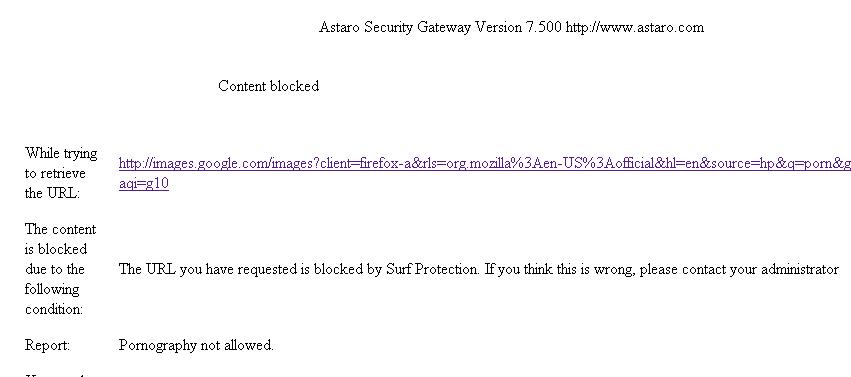
    Also, now that I am not putting proxy settings in my browser... the blocked by Astaro page is ugly!  What happened to the nice HTML and my pretty picture of Tux??? (See attachments.)

    I just changed my IP so I would be forced to log back in... and I did not have to log in. I was granted access to the web no questions ask.  The log is showing a user of "".

    Thanks,

    C68
  • View the source of the html page returned.  Interestingly, mine is trying to load content from passthrough.fw-notify.net.  You might need to add that domain to the block exceptions list too.
  • As long as RIPE is in the transparent skiplist, I CANT get to passthrough.fw-notify.net even with it in my block exceptions rule (1st PF rule in the list.) UNLESS, I have setup Firefox with proxy settings. 

    I thought I had this working... but I must have forgotten to hit save after I added RIPE back in to the skip list.

    Why is RIPE being bypassed, but my first rule is being ignored??? 

    This may be the issue...
    The PF shows a DEFAULT DROP going to my Astaro box on port 8080. (My IP to Astaro box's IP) What is causing this default drop??  Where do I find these default drop rules?

    Proxy log shows:
    2009:11:07-01:14:26 my DynDNS name httpproxy[29064]: id="0002" severity="info" sys="SecureWeb" sub="http" name="web request blocked" action="block" method="GET" srcip="my IP" user="" statuscode="302" cached="0" profile="REF_chrbTpGucE (Local Network)" filteraction=" ()" size="2384" time="0 ms" request="0x8151650" url="www.google.com blah blah blah more google search string stuff.

    statuscode 302 -->
    10.3.3 302 Found

    "The requested resource resides temporarily under a different URI. Since the redirection might be altered on occasion, the client SHOULD continue to use the Request-URI for future requests. This response is only cacheable if indicated by a Cache-Control or Expires header field. "

    I am at a loss...

    Thanks,

    C68
  • I have put Firefox into the proxy.  I have set the proxy to standard mode.  I have a packet filter that blocks a range of address.  Internal network --> any service ---> Address blocks 

    When I try to go to a site in that range of IP's I can get there without issue.  The proxy log shows that it was allowed to pass, based on my core rules of my proxy profile for the user of me. I have nothing in the proxy rules that says this site is OK to go to or not OK to go to. This site (IP) is not mentioned anywhere but in the PF rules, and the network definition. 

    Also, when I open the PF live log, and do nothing else, I get bunch of default drops from my PC to the Astaro box on port 8080. 

    I thought that in standard mode, the PF rules would apply automatically.  Is this not the case?

    I am starting to feel real dumb here!

    Thanks,

    C68