This discussion has been locked.
You can no longer post new replies to this discussion. If you have a question you can start a new discussion

HTTP Proxy Config/Timed Access

Hey all, looking for some info here. I have the following scenario at home here. I have 2 networks here. One with my workstation, my servers, and my wifes AP. I have a separate network with my kids AP on it. What I'm trying to figure out is how to configure timed access for my kids, one profile for weekdays and another for weekends, without affecting anything else. The documentation is a little sketchy for stuff like this so I'm hoping one of the Astaro gurus on here might be able to supply a step-by-step walkthrough on this, as I'm sure others could use the same information. Thanks!

Kevin


This thread was automatically locked due to age.

  • Please give names for the networks, times and days you want restrictions and a sample restriction of each type you want.  

    Cheers - Bob
     
    Sophos UTM Community Moderator
    Sophos Certified Architect - UTM
    Sophos Certified Engineer - XG
    Gold Solution Partner since 2005
    MediaSoft, Inc. USA
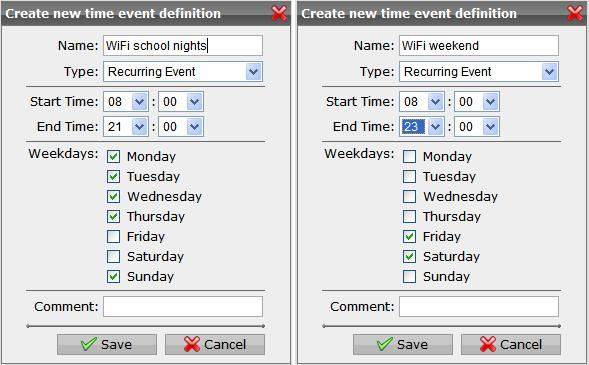
  • Thanks Bob. 2 networks, LAN and Wifi. Wifi should have access between the hours of 8AM-9PM Sun thru Thu, and 8AM-11PM Fri and Saturday. After those hours there should be NO access of any kind allowed from wireless. LAN is of course 24/7.

    Kevin
  • Create Time Event definitions
    Time Events.JPG

    Configure the 'Web Security >> HTTP/S' with only "LAN" in 'Allowed networks'.

    In 'HTTP/S Profiles', do the following:

    Create Filter Actions 'Block All' and WiFi (remember to enable virus scanning)
    Block.JPG WiFi.JPG

    Create Filter Assignments 'Kids school nights' and 'Kids weekend'
    Filter Assignments.JPG

    Create a Proxy Profile 'Kids'
    Profile.JPG

    Make sure you don't have Packet Filter rules that allow them to go around the Proxy.  If you suspect IM usage during the unallowed times, then you will need to use these Time Events in the packet filter rules that allow such traffic from WiFi.

    Cheers - Bob
     
    Sophos UTM Community Moderator
    Sophos Certified Architect - UTM
    Sophos Certified Engineer - XG
    Gold Solution Partner since 2005
    MediaSoft, Inc. USA
  • That did it Bob, thanks! Working like a charm. Maybe this should be made a sticky by the admins for others that need the info?

    Kevin
  • Bob,
     Followed the instructions and WEB browsing does indeed work. However, other protocols, such as AIM and some of the game servers used by my one son are broken. How do I allow that traffic to pass through? I added packet filters from the wireless network but they still don't work. Any ideas? Thanks!

    Kevin
  • Ok, still having some issues here. The timed access proxy rules work fine, and when the time arrives http access stops. HOWEVER, other ports, such as AIM and online games do not. If I try and create a packet filter using a timed access filter it stops them from working even when the time IS within the specified period. The only way it will work is if I remove the timed access definition. Is this a bug or am I missing something?

    Kevin
  • Hi,
    you will need to add time managed Packet filter rules as well for that group of users.

    Ian M
  • Hi,
    you will need to add time managed Packet filter rules as well for that group of users.

    Ian M


    Ian,
     That's what I'm saying, I DID create a timed access filter rule for that network and it does not work. If I leave the packet filter in place and simply disable the timed part and set to "Always Allowed" it works fine. This is the issue I seem to be having. HTTP proxy profiles work fine with the timed events, however the packet filter is not. Thanks.

    Kevin
  • Kevin, please show the lines from the PF log where the blocking occurs.  If you don't see the blocks there, then go look in the IPS log.  If you don't see them there, then try with IPS disabled.

    Cheers - Bob
     
    Sophos UTM Community Moderator
    Sophos Certified Architect - UTM
    Sophos Certified Engineer - XG
    Gold Solution Partner since 2005
    MediaSoft, Inc. USA
  • I'll check the log and let you know. I have IPS disabled. Thanks Bob.

    Kevin