This discussion has been locked.
You can no longer post new replies to this discussion. If you have a question you can start a new discussion

Proxy port 80 doesn't work anymore under transparent mode

Hi ,

after upgrade to 7.400 from 7.306 the port 80 for HTTP proxy doesn't work anymore in transparent mode. If I set the proxy port to 8080 it works. 
I know that other users had this issue, too. But there was no answer for this problem.
Can anybody help.

If I remove "use proxy" in the IE this also works from my PC, but it doesn't work from the Terminalservers. Maybe this has nothing to do with the problem above.

I want to keep the settings and I don't want to change it to port 8080. Can anybody help.

Thanks,
Thor


This thread was automatically locked due to age.

  • If astaro is your default gateway, you don't have to put anything in clients browsers for http traffic in transparent mode. A packet filter rule is automatically added to route all the port 80 traffic to http proxy. Port 8080 still works for custom installations with transparent proxy thats all.
  • Hi ,

    I guess, I know why my local PC can surf without any proxy, because the DNS resolution goes over the firewall. The terminalservers use only the local DC (domain controllers).
    Without DNS the terminalservers don't send any http packet to the default gateway, because they don't know the IP address of the webpage and that this lies outside the local network. 

    Billybob, exactly this is my problem: there is no automatically added packet filter rule to route all the port 80 traffic to the http proxy. 
    I know it shoud work, but it doesn't work. Port 80 is dead.

    So any ideas ?

    Thanks,
    Thor
  • Hi Thor,

    but you know that the proxy rule isn't visible like your defined rules?
    -- 
    MfG, Steffen
  • Hi ,

    yes I know. So it is a guess - because it doesn't work. But if somebody tell me what the Astaro do when everything is perfect, then I will tell him, it is not so.

    After database conversion I have made an update to 7.401. The problem still exists. No port 80 traffic is routed to the http proxy in transparent mode.

    Need ideas, help.....

    Thanks,
    Thor
  • Have you checked your Content filter logs and perhaps packet filter logs to see if traffic from your terminal servers reaches the Astaro at all and if so, if there is a block?
  • Hi, 

    thanks for your answer, but forget the terminalservers. Those are not the problem.
    You can use the proxy with port 8080 in transparent mode or you can use no proxy, but then you have to use a DNS server that makes all the DNS resolution and the firewall as default gateway in transparent mode.

    But you can't use proxy and port 80 in transparent mode. And this is a bug.

    Thanks,
    Thor
  • Hi Thor,

    I think it's not a bug but a problem by design. Sry, but I didn't know better words for it.

    IMHO, in transparent mode all web requests from a client coming in to the web proxy on port 80:

    client:12345 >>> web proxy:80 >>> target site:80

    So I think it's not possible to use port 80 twice and it's why the proxy uses an other port different from 80.
    -- 
    Kind regards, Steffen
  • Hi ,

    the answer from Astaro support is:
    In the past the proxy in transparent mode listened to port 80 and 8080, but this was not correct. So they changed it. Now it is no longer possible to use port 80.

    Even in the standart mode it is no longer possible to change port 8080 to 80.
    So I will use port 8080 and switch to standart mode.  

    It's a pity, that they declare a feature to a bug and then remove it without notification.

    Thanks for the answers in this thread.

    Best regards,
    Thor
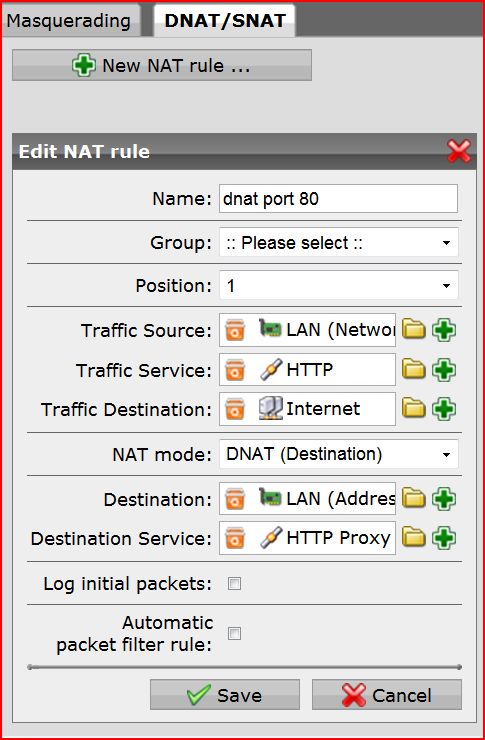
  • This is not that big of a deal to bypass. Just create a dnat rule to catch all you port 80 traffic and forward it to port 8080 on astaro and it will work.
  • Here is a screenshot of what you need to do just in case.[;)]