This discussion has been locked.
You can no longer post new replies to this discussion. If you have a question you can start a new discussion

How to import Proxy CA with Ubuntu

How can I import the Proxy Certificate with Ubuntu (9.04). Every time I would like to enjoy a unknown https site, firefox warns, that the created certificate won't be trusted. So I have to import that certificate for every ssl site again. I think thats not the right way. 

I am using the astaro in transparent mode.


This thread was automatically locked due to age.

Parents
  • Browse to http://passthrough.fw-notify.net/cacert.pem (With enabled proxy). That should give a popup were you can add the Proxy CA Cert to the browser. Other way would be downloading the cert via WebAdmin/EnduserPortal.

    Cheers,

    Sven.
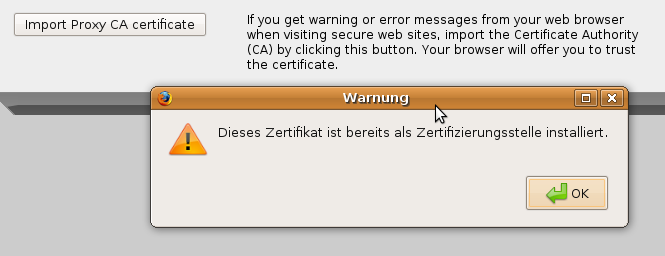
  • A popup message says, that the certificate is already installed.... I've done that already....

    But every new SSL site wants to confirm the ssl certificate and the eicar-test-virus site ist still just text.
  • I am having an issue with this also. 

    After some research, I found out that Firefox 3.5 no longer turst self signed certificates.  If you improt your certificate into IE, you will not get these errors.  From what I can tell, you can't even improt self signed CA's into Firefox.  Or can you?

    After 10 or 15 minutes of playing around, I have found a workaround. [:D]

    Download the cert from your Astaro Interface.
    Import this into IE's CA list.
    Export your freshly imported cert. Make sure when you export you change the format to Base64 Encoded x.509 (*.cer) (Advanced tab) Save the cert.
    Import the cert into your Firefox CA - choose turst this cert to identify websites.
    Close and reopen Firefox... may not need to do this.  Try the same sites you had issues with before and those cert warnings should be gone!

    If I remember, I will post a full how to with pics.  (I am making this for my own documentation.)


    C68
Reply
  • I am having an issue with this also. 

    After some research, I found out that Firefox 3.5 no longer turst self signed certificates.  If you improt your certificate into IE, you will not get these errors.  From what I can tell, you can't even improt self signed CA's into Firefox.  Or can you?

    After 10 or 15 minutes of playing around, I have found a workaround. [:D]

    Download the cert from your Astaro Interface.
    Import this into IE's CA list.
    Export your freshly imported cert. Make sure when you export you change the format to Base64 Encoded x.509 (*.cer) (Advanced tab) Save the cert.
    Import the cert into your Firefox CA - choose turst this cert to identify websites.
    Close and reopen Firefox... may not need to do this.  Try the same sites you had issues with before and those cert warnings should be gone!

    If I remember, I will post a full how to with pics.  (I am making this for my own documentation.)


    C68
Children
No Data