This discussion has been locked.
You can no longer post new replies to this discussion. If you have a question you can start a new discussion

Anonymous Proxt that uses SSL.

I'm having a issue where students from my k12 school district I work for are able to get to https://www.vtunnel.com. I've added it to the black list and the site still comes up. Is there any way to block the ssl connection to the anonymous proxy? I have even added the ip 74.63.82.148 to the black list.


This thread was automatically locked due to age.

Parents
  • What version of Astaro?  Do you have Anonymizers blocked?
     
    Sophos UTM Community Moderator
    Sophos Certified Architect - UTM
    Sophos Certified Engineer - XG
    Gold Solution Partner since 2005
    MediaSoft, Inc. USA
  • Oops, sorry I didn't leave specs. I'm running 7.306 and I am blocking Anonymizers .
  • Bob sorry for not clarifying. If the proxy is in standard mode, all your initial connections are handled by the proxy as long as the service is in allowed services. So the content filter is applied to the url as long as you enter it.

    If the link existed on a https page, ofcourse the proxy won't see it but it will filter all the urls entered manually as long as it is in standard mode (probably anything other than transparent would work like this).


    jburke - what mode is the http proxy in?


    Thanks dilandau, I assumed he was using regular proxy throughout. I bet its transparent proxy. Still nothing that a quick group policy can't fix. Change IE settings for all users to use http proxy in Active directory. Of course it won't work if they are using firefox but its a school and jburke seems to be running it like my old head master.
  • Have you ticked the box for 'Scan HTTPS (SSL) Traffic' on the 'Global' tab?
     
    Sophos UTM Community Moderator
    Sophos Certified Architect - UTM
    Sophos Certified Engineer - XG
    Gold Solution Partner since 2005
    MediaSoft, Inc. USA
  • jburke - what mode is the http proxy in?

    It sounds like you have it in transparent mode which will only be filtering port 80 or http traffic. If it was in standard or user auth mode then it would filter like billybob mentioned. The other option is to enable the new https scanning in 7.402.


    I am in Transparent mode.
  • Have you ticked the box for 'Scan HTTPS (SSL) Traffic' on the 'Global' tab?


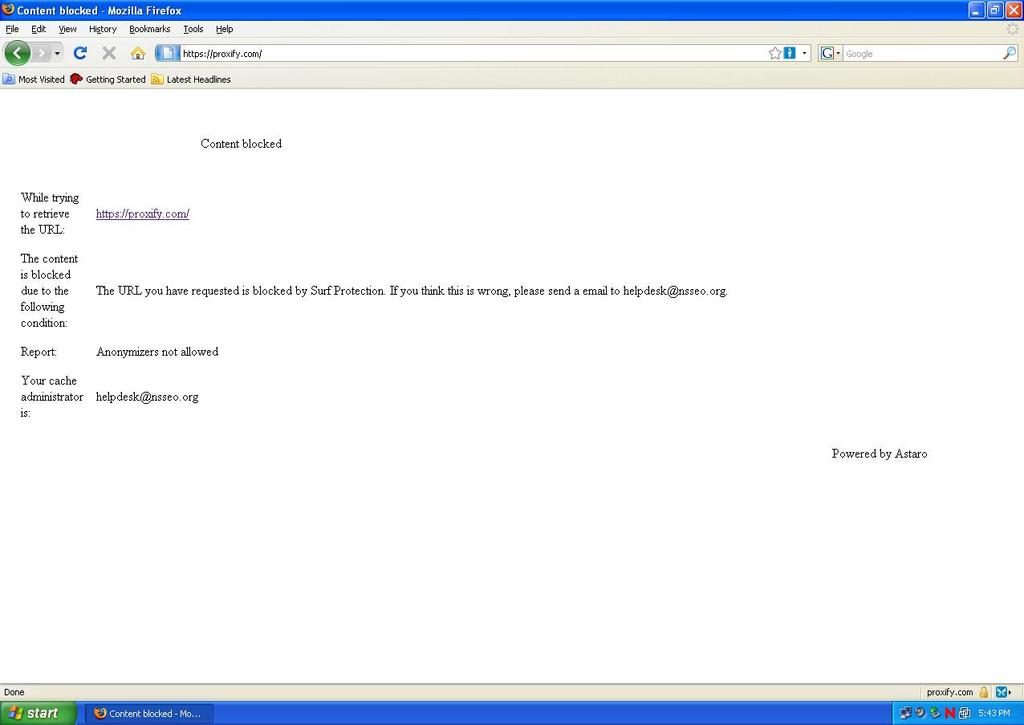
    [:$] I didn't see that new feature. I ticked the "Scan HTTPS (SSL) Traffic" box and it has blocked the ssl proxy site. [[:D]] The only thing now is, the "Content Blocked" page displays strangely in the browser. Before the site attempts to load a prompt comes up warning the cert is invalid. Once you accept it, the "Content blocked" webpage comes up, there aren't any images displayed. Looks like this. [[:D]] And thank you everyone for helping me out with this!!

    Screen shot.jpg
  • Hmmmm.. So, I tried opening https://www.chase.com and got the same warning about the cert, i accepted it twice and chase came up. Is this where the ssl cert from the Astaro comes into play?
  • Hmmmm.. So, I tried opening https://www.chase.com and got the same warning about the cert, i accepted it twice and chase came up. Is this where the ssl cert from the Astaro comes into play?


    Ok.. So I have been playing around here. I noticed Astaro has added a skip cert check in the Exceptions tab under HTTPS/S. Even if I tick Certificate Trust Check and Certificate Date Check, under HTTPS Scanning the broswer still warns of a invalid security cert.
  • I and still running 7.306 and it blocks based on catagory for both http and https. I am running in Auth mode with Edir, is that why it workes?
  • Yes. In order to use auth or standard mode you have to point your browser at the Astaro HTTP Proxy.  As Billybob pointed out above, the content filter will be applied to any service listed in 'Allowed Services'.  If you were in transparent mode, the browser would not capture your port-443 traffic, just the port-80 traffic.
     
    Sophos UTM Community Moderator
    Sophos Certified Architect - UTM
    Sophos Certified Engineer - XG
    Gold Solution Partner since 2005
    MediaSoft, Inc. USA
  • Yes. In order to use auth or standard mode you have to point your browser at the Astaro HTTP Proxy.  As Billybob pointed out above, the content filter will be applied to any service listed in 'Allowed Services'.  If you were in transparent mode, the browser would not capture your port-443 traffic, just the port-80 traffic.


    So this sounds like a weekend project. I should apply a GPO pointing IE to the Astaro proxy. Then change Operation Mode to Standard and tick the scan SLL traffic and all should be good?
  • Also add the Astaro certificate to the Trusted Root for the domain.
    That will illiminate the security pop-ups for legit SSL sites.
Reply Children
  • Sounds like a good plan, too.  Probably easier than dealing with the various cert issues now when scanning HTTPS!

    Another advantage of pointing the browsers at your Astaro proxy is that you can later turn on Active Directeory authentication and be able to assign users to specific HTTP Profiles based on group membership in Active Directory.  Yet another benefit is that users in Web Security reports are identified by their AD CN instead of by the IP of the accessing computer.

    Cheers - Bob
     
    Sophos UTM Community Moderator
    Sophos Certified Architect - UTM
    Sophos Certified Engineer - XG
    Gold Solution Partner since 2005
    MediaSoft, Inc. USA