This discussion has been locked.
You can no longer post new replies to this discussion. If you have a question you can start a new discussion

Block facebook except at lunch.

Hi;

I'm having trouble setting up a a block on facebook except during lunch time.

I have the following.
==========================
Proxy Profile: (position 1)
Source networks = Internal Network

Filter Assignment:
 1. Full Internet allowed between 1-2pm.
 2. Facebook blocked for selected users.

Fallback Action = Default
Operation Mode = Active Directory SSO
==========================

Filter assignments explained.
---------
Name = Full Internet allowed between 1-2pm
User/Groups = Active Directory Group
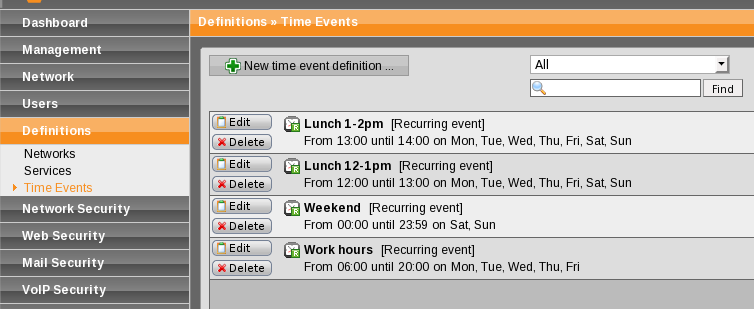
Timed event = Lunch 1-2pm
Filter action = Default Filter.
---------
Name = Facebook blocked for selected users.
User/Groups = usera, userb, userc (Selected from AD)
Timed event = Always
Filter action = Block Facebook.
---------

Filter Actions explained.
+++++++++
Name = Block Facebook.
Mode = Allow by default.
Tick = Block Spyware communications
No Categories blocked.
Block these url sites.
         facebook.com
         fbcdn.com
tick = content removal.
tick = Remove javascript
tick = Use antivirus scanning, single scan
+++++++++

I'm sure I have my logic correct.
Lets assume it's 1.15pm, 
It uses the Full Internet allowed between 1-2pm filter
It first checks is the user in the AD list =yes, 
then, is it lunch time = yes,
use the default filter action.
(This should work with either any user from AD)

Lets try my logic at 10am, with a banned user.
It uses the Full Internet allowed between 1-2pm filter
It first checks is the user in the AD list =yes, 
then, is it lunch time = NO, Go to rule 2.
It uses the Facebook blocked for selected users filter
It now checks if the user is in the list = yes
Then is it part of the timed event = Always = yes.
use the filter block Facebook.

Lets try my logic at 10am, with a NON banned user.
It uses the Full Internet allowed between 1-2pm filter
It first checks is the user in the AD list =yes, 
then, is it lunch time = NO, Go to rule 2.
It uses the Facebook blocked for selected users filter
It now checks if the user is in the list = No
Use the Fallback action = which is the Default, which is allow all.

Am I missing something.
Trevor.


This thread was automatically locked due to age.

Parents
  • If this is the first that you've begun using AD SSO, do you have your users' browsers all set up to point at the Astaro as proxy server on port 8080?

    What actually happens and what do you see in the 'Content Filter (HTTP)' Live Log?

    Cheers - Bob
     
    Sophos UTM Community Moderator
    Sophos Certified Architect - UTM
    Sophos Certified Engineer - XG
    Gold Solution Partner since 2005
    MediaSoft, Inc. USA
  • Hi;

    Users browser is setup to point to the proxy on 8080

    Below are 2 live-log reports showing the two different times.

    2009:04:08-10:58:58 mail httpproxy[18262]: id="0062" severity="info" sys="SecureWeb" sub="http" name="web request blocked, forbidden url detected" action="block" method="GET" srcip="192.168.0.163" user="cas" statuscode="403" cached="0" profile="REF_aCZhQRovVB (Block Facebook/Myspace except between 1-2pm)" filteraction="REF_svQLojhSeM (Block Facebook/Myspace)" size="2245" time="284 ms" request="0xb0415bd0" url="www.facebook.com/" exceptions="" error="" 

    2009:04:08-13:06:51 mail httpproxy[18262]: id="0062" severity="info" sys="SecureWeb" sub="http" name="web request blocked, forbidden url detected" action="block" method="GET" srcip="192.168.0.163" user="cas" statuscode="403" cached="0" profile="REF_aCZhQRovVB (Block Facebook/Myspace except between 1-2pm)" filteraction="REF_svQLojhSeM (Block Facebook/Myspace)" size="2245" time="14267 ms" request="0xb100738" url="www.facebook.com/" exceptions="" error="" 

    Hope this helps.
    Trevor..
  • size="2245" time="14267 ms" 

    14 seconds to send 2KB?  Normally, that would indicate that the server timed out, probably because of the AV check, but the reason given is the same as at the other time, so I don't think that's the problem.  The user is identified as "cas" in both, so there's no question that the Astaro Authentication and the user's browser are correctly set up.

    That the same filter action was chosen could indicate that "cas" is not recognized as a member of the "Active Directory Group" group or that there's a problem with Profiles.

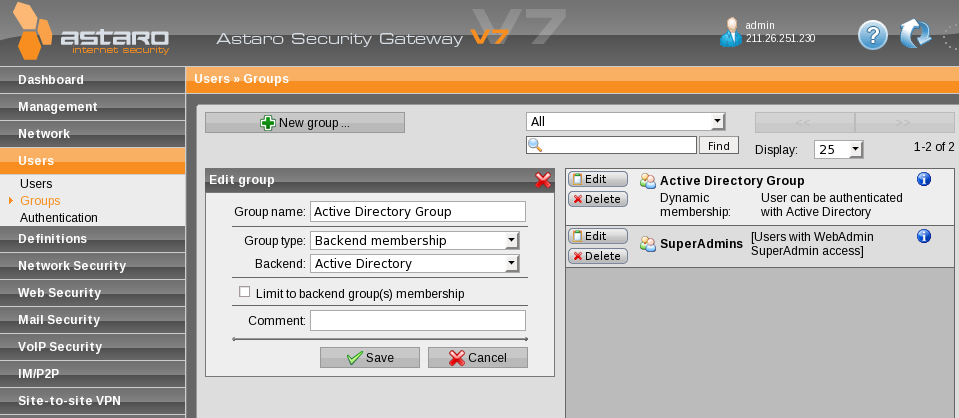
    Please [Go Advanced] for your next post and attach pics of:

    • Edit the group definition of "Active Directory Group"
    • Display the 'Proxy Profiles' tab of 'Web Security >>  HTTP/S Profiles'
    • On your AD machine, edit the user "cas" and show the "Member of" tab (I think that's the name)

    CHeers - Bob
     
    Sophos UTM Community Moderator
    Sophos Certified Architect - UTM
    Sophos Certified Engineer - XG
    Gold Solution Partner since 2005
    MediaSoft, Inc. USA
  • The requested snapshots are attached. I've also included the other 2 http/profile screens, (Filter Assignments, Filter Actions)
  • Either "cas" is not recognized as a member of the "Active Directory Group" group, or the time event isn't working.  Can you confirm that "cas" is Courtney's username in AD, and that "cas" is listed as "Remotely authenticated" in the Astaro list of users?  Can we see the time event "Lunch 1-2pm?"

    The only thing I can imagine that might be a glitch in the Astaro is the "Active Directory Group" group definition.  In an HTTP Profile, I've not tried to use a group that wasn't based on an AD group.  Try changing the definition of "Active Directory Group" by having it limited to the AD group that contains everyone.

    Cheers - Bob
     
    Sophos UTM Community Moderator
    Sophos Certified Architect - UTM
    Sophos Certified Engineer - XG
    Gold Solution Partner since 2005
    MediaSoft, Inc. USA
  • Hi;

    Just confirming that Courtney is cas, and is authenticated, time events image is attached. And I've made the changed the definition of "Active Directory Group" by having it limited to the AD group that contains everyone. I'll check it with the user tomorrow at lunch to see if she can access the web site.

    Thanks 
    Trevor..
  • Hi;

    I just got confirmation from CAS that she still can't access Facebook during lunch. 

    Just when I thought we may have had it fixed.

    Would it pay to setup a new set of rules. Something like. 
    rule 1. block facebook from 6am-1pm.
    rule 2. block facebook from 1pm-7pm.

    Thanks Again.
    Trevor..
  • Does the Content Filter log still contain 
    filteraction="REF_svQLojhSeM (Block Facebook/Myspace)"
     at lunch?

    Now that I look again at your Filter Assignements and Actions, I do see two things that make me uncomfortable.  In Filter Actions, you have two Actions with the word "Default" in them, and neither is the 'Default Content Filter Action'; I don't see these in use anywhere, so they aren't causing any problems.  In the 'Full Internet Allowed 1-2pm', you select the 'Default Content Filter Action' instead of the action allowing Internet access; this may be the problem.

    Is that it?

    Cheers - Bob
     
    Sophos UTM Community Moderator
    Sophos Certified Architect - UTM
    Sophos Certified Engineer - XG
    Gold Solution Partner since 2005
    MediaSoft, Inc. USA
  • Hi;

    I deleted the old rule and creted two new one's that cover the morning period and the arvo period, and that seems to be working.
    Full test will be tomorrow, but so far it looks good.

    Thanks for your help.
  • I  do it with application called FB Limiter an it works for me. 
    Block Facebook
Reply Children
No Data