This discussion has been locked.
You can no longer post new replies to this discussion. If you have a question you can start a new discussion

Cannot determine from logs why "Connectinon refused"

FormerMember
FormerMember
Hi,
I've been trying to set up Proxy Profiles onthe AWG4000 model we purchased, and I'm not able to determine where it's going wrong by looking at the log output.
I successfully set up A/D and have pre-fetched users in a group. I know that authentication is working, and the device is joined to the domain. 
I set up a proxy profile that looks at traffic coming from my subnet, and allows me to access sites, except for one, I blocked Facebook. I set up the default fallback action to block any access. I'm using my own account to access the profile.
When I use the AWG as a proxy and hit Facebook, I get the message that connection is refused. When I hit Google, I again get the message that the connection is refused. 
I'm trying to determine the cause, whether it's not authenticating me properly and using the fallback, or some other issue.
In the HTTP Content filter log I see this pattern repeated
First this:
2009:03:17-13:54:42 SHAWG4000A httpproxy[4222]: [ 0x80ccfb0] send_request_headers (request.c:167) write: Connection refused

Then my username and source IP in another message:
2009:03:17-13:54:42 SHAWG4000A httpproxy[4222]: id="0002" severity="info" sys="SecureWeb" sub="http" name="web request blocked" action="block" method="GET" srcip="172.16.16.208" user="gmoonadm" statuscode="502" cached="0" profile="REF_DefaultHTTPProfile (Default Proxy)" filteraction="REF_DefaultHTTPCFFAction (Default content filter action)" size="2919" time="4966 ms" request="0x80ccfb0" url="www.facebook.com/" exceptions="" error="Connection refused" category="9999" categoryname="Categorization failed"

Then a series of 5 of the following messages:
2009:03:17-13:54:42 SHAWG4000A httpproxy[4222]: [ (nil)] sc_handle_cmd (scr_scanner.c:510) write: Connection refused

Then, another one of these as it can't pull up the search page:
2009:03:17-13:54:42 SHAWG4000A httpproxy[4222]: [ 0x80ccfb0] sc_categorize_url (scr_scanner.c:939) no categorization received for url: www.facebook.com - Google Search
2009:03:17-13:54:42 SHAWG4000A httpproxy[4222]: [ 0x80ccfb0] send_request_headers (request.c:167) write: Connection refused
2009:03:17-13:54:42 SHAWG4000A httpproxy[4222]: id="0002" severity="info" sys="SecureWeb" sub="http" name="web request blocked" action="block" method="GET" srcip="172.16.16.208" user="gmoonadm" statuscode="502" cached="0" profile="REF_DefaultHTTPProfile (Default Proxy)" filteraction="REF_DefaultHTTPCFFAction (Default content filter action)" size="3129" time="60 ms" request="0x80ccfb0" url="http : //www.google.com/search? q=www .facebook.com&rls=com.microsoft:*&ie=UTF-8&oe=UTF-8&startIndex=&startPage=1" exceptions="" error="Connection refused" category="9999" categoryname="Categorization failed" 

And now, I've found this same result no matter what proxy rules I set. I also disabled checking for uncategorized sites, but this didn't make a difference.
 Can someone shed some light on this "Connection refused" message? I have verified with our network administrator that he's not blocking any ports on the External interface of the AWG 4000, and that 1500 MTU is probably a good setting.
Thanks


This thread was automatically locked due to age.

Parents
  • FormerMember
    0 FormerMember
    Reply to my own post - I now notice that I get the same message when trying to hit the built-in exceptions that were built for apple.com and Microsoft. So, it appears I have some global configuration issue here.
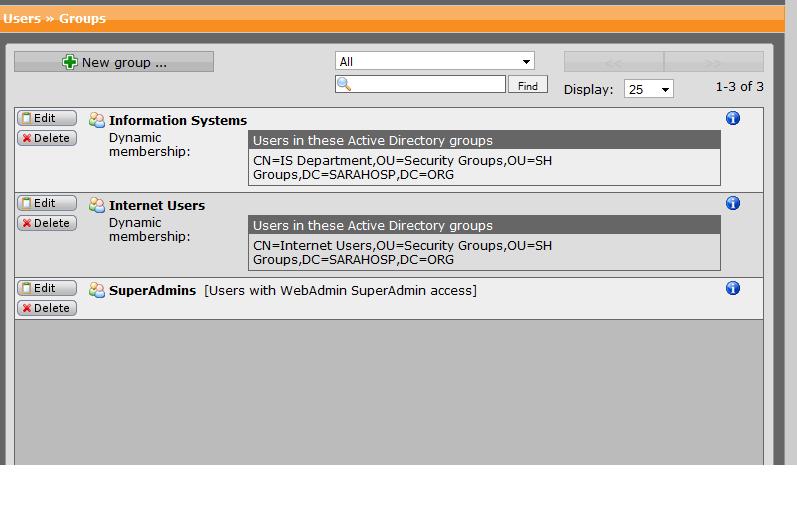
  • Gary, What version are you on?  Could you post a pic of the 'Users >> Groups' backend group authenticated by AD?

    If you have the Proxy Profile in mode 'transparent', you will not be authenticated; you have to set it to 'Active Directory SSO'.  You have to set your browser to connect with the Astaro Proxy at the address of the AWG's Internal interface on port 8080.

    Cheers - Bob
     
    Sophos UTM Community Moderator
    Sophos Certified Architect - UTM
    Sophos Certified Engineer - XG
    Gold Solution Partner since 2005
    MediaSoft, Inc. USA
  • PS, Although you didn't mention it, I assume that you already have joined the AWG to your domain, thus activating SSO.
     
    Sophos UTM Community Moderator
    Sophos Certified Architect - UTM
    Sophos Certified Engineer - XG
    Gold Solution Partner since 2005
    MediaSoft, Inc. USA
  • FormerMember
    0 FormerMember in reply to BAlfson
    Thanks for the reply, BAlfson. Yes, it's joined to the domain, and I have authentication set to Active Directory SSO as well as in the Operation Mode of the Proxy Profile I set up. I've attached a screenshot of the Users>>Groups screen. Firmware Version 7.4 Pattern version 9310,
  • FormerMember
    0 FormerMember in reply to FormerMember
    Another thought, (just checking my basics because it appears I'm not getting out at all), I have the default gateway set to the Internal on eth0, and I have no static routes set at all. I notice under the version block it states "Updated: never".  I can ping all interfaces and can ping both the gateway interfaces from the device and I can resolve internal and external DNS queries from the device.
  • It's exactly what I suspected.  This was a glitch pre-V7.4; The AD group name should have only "IT Department" without the quote marks and without the rest of the AD description.  Make that change and you will be amazed...

    Cheers - Bob
     
    Sophos UTM Community Moderator
    Sophos Certified Architect - UTM
    Sophos Certified Engineer - XG
    Gold Solution Partner since 2005
    MediaSoft, Inc. USA
Reply
  • It's exactly what I suspected.  This was a glitch pre-V7.4; The AD group name should have only "IT Department" without the quote marks and without the rest of the AD description.  Make that change and you will be amazed...

    Cheers - Bob
     
    Sophos UTM Community Moderator
    Sophos Certified Architect - UTM
    Sophos Certified Engineer - XG
    Gold Solution Partner since 2005
    MediaSoft, Inc. USA
Children
  • FormerMember
    0 FormerMember in reply to BAlfson
    Wow! Interesting. Those FQDN were filled in by the AWG as I chose them from the list in AD. I can't wait to try that one out! Thanks, I'll let you know!
  • This was a well-known glitch in V7.30x, but was supposedly corrected in V7.400.  Can you confirm that you set this up prior to Up2Dating to V7.400?

    Thanks - Bob
     
    Sophos UTM Community Moderator
    Sophos Certified Architect - UTM
    Sophos Certified Engineer - XG
    Gold Solution Partner since 2005
    MediaSoft, Inc. USA
  • FormerMember
    0 FormerMember in reply to BAlfson
    Hmm. I just changed the groups to not include the FQDN Information and resaved, and still the same. I also recreated the Proxy profiles for good measure. Same message. 
    I was looking at the logs for the Up2Date info and todays logs indicate "all authentication servers failed". I guess the glitch may not be the problem right now.
  • "All authentication servers failed"" sounds like the connection to the outside isn't functionning.

    I also assumed that you had enabled masquerading.

    Cheers - Bob
     
    Sophos UTM Community Moderator
    Sophos Certified Architect - UTM
    Sophos Certified Engineer - XG
    Gold Solution Partner since 2005
    MediaSoft, Inc. USA
  • FormerMember
    0 FormerMember in reply to BAlfson
    This is a Web Gateway... does it even have that feature? NAT is being performed by Cisco ASA at the perimeter.
  • So, what are the IP addresses of the internal and external interfaces?  192.168.x.a and 192.168.y.b, or are they bridged?  When you disable the proxy and put in a packet filter rule 'Any -> Any -> Any', can you get out?
     
    Sophos UTM Community Moderator
    Sophos Certified Architect - UTM
    Sophos Certified Engineer - XG
    Gold Solution Partner since 2005
    MediaSoft, Inc. USA
  • FormerMember
    0 FormerMember in reply to BAlfson
    I guess it was more basic than I was looking... My network admin pointed out to me that we are heavily subnetted, and in fact, I will need to define static routes from all of our client subnets through the box. As soon as we created the static route from the client subnet, it worked. I had been thinking in terms of a flat structure (which is not the reality of what we have here). Thanks for your suggestions.
  • Great!  It sounds like you've done an exceptional job of understanding the use of HTTP/S Proxy Profiles in an AD environment.

    Depending on your physical topology, you might be able to use an interface route instead of having to fiddle endlessly with multiple subnets.

    Cheers - Bob
     
    Sophos UTM Community Moderator
    Sophos Certified Architect - UTM
    Sophos Certified Engineer - XG
    Gold Solution Partner since 2005
    MediaSoft, Inc. USA
  • FormerMember
    0 FormerMember in reply to BAlfson
    That's interesting. So, with the interface route, wouldn't I still have to specify, for example, 172.16.x.0 goes through the Internal interface, and 172.18.x.0 also goes through the interface, etc.? The box resides on 172.17.2.0 which is reserved for a DMZ of sorts.
  • You don't have that many subnets anyway, so there's no point in playing with the "trick" I learned here last year.  Basically, it's to minimize the number of rules that one has to create by lumping everything together in a network definition like the following which was made for the other interface (and makes more sense for it):

    Name: Internet
    Type: Network
    Address: 0.0.0.0
    Interface: External
    Netmask: 0.0.0.0

    I had a different thought - I haven't tried it in a situation where the Astaro isn't on the perimeter, but I wonder if you couldn't just just define 172.17.2.?/255.252.0.0 for your Internal interface, activate the HTTP Proxy with 'Internal (Network)' and be done without writing any routes.  Assuming, of course, that the External interface and the perimeter firewall aren't in 172.16.0.0/14.

    Cheers - Bob
     
    Sophos UTM Community Moderator
    Sophos Certified Architect - UTM
    Sophos Certified Engineer - XG
    Gold Solution Partner since 2005
    MediaSoft, Inc. USA