This discussion has been locked.
You can no longer post new replies to this discussion. If you have a question you can start a new discussion

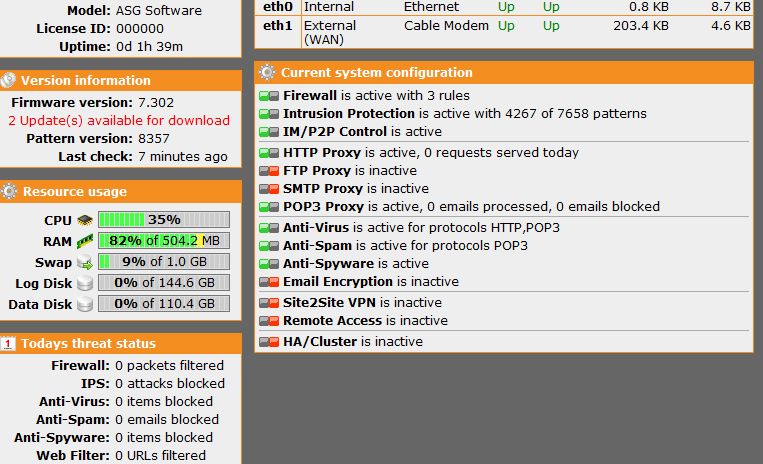
Finally got ASG working...but

content filtering does not work.  I enable content filter and block nudity and still able to access playboy.com website.  I even added playboy.com in the additional sites to block, but nothing.  Do I have to enable anything else to make this work?

Thanks in advance


This thread was automatically locked due to age.

Parents
  • What mode is the HTTP proxy in?  If your using transparent mode, then it should just work.  If using standard mode, then you'll need to set the proxy (default is port 8080) in the browsers of your client systems.
     
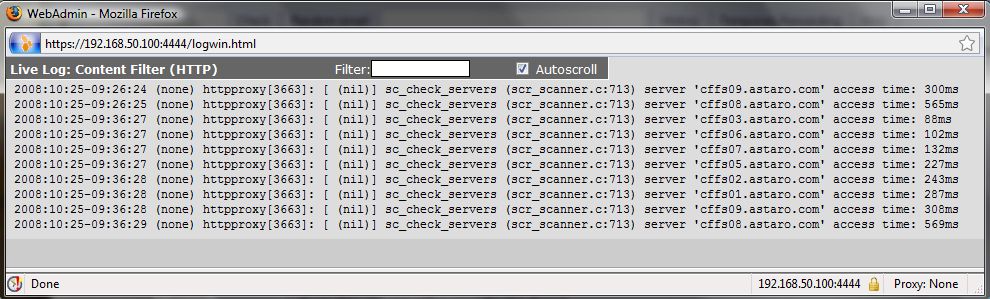
    Take a look in the Content Filter (HTTP) log  and check what's going on with this site.
     
    Did you accidentally add the client system your using to visit playboy.com or your local network to the Transparent mode skiplist?  If you did, then it/they won't be filtered at all.
     
    These are just a few of several possible troubleshooting steps you can take.
    __________________
    ACE v8/SCA v9.3

    ...still have a v5 install disk in a box somewhere.

    http://xkcd.com
    http://www.tedgoff.com/mb
    http://www.projectcartoon.com/cartoon/1
  • Thank you for replying,

    The HTTP proxy is setup in transparent mode.  I've attached the log for content filter http (pic attached).  I don't have any client added to the transparent mode skiplist (pic attached).  I appreciate any other suggestions I could try.

    Thanks again for your help
  • I change HTTP proxy from transparent mode to standard mode and content filtering works.  When I changed it back....does not work!

    Anyone experienced this?

    Thanks
  • Weren't you playing with some of the default port settings?

    Cheers - Bob
     
    Sophos UTM Community Moderator
    Sophos Certified Architect - UTM
    Sophos Certified Engineer - XG
    Gold Solution Partner since 2005
    MediaSoft, Inc. USA
  • the only port settings I changed is when I used the standard mode to 8080.  When I change it back to transparent mode, I remove the port 8080 settings.

    Thanks
  • Is this limited to nudity?  Set a bunch of content filters and see if anything is blocked.  If that doesn't stop anything, try the negative function (everything blocked but those you allow).

    If that's not working, is there any way around the Astaro (is it getting bypassed)?

    Run a tracert from your workstation to playboy.com.

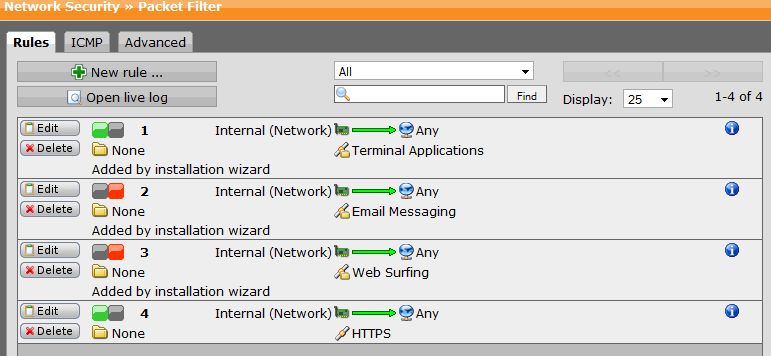
    If the tracert is going through the Astaro, show us your packet filters and NAT rules.

    Also, do something Bill Gates would do.  Reboot the Astaro.  And update yourself to 7.304 (the up2dates are already on your Astaro).
  • Thanks for replying,

    I've include: games/gamble, job search and I can get through.  Also tried the negative as you suggested and still not blocking.  Tracert from my PC to playboy.com is not going through astaro. Packet filter and NAT rules are attached.  I'm also running current version 7.304.  Rebooting now....

    Thanks again
  • Tracert from my PC to playboy.com is not going through astaro.


    If it's not going through the Astaro - what's the route?  Take the Astaro off line and figure out how the signal is getting out.
  • If it's not going through the Astaro - what's the route?  Take the Astaro off line and figure out how the signal is getting out.

    1st hop is my router and not going through the astaro at all.  Wonder if I have to bridge the two interfaces?  My setup


               (eth1 - 192.168.50.107 - receiving IP from DHCP router)
    router 
  • It's not clear exactly what you've got configured here, so here's what you would typically want to have:

    LAN (workstations)  switch(es)  astaro  upstream device (usually DSL, Cable, T1, etc).  Only in a more complex installation could you need to use another router between your Astaro and your upstream device.

    It's not common to have your public and private side IP addresses in the same subnet as you've listed above (192.168.50.1xx).  The Astaro is typically set to use private (non-routable) addressing (192.168.x.x, 10.x.x.x, etc.) to your downstream switch(es).  The Astaro is also typically set to use public (routable) addressing  (x.x.x.x (the address from your ISP)) to your upstream device.

    Assuming your upstream device is a router, and thus you could bridge either the Astaro or the upstream router - bridge the upstream router.  The Astaro is extremely flexible and capable and much more sophisticated than a "regular" router.  Do your NAT, DNS, DHCP, etc. all from the Astaro. Your content filtering will work and you can control it all from one easy to use interface.

    If this scenario isn't correct or can't work, then tell us again how you have your network connected in a bit more detail.
Reply
  • It's not clear exactly what you've got configured here, so here's what you would typically want to have:

    LAN (workstations)  switch(es)  astaro  upstream device (usually DSL, Cable, T1, etc).  Only in a more complex installation could you need to use another router between your Astaro and your upstream device.

    It's not common to have your public and private side IP addresses in the same subnet as you've listed above (192.168.50.1xx).  The Astaro is typically set to use private (non-routable) addressing (192.168.x.x, 10.x.x.x, etc.) to your downstream switch(es).  The Astaro is also typically set to use public (routable) addressing  (x.x.x.x (the address from your ISP)) to your upstream device.

    Assuming your upstream device is a router, and thus you could bridge either the Astaro or the upstream router - bridge the upstream router.  The Astaro is extremely flexible and capable and much more sophisticated than a "regular" router.  Do your NAT, DNS, DHCP, etc. all from the Astaro. Your content filtering will work and you can control it all from one easy to use interface.

    If this scenario isn't correct or can't work, then tell us again how you have your network connected in a bit more detail.
Children
  • Assuming your upstream device is a router, and thus you could bridge either the Astaro or the upstream router - bridge the upstream router.  The Astaro is extremely flexible and capable and much more sophisticated than a "regular" router.  Do your NAT, DNS, DHCP, etc. all from the Astaro. Your content filtering will work and you can control it all from one easy to use interface.

    If this scenario isn't correct or can't work, then tell us again how you have your network connected in a bit more detail.

    I apologized if I didn't explained it correctly and the drawing didn't help because viewing afterward doesn't make it any clearer...[:O]

    My setup is exactly as you described above.  I'm trying to setup the astaro as a bridge.  My router is a Buffalo WHR-G54S running dd-wrt firmware and I would rather not touch the configuration right now as I'm not yet familiar with using astaro yet.  I'm sure once I have it working I will implement as you suggested (router as bridge and astaro as router)

    My connections are as followed

    astaro has dual NIC Broadcom NetXtreme Gigabit Ethernet

    LAN (workstations) --> sw  router --> cable

    I bridge the two interfaces (eth0 and eth1) to create br0.  This is what happened when I plug the eth1 cable into the router

    - router goes into diag mode
    - all workstations (wired and wireless) hosed or lose connection

    If I uplug the eth1 cable from the router, all back to normal operations

    Thanks again
  • I thought you said on the 23rd that you had this resolved?  I still say it sounds like you have created a loop somehow.  If you plug the Astaro into the Buffalo, but not into the lan, what happens?
     
    Sophos UTM Community Moderator
    Sophos Certified Architect - UTM
    Sophos Certified Engineer - XG
    Gold Solution Partner since 2005
    MediaSoft, Inc. USA
  • I'm trying to setup the astaro as a bridge.


    http://portal.knowledgebase.net/display/2n/kb/article.asp?aid=294827

    This is a Astaro v.7.300 Admin Guide in .pdf.   Lots of good info.  "Bridging" starts on page 96.  Read first (it's quick), and then let us know if you have questions.
  • http://portal.knowledgebase.net/display/2n/kb/article.asp?aid=294827

    This is a Astaro v.7.300 Admin Guide in .pdf.   Lots of good info.  "Bridging" starts on page 96.  Read first (it's quick), and then let us know if you have questions.

    link is not valid

    Balfon - it did work if the configuration wasn't bridge

    Thanks
  • link is not valid


    Go here: Astaro Knowledgebase

    Download the ASG-V7-3-Administration-Guide-EN
  • I found it at Astaro Knowledgebase

    read it and did it exactly as the guide instructed on how to create a bridge. Unless you guys have some other suggestion on how my cable should connect, I'm out of idea

    LAN (workstations) --> switch  router --> cable

    Thanks
  • I feel like I'm not communicating very clearly here.  Let me try again.

    If you only connect one Astaro interface to the Buffalo and leave the other disconnected, what happens?  Can you ping the Astaro from the Buffalo or vice versa?  If not, then you have a hardware problem.

    Can you ping the Astaro from any of the workstations?  Can any workstation ping the Buffalo?  If so, then you can't use a bridge because you'll create a loop.

    Cheers - Bob
     
    Sophos UTM Community Moderator
    Sophos Certified Architect - UTM
    Sophos Certified Engineer - XG
    Gold Solution Partner since 2005
    MediaSoft, Inc. USA
  • I feel like I'm not communicating very clearly here.  Let me try again.

    If you only connect one Astaro interface to the Buffalo and leave the other disconnected, what happens?  Can you ping the Astaro from the Buffalo or vice versa?  If not, then you have a hardware problem.

    Can you ping the Astaro from any of the workstations?  Can any workstation ping the Buffalo?  If so, then you can't use a bridge because you'll create a loop.

    Cheers - Bob

    when only 1 astaro interface connected to the Buffalo
     - I can access the astaro admin page from any workstation (wired or wireless)
     - I can ping the astaro interface from any workstation (wired or wireless)
     - I can ping from my buffalo router to the astaro interface
     - I can ping from any workstation (wired or wireless) to my buffalo router

    Understood.  Bridge is disabled.

    As the title suggested.  I got it working without creating a bridge, but ran into a problem with content filtering (chk beginning post).  If I set the HTTP global proxy in standard mode content filtering works, when I change to transparent mode it does not.
  • when only 1 astaro interface connected to the Buffalo
     - I can access the astaro admin page from any workstation (wired or wireless)
     - I can ping the astaro interface from any workstation (wired or wireless)
     - I can ping from my buffalo router to the astaro interface
     - I can ping from any workstation (wired or wireless) to my buffalo router


    There appears to be a problem with the network design. If only one cable is connected to the router, from your diagram the wired computers should not be able to access the astaro.

    Is the switch also connected directly to the router? If it is this would explain why setting up a bridge did not work for you as the router would have seen to mac addresses for the same IP.

    I'd just like to add, even though it has been mentioned before, the wireless computers will never have there traffic transparently filtered by the astaro with this setup. If you want the wireless computers to be transparently filtered you will need to put the astaro on the edge of the network.
  • Thanks all for your input.  I won't take up any more of your time.  I was trying to setup a bridge similar to this type of deployment

    Deployment Options
    Introduction - UntangleWiki