This discussion has been locked.
You can no longer post new replies to this discussion. If you have a question you can start a new discussion

Wireless PDA download error

I'm getting this error in http proxy logs
error=deferred download status refresh timeout, removing" category="1710

I'm using transparent proxy. 
Windows Mobile clients can not download any files. It shows downloading page
Please wait, no URL link displayed, stage 1 of 3 downloading.

What could be could be wrong. All wireless clients get IP from Astaro DHCP as my Internal Network.

Also the host xp machine where ASG running on VMware Server frequently getting Network Timeout, I have to refresh several times then pages are loaded and after sometime it happens again. Nome of the other Internal client get this Network Timeout Page


This thread was automatically locked due to age.

Parents Reply Children
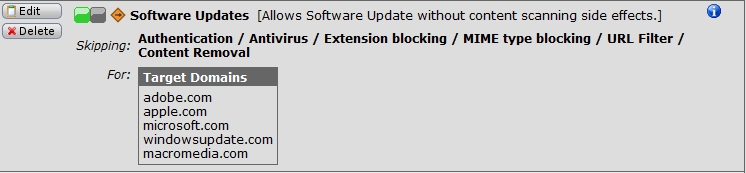
  • We routinely configure exceptions for software updates, and would recommend that to everyone above.  Transparent mode skiplist is a quick way and effective, but we usually reserve that for things like trusted Citrix servers that don't work well with the HTTP Proxy.

    I could be wrong, but I think the problem is an indiosyncracy of the download servers, and not something that Astaro needs to repair, and that creating an exception is the proper response.

    Cheers - Bob
     
    Sophos UTM Community Moderator
    Sophos Certified Architect - UTM
    Sophos Certified Engineer - XG
    Gold Solution Partner since 2005
    MediaSoft, Inc. USA
  • We routinely configure exceptions for software updates, and would recommend that to everyone above.  Transparent mode skiplist is a quick way and effective, but we usually reserve that for things like trusted Citrix servers that don't work well with the HTTP Proxy.

    I could be wrong, but I think the problem is an indiosyncracy of the download servers, and not something that Astaro needs to repair, and that creating an exception is the proper response.

    Cheers - Bob


    No offense Bob, but you are wrong.

    Recommending that a site be added to the skiplist only decreases the security of the network that Astaro is protecting and also the usefulness of the http filter.

    How could this be the download server's fault? Without Astaro in-line, download succeeds. Insert Astaro, download fails.
  • Ugh! Figured this one out finally...bug was between keyboard and chair.

    Turns out NoScript (the Firefox plugin) is to blame.

    Astaro redirects to "fw-notify.net." NoScript had not been configured to allow scripts to run at this site. Thus, downloads appeared to hang. :/

    Hope this helps everyone. Sorry for the misplaced blame.
  • Glad you found the origin of your problem; it sounds like you have good mental health!

    You're right that it's not advisable to add lots of sites to the transparent mode skiplist.  That's why we don't recommend that unless it's necessary for things like Citrix servers hosted outside the Astaro.  Plus, that only works in transparent mode.

    When you install a new Astaro, two exceptions are created by Astaro:
    [LIST=1]
    • 'Antivirus / Extension blocking / Content Removal / Authentication / URL Filter' for adobe.
    • 'Antivirus / Extension blocking' for apple, microsoft and windowsupdate
    [/LIST]
    This is the correct solution for specific sites that you need, but don't want to trust completely.  If you turn off the windowsupdate exception then check the logs, you'll see that it's the Microsoft server that drops the connection because the Astaro is cogitating.

    So, although I wouldn't call this a bug, there might be a way for the developers to avoid having the remote site decide that it doesn't have a client anymore.

    Cheers - Bob
     
    Sophos UTM Community Moderator
    Sophos Certified Architect - UTM
    Sophos Certified Engineer - XG
    Gold Solution Partner since 2005
    MediaSoft, Inc. USA