This discussion has been locked.
You can no longer post new replies to this discussion. If you have a question you can start a new discussion

Possible breach

Hi, 

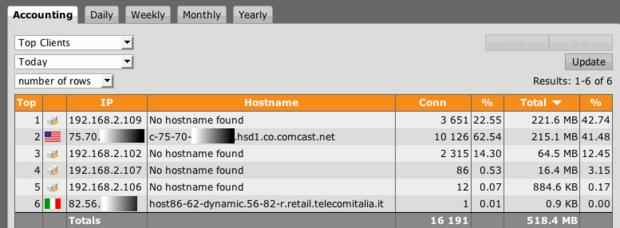
I had a weird occurrence yesterday. I had the following entry in the web security usage report


It is at the bottom, the "anonymous" access... I only have two clients on my network. No pinholes in the FW (no inbound rules). Here is the second very strange occurrence that was from Taiwan! :


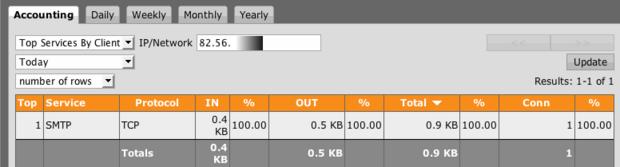
Which showed access to the SMTP service. Now I only have the SMTP proxy activated in order to receive notifications. I do not have a relay or smtp server for that matter. This is disturbing to say the least... I took measures to turn off the SMTP proxy in the mean time and I am watching my network a little more closely than usual. Does anyone know how/why this is happening. Especially if I don't have any external access to my FW... 


BTW: I did a 'Whoisip" on the ip and found it going to here:

OrgName:    Asia Pacific Network Information Centre 
OrgID:      APNIC
Address:    PO Box 2131
City:       Milton
StateProv:  QLD
PostalCode: 4064
Country:    AU

ReferralServer: whois://whois.apnic.net

NetRange:   219.0.0.0 - 219.255.255.255 
CIDR:       219.0.0.0/8 
NetName:    APNIC5
NetHandle:  NET-219-0-0-0-1


Regards
Jazzie


This thread was automatically locked due to age.
Parents
  • Probably someone scanning your external IP(s).

    Shouldn't be a concern as long as you aren't allowing any unknown external traffic through the firewall.

    Barry
  • Hi BarryG!

    That may very well be! But, how does that explain the web proxy usage (1.2 Megs)?? this was from the anonymous user. How does one get anonymous on the fw anyways?

    The smtp access was small enough not to cause too much panic. It is the other bandwidth from this anonymous user that concerns me...

    Regards
    Jazzie
  • Make sure you don't have the http proxy allowing external traffic, or even listening on the EXT interface, if possible.

    Then, check it with a portscanner from outside, or use one of the online portscanners such as the ShieldsUp test at grc.com

    the proxy port (80 or 8080 IIRC, depending on how you have the proxy setup) should be listed as 'closed' or 'filtered'.

    Barry
  • [SIZE=2]Hi, what are your packet filter rules?[/SIZE]
  • BarryG-

    Did a few port scans from GRC and Symantec. Both came out "Stealth" (closed)  Thnx for the heads up...

    RFCat_vk-

    Hi,

    I have all outbound rules for web surfing, email clients, IM (Adium), LOTR (online) and Guild wars. I only enable the game ports when needed. Otherwise they are off.  No icmp traffic and have spoof protection turned on normal. I still wonder how the anonymous account got access?

    Regards
    Jazzie
  • Ok, 

    here it is again, this time it is from Italy, using the SMTP service again!


    And here is the SMTP usage:


    So in the mean time, I have turned off SMTP proxy usage all together. Better that then some kind of hole in the SMTP service, letting anyone use the service. Which is not favorable. The downside is no notifications, but I could live with that... 

    Regards
    Jazzie
  • Jazzie05,

    You did not answer BarryG. In the HTTP Proxy > Allowed Networks what do you have listed? It should just list your internal networks. Make sure you did not put the ANY definition in the Allowed Networks for the HTTP and SMTP Proxy.
  • Hi-con-

    It is all set to my internal network. I would never make a mistake and set it to any. I have the internal server portion of my proxy going to my private ip...


    Regards
    Jazzie
  • Hi,
    I would suggest that you have a look at the allowed protocols/ports in your various proxy configurations, because somewhere there is an "any" hiding.

    Ian M
  • Hallo,

    one idea, have you a nat/dnat/snat-rule and you have enabled the option "Automatic 
    packet filter rule: " ? Then you have a rule, this rule is not visible in the packet filter screen.
    I had the same, the port 443 was open after a external portscan, was a dnat-rule for the Windows Home Server with enabled option for automatic packet filter rule. In the packet filter screen this rule was not visible.
    Hope, it will help you.

    Best regards for the new year 2008

    Egbert
Reply
  • Hallo,

    one idea, have you a nat/dnat/snat-rule and you have enabled the option "Automatic 
    packet filter rule: " ? Then you have a rule, this rule is not visible in the packet filter screen.
    I had the same, the port 443 was open after a external portscan, was a dnat-rule for the Windows Home Server with enabled option for automatic packet filter rule. In the packet filter screen this rule was not visible.
    Hope, it will help you.

    Best regards for the new year 2008

    Egbert
Children
No Data