This discussion has been locked.
You can no longer post new replies to this discussion. If you have a question you can start a new discussion

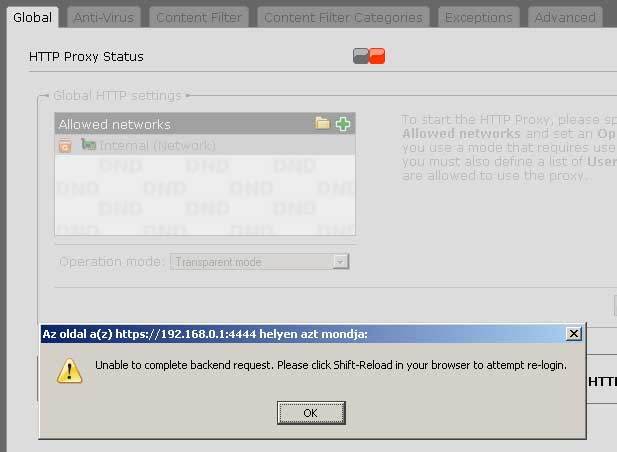
http proxy enable problem

the problem is, that i simply can't enable the http proxy, i got an "unable to complete.." message every time. this one is new for me, i had no problems when i installed 7.000 but i turned it off after a try. here are same lines from the http deamon log, i hope it helps to find an answer:


2007:02:08-03:34:07 (none) httpd: 192.168.0.11 - - [08/Feb/2007:03:34:05 +0100] "POST /index.plx HTTP/1.1" 200 2261
2007:02:08-03:34:08 (none) httpd[31633]: [error] [client 127.0.0.1] access to /var/webadmin/ failed, reason: SSL connection required
2007:02:08-03:34:08 (none) httpd: 127.0.0.1 - - [08/Feb/2007:03:34:08 +0100] "GET /" 403 -
2007:02:08-03:34:09 (none) httpd[31635]: [error] [client 127.0.0.1] access to /var/webadmin/ failed, reason: SSL connection required
2007:02:08-03:34:09 (none) httpd: 127.0.0.1 - - [08/Feb/2007:03:34:09 +0100] "GET /" 403 -
2007:02:08-03:34:09 (none) httpd: 192.168.0.11 - - [08/Feb/2007:03:34:07 +0100] "POST /index.plx HTTP/1.1" 200 716
2007:02:08-03:34:11 (none) httpd: 192.168.0.11 - - [08/Feb/2007:03:34:09 +0100] "POST /index.plx HTTP/1.1" 200 898
2007:02:08-03:34:12 (none) httpd[31636]: [error] [client 127.0.0.1] access to /var/webadmin/ failed, reason: SSL connection required


This thread was automatically locked due to age.

Parents Reply Children
  • The messages means that there was a temporarily communication problem between the pop3 proxy and the content filter framework daemon (cffd). The cffd is used to scan messages for pop3 and smtp.

    If the error message occurs only one or two times is not a permanent problem and the proxy works well.
  • i got this error message every time i enable the pop3 proxy. and if i enable the proxy no mail comes through. outlook shows no error, just no new message
  • Are you sure that you disabled the prefetch mode?

    If prefetch is enabled this is the normal behaviour.
  • prefetch, anti virus and anti spam scanning are disabled. in the live log i see the same line "..communication error with cffd, could not reset database"'
  • From past experience with prefetch,
    1/. you need to disable prefetch and the pop3 proxy.
    2/. open a packet filter rule to allow 110 (pop3) through.
    3/. do a send/receive 
    4/. wait for at least 30 minutes until all e-mail has been downloaded
    5/. disable the 110 packet filter
    6/. re-enable the pop3 proxy without prefetch until an up2date is released fixing a couple of bugs that have been identified by Astaro.

    The error messages are caused by a couple of things
    1/. same record in database
    or
    2/. empty database and for some reason it doesn't get initalised correctly

    Mine worked correctly without prefetch being enabled after the above steps. You don't get full spam control, but you do get some spam caught in the quarantine manager.

    I hope this helps.

    Ian M[:)][:S][:$]

    Yes, I know this is the http proxy page.
  • thanks RFCat_vk, it works!! do have any idea to solve the proxy enable problem?
  • frufru,
    my solution is nearly the worst case. Shutdown, power off, power on, restart.

    Then try again.

    Ian M[:)]
  • tried before, but i gave up the restart method after the third time..[:)]