
This discussion has been locked.
You can no longer post new replies to this discussion. If you have a question you can start a new discussion

website getting timeout error

We have an offsite office which is connected to us through VPN. whereas we have XG550, they are using SG125.

While accessing a specific page of our inhouse website through VPN users at other location are getting timeout error.

The page itself takes time at our location ~ around 2 to 3 mins, since its loading data.

Is there some method through which we could increase time out limit on sg125 for accessing website.
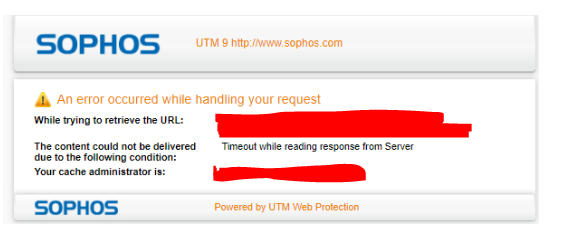
As I checked there is no latency or packet drop on network or on VPN connection. Please guide.


This thread was automatically locked due to age.

Top Replies

  • I think if the page is desired to load this long, you just want to exclude the page from beeing processed by the webproxy on SG. Exclude the webserver from the allowed destinations.

    Skip Transparent Mode Destination Hosts/Nets
    Jump to answer
Parents Reply Children
  • Web Protection > Filtering Options > Misc

    Transparent Mode Skiplist

    Using this option is only meaningful if the Web Filter runs in transparent mode. Hosts and networks listed in the Skip transparent mode hosts/nets boxes will not be subject to the transparent interception of HTTP traffic.

    If you do not use transparent mode - just place the URL in some Exception rule Web Protection > Filtering Options > Exceptions

  • Thanks. I have added them in exceptions. will monitor if this settings work

  • Hi LHerzog,

    As checked still user are getting time out error since page is loading.

    I did both settings, added them in skip list and exception still getting timeout error.

  • If you have excluded the website from Webproxy there should'nt be a proxy warning anymore.

    Please confirm that the clients and the SG 125 firewall resolve the website on the remote location with the same IP-Address that is configured on the webserver itself.

    Which firewall is presentig the block - timeout message? The remote firewall or the HQ firewall? You should find it in the webproxy logs. Maybe you have excluded the IP on the wrong firewall.