This discussion has been locked.
You can no longer post new replies to this discussion. If you have a question you can start a new discussion

SSL VPN Split tunneling - when enabled I can't access my internal network.

Hi,

I have a Sophos UTM setup as a VPN server.  Everything is working fine - I can RDP and access my servers in the internal network.  Due to a compliance issue, I need to disable split-tunneling.  However, when I disable split-tunneling by changing Remote Access>SSL>Local networks>Any, I can't access my servers in the internal network.   I still have my internal network listed in Local Networks.  What configuration do I need to add so I can access my servers in the internal network?

Thanks

Eddie


This thread was automatically locked due to age.

Top Replies

  • in reply to eddiejk +1 suggested

    Hi Eddie and welcome to the UTM Community!

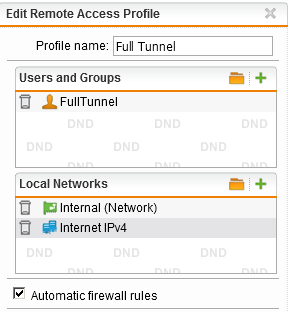
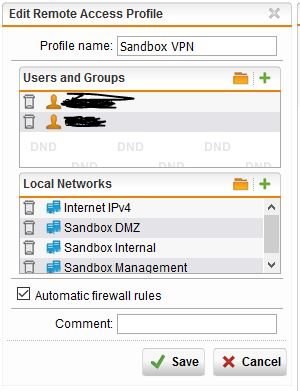
    The "Any" object gives strange results in several places.  Try:

    If you don't want to allow all access, then you will want to de-select 'Automatic firewall rules' and make your own.  You might also want to add "VPN Pool (SSL)" to 'Allowed Networks' in Web Filtering.

    Cheers - Bob

    Jump to answer
Parents Reply Children
  • Not sure what you're doing to enable/disable split tunneling.

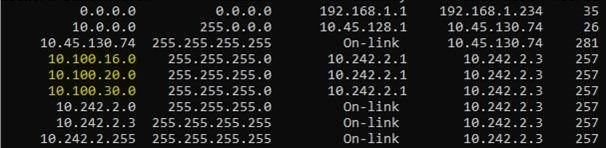
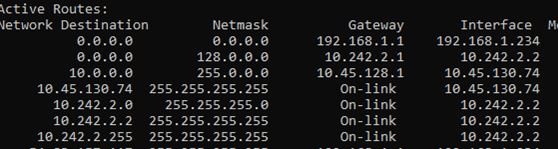
    I still think your real problem is your 10.0.0.0/8 subnet.  That's got to be creating routing problems with the smaller 10. subnets.

    Cheers - Bob

     
    Sophos UTM Community Moderator
    Sophos Certified Architect - UTM
    Sophos Certified Engineer - XG
    Gold Solution Partner since 2005
    MediaSoft, Inc. USA
  • Hi Bob,

    Yes, you are correct.  That 10.0.0.0/8 subnet was created by our corporate IT so all of our work laptops have that.  I tried using a different laptop and it did work.