This discussion has been locked.
You can no longer post new replies to this discussion. If you have a question you can start a new discussion

[9.201-25] httpproxy high CPU

Hi,
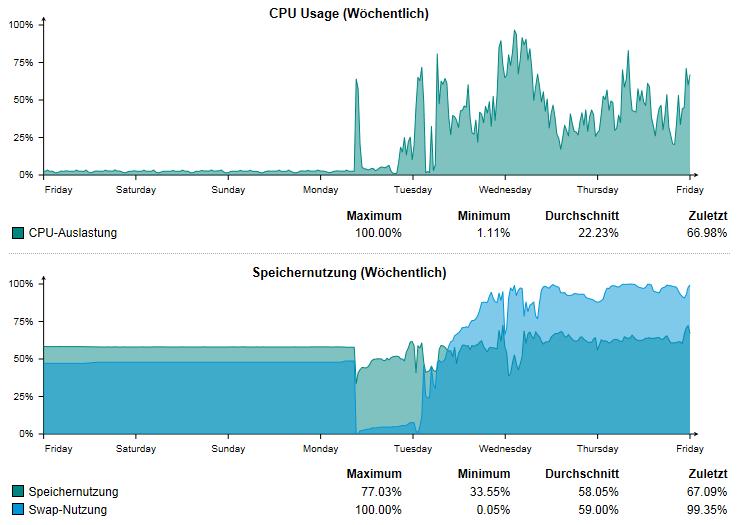
after the update from 9.111-7 to 9.201-25 do we have Problems with the Performance.
Hardware: HA two Sophos UTM9 ASG320
CPU is switching between 50 an 100%.
In the Process list i see the httpproxy is up to 61%

61.3 39.4 2010332 1586496 ?     Ssl  May28 1537:11 /var/chroot-http/usr/bin/httpproxy -f -c /var/chroot-http -u httpp

Swap is after the Update also on nearly 100%

We tried to go back on 9.111-7 via Backup restore, but it dosen´t work.
After the restore we have still the firmwar 9.201-25


This thread was automatically locked due to age.

Parents
  • OK here is my recommendations, 

    - Change pattern update to every 2 hours or more (with 600 users id recommend maybe once every 12 hours)

    - Change IPS settings to last 12 month, and untick rules that you don't host internally i.e pop3, sql server, etc

    - If you are using transparent proxy, ensure that its set as transparent. When upgrading from 9.1 to 9.2 it seems like it sets it as "Full transparent, but this is not a selectable option any more and is greyed out" so set it to "Transparent"

    Then SSH into the box - and first lets turn all settings off

    cc set http sc_local_db none
    cc set http use_sxl_urid 0

    /var/mdw/scripts/httpproxy restart

    cd /var/storage/chroot-http/var/pattern/sfcontrol
    rm sfcontrol
    ls


    (ls should show no folders)


    exit out of SSH

    - Restart both UTM

    log back in to SSH 

    cc set http sc_local_db mem

    /var/mdw/scripts/httpproxy restart

    After a few minutes it will start downloading the database (this will take sometime about 15 minutes - ensure that your patten update is much greater than 15 minutes)

    You can check how much its downloaded by going to

     ls -l /var/chroot-http/var/pattern/sfcontrol

    and should show something like this (or be downloading up to this number):
    total 403052
    -rw------- 1 httpproxy httpproxy 412719748 Jun  3 23:04 sfcontrol


    Although 600 users is alot for this poor box, really you want a 5 series or a new SG series.

    If none of these improvments help it might be better to stay at 9.1
Reply
  • OK here is my recommendations, 

    - Change pattern update to every 2 hours or more (with 600 users id recommend maybe once every 12 hours)

    - Change IPS settings to last 12 month, and untick rules that you don't host internally i.e pop3, sql server, etc

    - If you are using transparent proxy, ensure that its set as transparent. When upgrading from 9.1 to 9.2 it seems like it sets it as "Full transparent, but this is not a selectable option any more and is greyed out" so set it to "Transparent"

    Then SSH into the box - and first lets turn all settings off

    cc set http sc_local_db none
    cc set http use_sxl_urid 0

    /var/mdw/scripts/httpproxy restart

    cd /var/storage/chroot-http/var/pattern/sfcontrol
    rm sfcontrol
    ls


    (ls should show no folders)


    exit out of SSH

    - Restart both UTM

    log back in to SSH 

    cc set http sc_local_db mem

    /var/mdw/scripts/httpproxy restart

    After a few minutes it will start downloading the database (this will take sometime about 15 minutes - ensure that your patten update is much greater than 15 minutes)

    You can check how much its downloaded by going to

     ls -l /var/chroot-http/var/pattern/sfcontrol

    and should show something like this (or be downloading up to this number):
    total 403052
    -rw------- 1 httpproxy httpproxy 412719748 Jun  3 23:04 sfcontrol


    Although 600 users is alot for this poor box, really you want a 5 series or a new SG series.

    If none of these improvments help it might be better to stay at 9.1
Children
No Data