This discussion has been locked.
You can no longer post new replies to this discussion. If you have a question you can start a new discussion

additional network card

Hello

I've four network cards on my astaro 6.314, i need more interfaces for a new internet line.
when i put in a new card every eth position change and nothing works any more.

what is the correct way to add a new network card?

thanks


This thread was automatically locked due to age.

Parents
  • Normally, Astaro Support will suggest reloading the ASG software if you want to change the hardware configuration.  This is because unnecessary drivers are not even loaded when you do an Astaro install.  In fact, if you use a new NIC that is identical to one already in use, the driver will be available, so you do not have to re-install.

    It sounds like either you'll need to move some cables around or modify your configuration slightly.  Read the following first: https://community.sophos.com/products/unified-threat-management/astaroorg/f/52/t/26986

    Cheers - Bob
     
    Sophos UTM Community Moderator
    Sophos Certified Architect - UTM
    Sophos Certified Engineer - XG
    Gold Solution Partner since 2005
    MediaSoft, Inc. USA
Reply
  • Normally, Astaro Support will suggest reloading the ASG software if you want to change the hardware configuration.  This is because unnecessary drivers are not even loaded when you do an Astaro install.  In fact, if you use a new NIC that is identical to one already in use, the driver will be available, so you do not have to re-install.

    It sounds like either you'll need to move some cables around or modify your configuration slightly.  Read the following first: https://community.sophos.com/products/unified-threat-management/astaroorg/f/52/t/26986

    Cheers - Bob
     
    Sophos UTM Community Moderator
    Sophos Certified Architect - UTM
    Sophos Certified Engineer - XG
    Gold Solution Partner since 2005
    MediaSoft, Inc. USA
Children
  • I would:

    1) make a configuration backup
    2) Install the additional card.
    3) reload the system from .iso
    4) configure it enough so you can up2date to the same, or greater version than the backup was made under.
    5) Restore the backup.
    6) configure your additional interface.

    Note that your existing nics may show up in a different order after adding an additional NIC..  It would be a good idea to jot down the MAC addresses of each card before Step 2, and compare them to the reloaded system so you know which interface is which after the reload with the additional card.

    I also recommend that you up2date to 7.405 when you get a chance; the performance of the new version is greatly improved, and it has a lot of new features.

    CTO, Convergent Information Security Solutions, LLC

    https://www.convergesecurity.com

    Advice given as posted on this forum does not construe a support relationship or other relationship with Convergent Information Security Solutions, LLC or its subsidiaries.  Use the advice given at your own risk.

  • Hello

    Thanks for the answers

    all cards are 3com, so i didn't have to install the driver, the system recognize them.
    I had switched the cable but some didn't work. (i tryed all solutions :-))

    now i'll install on a other "workstation" Ver.7.4 with enough interfaces.

    the problem is we have a new internet connection (the old is stil online) with an other ip-range, so i have to switch fluently from one range to the other.
    so i need a free network card to give the new range and then to switch from one to the other.
    am i on the right way?

    thanks & cu
  • Hello

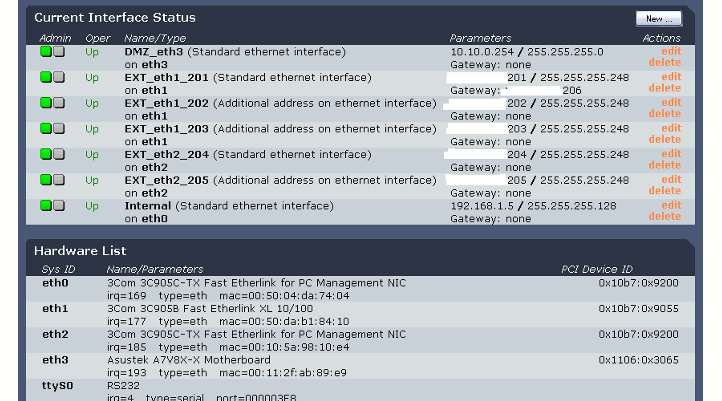
    here is my interface printscreen.

    another question, I have two lines which are going out, two different ips.
    one is for website, another for mail.
    why must they be both online, i do not know whic one is only for web surfing/mail and which one only for our website?
    if i take one cable out, nothing works, only if they both in
    I do not understand that.

    thanks & cu
  • Hello

    I installed a similar firewall, everything works, but when i switch the cables from the active fw to to new one i can't reach the new one.

    after deletint arp cache everything is ok. (arp -d *)

    my question is, how to delete on all server and workstation in the same network? (without doing it manually on every station)

    thanks