This discussion has been locked.
You can no longer post new replies to this discussion. If you have a question you can start a new discussion

Automatic firmware download problem

Hi Friends!

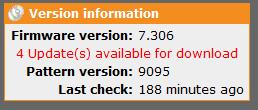
I have Astaro V7.306 installed on the server. I have some problem with the automatic firmware download. I had automatic firmware download enabled under configuration tab at Up2Date. My problem is it doesn't download the latest firmware version.

My Up2Date.log shows:

2009:07:01-10:33:01 (none) audld[25055]: >=========================================================================
2009:07:01-10:33:01 (none) audld[25055]: Another instance of this process is already running, exiting
2009:07:01-10:33:01 (none) audld[25055]: pids currently running: 24618 25055 (my pid: 25055, parent pid: 25054)
2009:07:01-10:33:01 (none) audld[25055]: 
2009:07:01-10:33:01 (none) audld[25055]:  1. main::run:194() audld.pl
2009:07:01-10:33:01 (none) audld[25055]:  2. main::top-level:33() audld.pl
2009:07:01-10:34:01 (none) auisys[25065]: Starting Up2Date Package Installer (Version 1.65)
2009:07:01-10:34:01 (none) auisys[25065]: Searching for available up2date packages for type 'man-sw'
2009:07:01-10:34:01 (none) auisys[25065]: id="371D" severity="info" sys="system" sub="up2date" name="No up2date packages available for installation" status="failed" action="install" package="man-sw"
2009:07:01-10:34:01 (none) auisys[25065]: Searching for available up2date packages for type 'ohelp'
2009:07:01-10:34:01 (none) auisys[25065]: id="371D" severity="info" sys="system" sub="up2date" name="No up2date packages available for installation" status="failed" action="install" package="ohelp"
2009:07:01-10:34:01 (none) auisys[25065]: id="3716" severity="info" sys="system" sub="up2date" name="Up2date Package Installer finished, exiting"


Can you please help me to figure out what the problem is?

Thanks a lot in advance.
-RB


This thread was automatically locked due to age.

Parents
  • Here are the print screen attachments of the configuration settings for automatic update.
  • Hi RB,

    Unusual that the system is still stuck in seeing the downloads and yet won't download them.

    A couple suggestions to check:
    1) Licensing- Management>>Licensing make sure that you have a current maintenance subscription on the system

    2) Try restarting the download process from ssh
    login to ssh and get root access:
    audld.plx

    3) If no new packages are downloaded try clearing out the system folder
    cd /var/up2date/sys
    rm *
    Then run audld.plx

    4)  Finally if none of these work to allow auto updates manually install the 7.400 up2date from the ftp site in webadmin and up2date that way.  Try the autoupdates again after up2date is completed for 7.400

    Cheers,
Reply
  • Hi RB,

    Unusual that the system is still stuck in seeing the downloads and yet won't download them.

    A couple suggestions to check:
    1) Licensing- Management>>Licensing make sure that you have a current maintenance subscription on the system

    2) Try restarting the download process from ssh
    login to ssh and get root access:
    audld.plx

    3) If no new packages are downloaded try clearing out the system folder
    cd /var/up2date/sys
    rm *
    Then run audld.plx

    4)  Finally if none of these work to allow auto updates manually install the 7.400 up2date from the ftp site in webadmin and up2date that way.  Try the autoupdates again after up2date is completed for 7.400

    Cheers,
Children
  • 1) Licensing- Management>>Licensing make sure that you have a current maintenance subscription on the system

    Cath always has such creative insights - I bet she nailed it.

    Cheers - Bob
     
    Sophos UTM Community Moderator
    Sophos Certified Architect - UTM
    Sophos Certified Engineer - XG
    Gold Solution Partner since 2005
    MediaSoft, Inc. USA