This discussion has been locked.
You can no longer post new replies to this discussion. If you have a question you can start a new discussion

ASG 7.402 eating all mem and increasing!

Hi,

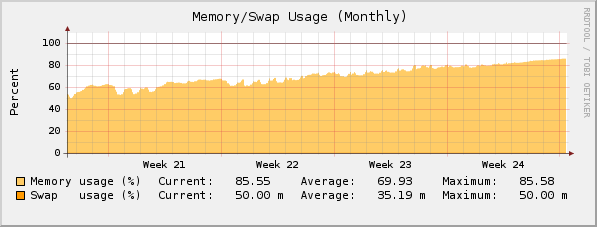
My ASG 7.402 is eating all memory. It's currently using 88% and is increasing. I have 1,5GB installed in the machine. See screenshot attached at the bottom. I'm using the firewall for about 35 users and we are using the HTTP-Proxy with no virus-scanning or content-filtering.

Here's the output of the processlist. Notice the line marked as bold that is using 55% of the memory:

USER       PID %CPU %MEM    VSZ   RSS TTY      STAT START   TIME COMMAND
root         1  0.0  0.0    716   280 ?        S    Apr28   0:04 init [3]  
root         2  0.0  0.0      0     0 ?        S    Apr28   0:03 [migration/0]
root         3  0.0  0.0      0     0 ?        SN   Apr28   0:00 [ksoftirqd/0]
root         4  0.0  0.0      0     0 ?        S    Apr28   0:41 [migration/1]
root         5  0.0  0.0      0     0 ?        SN   Apr28   0:31 [ksoftirqd/1]
root         6  0.0  0.0      0     0 ?        Droot      2929  3.4 55.6 867120 865712 ?       Ss   Apr28 2393:09 /usr/sbin/hald --daemon=yes --retain-privileges]
root      2960  0.0  0.0   1820   608 ?        S    Apr28   0:00  \_ hald-addon-acpi
root      4826  0.0  0.0   1812   580 ?        S    Apr28   0:07  \_ hald-addon-storage
root     20801  0.0  0.0      0     0 ?        R    10:40   0:00  \_ [hald]
root      3029  0.0  0.0   1516   380 ?        Ss   Apr28   0:00 /usr/sbin/irqbalance
root      3037  0.0  1.0  30148 16712 ?        Ss   Apr28   0:09 confd [master]
root      3075  0.0  0.8  29400 13584 ?        S    Apr28   0:26  \_ confd [listener]
root     15668  0.4  1.3  36340 20360 ?        R    10:29   0:03      \_ confd [worker[:P]rpc:webadmin]
root     20804  0.0  0.0   2128   884 ?        R    10:40   0:00      |   \_ ps auxwf
root     20629  0.8  0.0      0     0 ?        Z    10:39   0:00      \_ [confd.plx] 
root      3042  0.0  0.6  13732 10652 ?        Ss   Apr28  22:57 dns-resolver.plx
root      3065  0.0  0.3   8172  5212 ?        S    Apr28   0:03 /usr/local/bin/sysmond
root      3094  0.0  0.6  15816 10212 ?        Ss   Apr28   0:00 /var/aua/aua.bin
root     15669  0.0  0.0      0     0 ?        Z    10:29   0:00  \_ [aua.bin] 
root      3128  0.0  0.8  18924 12840 ?        S    Apr28   0:19 /usr/local/bin/notifier.plx
root      3159  0.0  0.0   1808   712 ?        Ss   Apr28   0:01 /usr/sbin/cron
postgres  3229  0.0  0.3  48816  5356 ?        S    Apr28   0:19 /usr/bin/postgres -D /var/storage/pgsql/data
postgres  3239  0.0  2.2  48944 34960 ?        Ss   Apr28   0:11  \_ postgres: writer process                    
postgres  3240  0.0  0.0  48816   996 ?        Ss   Apr28   0:13  \_ postgres: wal writer process                
postgres  3241  0.0  0.0  49088  1312 ?        Ss   Apr28   0:00  \_ postgres: autovacuum launcher process       
postgres  3242  0.0  0.0   6856  1044 ?        Ss   Apr28   0:28  \_ postgres: stats collector process           
postgres  4096  0.0  2.3  49732 37056 ?        Ss   Apr28   4:15  \_ postgres: reporting reporting [local] idle  
postgres  7180  0.0  0.8  49996 13536 ?        Ss   Apr28   0:00  \_ postgres: postgres smtp 127.0.0.1(60735) idle
postgres 19758  0.0  0.2  50028  4624 ?        Ss   03:15   0:14  \_ postgres: postgres smtp 127.0.0.1(51875) idle
root      3409  0.0  0.0   3048  1420 ?        S


Any ideas?

Thank in advance


This thread was automatically locked due to age.
Parents Reply Children
  • keep in mind this is Linux.  as long as you aren't using more than 30% swap it's fine.  Using 90%+ memory is NORMAL.  Your memory graph is actually very very nice looking..most of your ram is used while you have zero or little swap usage..good running Linux system..[:)]

    Owner:  Emmanuel Technology Consulting

    http://etc-md.com

    Former Sophos SG(Astaro) advocate/researcher/Silver Partner

    PfSense w/Suricata, ntopng, 

    Other addons to follow

  • Mine gets slow, and the console is butt-slow and the pages go up - reboot fixes all, just like Windows 95!
  • Got the same issues since going to 7.402, my box has been hanging with 100% CPU and gone offline.  I upgraded to 7.403 last night but it is as bad if not worse this morning.  I have taken offline the virus/spyware and other services but cannot control the memory which is being around 85-90%, normally much lower 50-60 and also CPU up 80-90%.

    Can't figure this one out.
  • I just did a top after reading some other posts and my POSTGRES processes are consuming 60-70% of RAM and CPU.

    Any ideas on how to tame the database side of things?

    EDIT:

    Found the spiking CPU article and did this:

    /etc/init.d/postgresql restart

    Restarting the database did the trick and brought the utilization down to 15%

    Will monitor and see if vacuuming the databases is needed as the next step.........
  • The network accounting system is probably responsible. If it gets worse, try turning it off.

    Barry
  • keep in mind this is Linux.  as long as you aren't using more than 30% swap it's fine.  Using 90%+ memory is NORMAL.  Your memory graph is actually very very nice looking..most of your ram is used while you have zero or little swap usage..good running Linux system..[[:)]]
    Thanks, i will let it run for a while and see what happens if it reaches 100%. Unfortunately i hade to reboot the firewall yesterday for another reason, so now it's running on about 40% utilization.

    Guess i'll have to wait a while since it took about 44 days to reach 90% [[:)]]
  • i run accounting on my machines and while they use ram it does not push the machine into swap..if the system needs the ram it gets reclaimed.  Now i am running 2 gigs of ram in both boxes.

    Owner:  Emmanuel Technology Consulting

    http://etc-md.com

    Former Sophos SG(Astaro) advocate/researcher/Silver Partner

    PfSense w/Suricata, ntopng, 

    Other addons to follow

  • I just did a top after reading some other posts and my POSTGRES processes are consuming 60-70% of RAM and CPU.

    Any ideas on how to tame the database side of things?

    EDIT:

    Found the spiking CPU article and did this:

    /etc/init.d/postgresql restart

    Restarting the database did the trick and brought the utilization down to 15%

    Will monitor and see if vacuuming the databases is needed as the next step.........


    Do you have an appliance?  If so, which one?  

    Just curious...
  • phil: What happens if you don't reboot monthly? Does the firewall hang? Just curious. I haven't dared to wait and see what happens [:)]


    Ive only let it get as far as users complaining it takes too long to access sites then kick off the reboot - usually about 70% mark
  • Hi,

    I had this issue before the 7.4 upgrade.  I kinda cheated and put more memory into my 220.  This coupled with the upgrade seemed to resolve the issue.

    Well so far anyway....

    FB.