This discussion has been locked.
You can no longer post new replies to this discussion. If you have a question you can start a new discussion

KACPID is running rampant

Hi,
I thought I had caused this by changing a heatsink from a free standing to a clipped one. The original heatsink is a bit light to operate without a fan, which has failed. This is a chipset heat sink.
Last night, about 3 hours after I changed the chipset heatsink and added a new nat runs kacpid runs one procesor up to 100%. After about 7 hours the ASG shutdown, I suspect from overheating.
Today I changed the heatsink back to a larger free standing version. About an hour ago kapcid stated to one run one processor to 100% and caused up2date to fail for 2 attempts. The system is running okay for the moment with only one cpu.
Tomorrow morning I will go through and reseat all devices to see if that makes a difference.
I have tried killing kacpid, but it won't die.

Any ideas or suggestions as to what I should be looking for. I searched the logs, but nothing was obvious. The memory normally sits about 50-60%% after a couple of days, ran up to 70% before the ASG stopped.

Ian M


This thread was automatically locked due to age.

  • Hallo,

    I have the same problem with the same hardware. I'm starting the machine, after a few minutes kacpid takes about 100 % cpu-usage. I have flashed the new bios (0171), but the problem is always there. I have contacted the Intel-Support, they have sent me a message as the following:

    Thank you for contacting Intel(R) Customer Support.

    I understand that your system is freezing when turning it on for the first time.

    According to the page 51 on the following document, you need at least 80 watts power supply, this would vary depending on your hardware configuration:
    http://download.intel.com/support/motherboards/desktop/d945gclf2/sb/e45013002us.pdf

    Please try the motherboard out of the chassis in a non-conductive surface, with only basic configuration (motherboard, processor, power supply, one memory stick) to see if the system has the same behavior.

    Also try a CMOS clear as instructed at:
    How do I clear the CMOS? 

    Finally try doing a clean installation of the operating system to determine if it is a hardware or software related issue.

    In case the motherboard needs to be replaced, I need you to provide the following information:

    AA number and serial number of the motherboard as showing at:
    Desktop Boards - What are AA numbers? 


    I will change the mainboard, the tips from Intel have brought no news.


    I always found in the web, that the bios is not compatible with apci. But in the release notes to the bios 0171 you can read, that it should fix this problem.

    I have not tested the mainboard with an other operating system. With ASG 7.402 the first start freezes the system, then I can reset the system with the reset button and then the machine runs and runs ...
    Best regards from egbert
  • Installing Astaro without ACPI would be one option, although it shouldn't be necessary on such modern hardware.

    I haven't seen this on my systems, including my Atom (just checked again). My Atom isn't a dual-core though.

    Some people have been recommending disabling HyperThreading; it's worth a shot (in the BIOS).

    Barry
  • Hi Guys,
    another attempt at entering this, not having a good day, the mouse has decided it needed a new config and has reversed it buttons.

    This problem is different to what you describe. I went through what you are describing when I first built this system. The current version with hyperthreading turned off had been very stable until I added a nat rule and changed a heat sink 2 nights ago.
    Since then the ASG runs for a couple of hours with memory use growing and one CPU running at 100% until eventually the system stops, but does not power off. I cannot find any reason in the logs.
    Last night I removed the new nat rule.

    This morning was a little different after I restarted the system because it wasn't responding to web requests. E-mail worked fine. I have restored from a backup taken a week ago and there is no difference.

    1/. http proxy refuses connection.
    2/. e-mail proxies (POP3 and smtp) work fine
    3/. packet filter works fine eg I am on the ASG forum.
    4/. webadmin was showing cpu to be about 20%, but top was only showing about 5% before I stopped the http proxy. Now running at about 1%.
    5/. the VLAN switch appeared to have lost one of the vlans even though traffic was able to get through.

    Maybe a fresh install and restore from an old backup, what do you think?

    Ian M
  • Hi egbert,
    the problem at initial installation appears to be something to do with a numbe rof databases taking time to build an dif you try to configure the ASG while it is building the databases kapcid seems to get upset.

    After many attempts and bios upgrade I let mine sit for about I think 30 minutes until the cpu load had settled and then fresh installation went in relatively easy.
    I don't think you have a motherboard issue, just needs a little bit of time. I would use an older version of the ASG except they don't recognise the onboard NIC. The new database structure if I remember correctly was only introdcued in v7.400.

    Regards

    Ian M
  • Hi folks,
    just tried the http proxy again and checked the log.

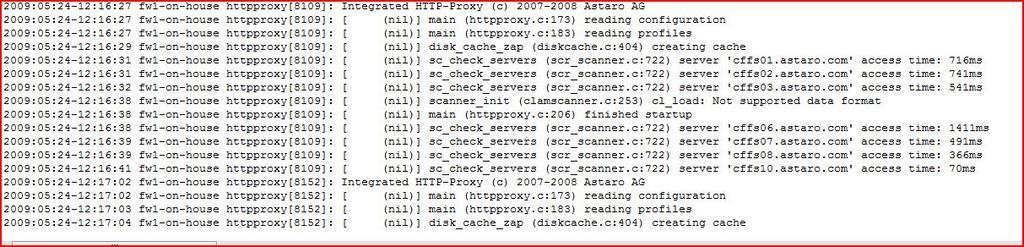
    Attached is an extract form the http live view log with a clam error.
    Ian M
  • Hallo,

    now I have changed the Motherboard. Now all runs fine. The machine doesn't freeze after the first start. KACPID does not run with 100%, all is good.
    Thanks to Intel for changing the motherboard.

    Best regards from
    Egbert
  • Hi egbert,
    I have upgraded the bios to the latest version. I have replaced the fan with a quieter one which blows more air at lower speeds.
    I am running v7.500b at the moment while trying to provide additional info on some bugs I had identified.

    I think I might have found the cause on my ASG why kacpid runs rampant. I plugged a keyboard and monitor in so I could enable HT after reading of your experience and kacpid ran to 100%. So before I remove the keyboard and monitor I will shut the system down.

    Ian M

    Put it back on line as a 7.403 system and the KACPID took one CPU to 100%. Interesting with hyperthreading enabled I was only using about 25% of the available CPU. While all this extra processing power is well and good it still won't pass traffic when kacpid hits 100% of a c cpu. Back to no HT.
  • I ended up removing the system altogether. I have e-mailed intel with my problem and are waiting on their response. I should here something Tuesday or Wednesday next week.

    I installed 7.460b and kapcid ran 1 cpu to 100%, this happened twice.

    Along with other bugs that showing up while testing v7.500b I have come to the conclusion there is a problem with the board. 2 other PCs built with the same software work fine (relatively).

    Ian M
  • Hi Folks,
    an update. Intel responded with some advice on resetting the BIOS to defaults after the BIOS upgrade and then reprogram the BIOS.

    I did that 3 days ago, had the box sitting around powered up for 2 days without any problems. I have now had it on line running v7.500b for about 10 hours and it is behaving itself.

    Ian M[[[:)]]][[[:)]]][[[:)]]]